• Products
  • Community
  • Markets
  • Brokers
  • More
Get started
  • Help Center
  • /Knowledge base
  • /
  • /Features and configuration
  • /How to pin/unpin tab in Desktop app
On this page
How to pin/unpin a tabHow to pin/unpin a tabHow to close a pinned tabHow to close a pinned tabHow pinned tabs workHow pinned tabs work

How to pin/unpin tab in Desktop app

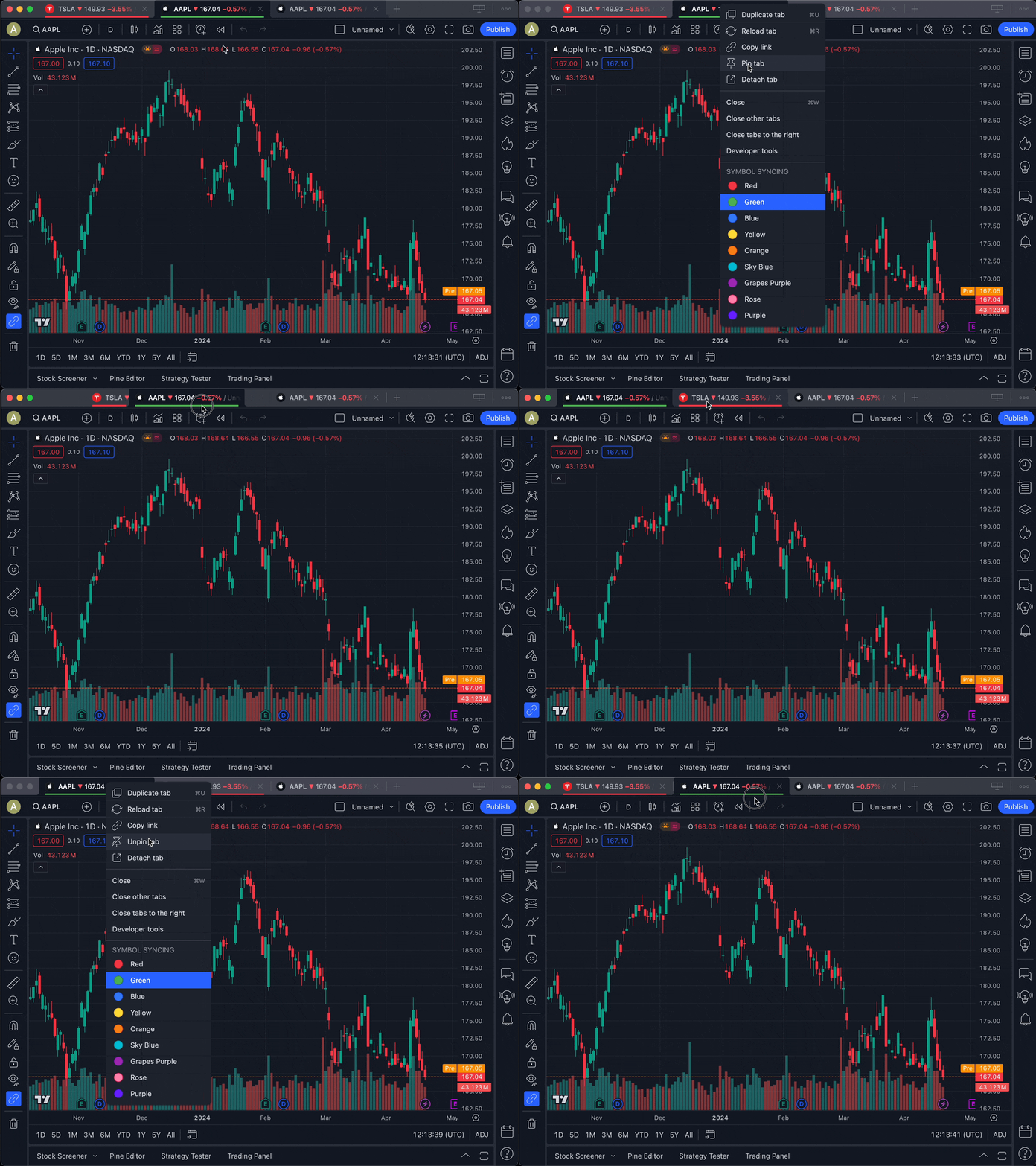
The browser “Pin tab” feature is also available in the TradingView Desktop app. You can lock some of your most frequently used tabs to ow, giving ythe left of the windou easy access to the tabs you most need and avoiding the possibility of accidentally closing them.

How to pin/unpin a tab

Right-click on the tab title and select “Pin tab” or “Unpin tab”:

  • Pin tab: Locks the tab to the left.
  • Unpin tab: Unlocks the tab and moves it back to the unpinned section.
How to close a pinned tab

Pinned tabs do not have a close button, so you cannot accidentally close them. The "Close other tabs" or “Close tabs to the right” options do not affect pinned tabs either.

If you want to close a pinned tab, you can use the [Ctrl+W] shortcut on Windows/Linux or [Cmd+W] on macOS to close the current tab, right-click on the tab and click "Close," or unpin the tab and close it as usual.

How pinned tabs work

  • Positioning: A pinned tab automatically moves toward the left of the window tab panel. All pinned tabs appear from left to right in the order you pinned them.
  • Separation: You can’t mix pinned and unpinned tabs; you can only change the position of the pinned tabs among other pinned tabs on the left side.
  • Unpinned tabs: All unpinned tabs appear to the right of the pinned ones. When you unpin a tab, it becomes the left-most of the unpinned tabs.
  • Persistence: The tab's pinned state is preserved when it is detached/attached, restored after being closed, or exited/launched the app.
How to sign out of your account in Desktop app
How to set up a proxy server

Made by humans

Select market data provided by ICE Data Services. Select reference data provided by FactSet. Copyright © 2026 FactSet Research Systems Inc.Copyright © 2026, American Bankers Association. CUSIP Database provided by FactSet Research Systems Inc. All rights reserved. SEC filings and other documents provided by Quartr.© 2026 TradingView, Inc.

SOC 2 CompliantGDPR Compliant
More than a product
  • Supercharts
Screeners
  • Stocks
  • ETFs
  • Bonds
  • Crypto coins
  • CEX pairs
  • DEX pairs
  • Pine
Heatmaps
  • Stocks
  • ETFs
  • Crypto coins
Calendars
  • Economic
  • Earnings
  • Dividends
  • IPOs
More products
  • News Flow
  • Portfolios
  • Fundamental Graphs
  • Yield Curves
  • Options
  • Macro Maps
  • Pine Script®
  • MCP Server
Apps
  • Mobile
  • Desktop
Community
  • Social network
  • Wall of Love
  • Refer a friend
  • Creator program
  • House Rules
  • Moderators
Ideas
  • Trading
  • Education
  • Editors' picks
Pine Script
  • Indicators & strategies
  • Wizards
  • Freelancers
  • Marketplace
Tools & subscriptions
  • Features
  • Pricing
  • Market data
  • Gift plans
Trading
  • Overview
  • Brokers
  • Brokers comparison
  • The Leap
Special offers
  • CME Group futures
  • Eurex futures
  • US stocks bundle
About company
  • Who we are
  • Space mission
  • Blog
  • Help Center
  • Careers
  • Media kit
Merch
  • Tarot cards for traders
  • The C63 TradeTime
Policies & security
  • Terms of Use
  • Disclaimer
  • Privacy Policy
  • Cookies Policy
  • Accessibility Statement
  • Trust Center
  • Security tips
  • Bug Bounty program
  • Status page
Business solutions
  • Widgets
  • Charting libraries
  • Lightweight Charts™
  • Advanced Charts
  • Trading Platform
Growth opportunities
  • Advertising
  • Brokerage integration
  • Partner program
  • Education program
Community
  • Social network
  • Wall of Love
  • Refer a friend
  • Creator program
  • House Rules
  • Moderators
Ideas
  • Trading
  • Education
  • Editors' picks
Pine Script
  • Indicators & strategies
  • Wizards
  • Freelancers
  • Marketplace
Business solutions
  • Widgets
  • Charting libraries
  • Lightweight Charts™
  • Advanced Charts
  • Trading Platform
Growth opportunities
  • Advertising
  • Brokerage integration
  • Partner program
  • Education program
Look FirstLook First