8EMA+BB-SubiProvides the facility to display 8 EMAs along with Bollinger Bands in the same indicator.Pine Script® indicatorby Muthukumar197719
ShooterViz Lazy Trader EMA SystemShooterViz Lazy Trader EMA System - Complete User Guide What This Script Does This is a position scaling indicator that tells you exactly when to enter, add to, and exit trades using a simplified 5-EMA system. It removes the guesswork and decision fatigue from trading by giving you clear visual signals. The Core Concept 3 entry signals that build your position from 20% → 50% → 100% 2 exit signals that scale you out at 50% → 50% (complete exit) 1 higher timeframe filter that keeps you on the right side of the trend No Fibonacci calculations, no RSI divergence, no multi-indicator confusion. Just EMAs and price action. What You'll See On Your Chart 1. Colored EMA Lines Blue Lines (Entry Zone): 3 EMA (lightest blue) - Early reversal detector 5 EMA (darker blue) - Confirmation line Green Lines (Add Zone): 21 EMA (bright green) - First add location 34 EMA (lighter green) - Final add location Red Lines (Exit Zone): 89 EMA (lighter red) - First exit trigger 144 EMA (darker red) - Final exit trigger Orange Lines (Hyper Frame - optional): Hyper 21 EMA (from higher timeframe) - Trend direction Hyper 34 EMA (from higher timeframe) - Bias confirmation 2. Triangle Signals Green Triangles (Below Price) = BUY/ADD: Lime triangle with "20%" = Entry 1: Price reclaimed 3→5 EMA (starter position) Green triangle with "30%" = Entry 2: Price bounced off 21 EMA (first add) Teal triangle with "50%" = Entry 3: Price broke out from 34 EMA compression (final add) Red Triangles (Above Price) = SELL: Orange triangle with "50% OFF" = Exit 1: Price broke below 89 EMA (take half off) Red triangle with "EXIT ALL" = Exit 2: Price broke below 144 EMA (close remaining position) 3. Background Color (Trend Bias) Light green background = Hyper frame EMAs trending up (bias LONG) Light red background = Hyper frame EMAs trending down (bias SHORT) Gray background = Neutral/choppy (be cautious) 4. Info Table (Top Right Corner) A live status dashboard showing: Which entry signals are currently active (✓ or —) Which exit signals are currently active (⚠ or ⛔) Current hyper frame bias (🟢 LONG / 🔴 SHORT / ⚪ NEUTRAL) Which timeframe you're using for hyper frame filtering How to Install and Set Up Step 1: Add the Script to TradingView Open TradingView Click "Pine Editor" at the bottom of the screen Copy the entire script code Paste it into the Pine Editor Click "Add to Chart" Step 2: Configure Your Settings Click the gear icon ⚙️ next to "LazyEMA" in your indicators list. Critical Settings to Configure: Hyper Frame Selection (Most Important!) Location: "Hyper Frame (Pick ONE)" section Setting: "Timeframe" What to choose: Trading 15min or 1H charts? → Use "240" (4-hour) Trading 4H or Daily charts? → Use "D" (Daily) Trading Daily or Weekly charts? → Use "W" (Weekly) Why this matters: This filter keeps you aligned with the bigger trend. Only take longs when this timeframe is green, shorts when it's red. MA Type (Optional, default is fine) Location: "MA Config" section Default: EMA (recommended) Options: EMA, SMA, WMA, HMA, RMA, VWMA Most traders should stick with EMA Visual Toggles (Customize your view) Entry Zone: Turn individual EMAs on/off (3, 5, 21, 34) Exit Zone: Turn individual EMAs on/off (89, 144) Hyper Frame: Toggle the higher timeframe EMAs on/off Step 3: Clean Up Your Chart Turn OFF these if visible: Volume bars (they clutter the view) Any other indicators you have loaded Grid lines (optional, but cleaner) Keep ONLY: Price candles Your ShooterViz Lazy Trader EMA System Maybe support/resistance levels if you manually draw them How to Trade With This Script The Basic Workflow Before the Market Opens: Check the background color and info table bias Green background? Look for LONG setups only Red background? Look for SHORT setups only Gray background? Stay flat or trade small During the Trading Session: LONGS (When hyper frame is bullish): Wait for Entry 1 signal: Lime triangle appears with "20%" Price has reclaimed the 5 EMA after dipping to 3 EMA Action: Enter 20% of your intended position Stop loss: Place below the 5 EMA or recent swing low Wait for Entry 2 signal: Green triangle appears with "30%" Price pulled back to 21 EMA and bounced Action: Add 30% more (you're now at 50% total) Move stop: Trail it up to below 21 EMA Wait for Entry 3 signal: Teal triangle appears with "50%" Price compressed at 34 EMA and broke out Action: Add final 50% (you're now 100% loaded) Move stop: Trail it up to below 34 EMA Wait for Exit 1 signal: Orange triangle appears with "50% OFF" Price broke below 89 EMA Action: Exit 50% of your position immediately Move stop on rest: Trail to 89 EMA or lock in profits Wait for Exit 2 signal: Red triangle appears with "EXIT ALL" Price broke below 144 EMA Action: Exit remaining 50% (you're now flat) Or: Stop gets hit at 89 EMA (same result) SHORTS (When hyper frame is bearish): Same process, but inverted Triangles appear above price instead of below Look for breakdowns below EMAs instead of bounces off them Exit when price reclaims 89 and 144 EMAs Real-World Example Walkthrough Setup: Trading ES (S&P 500 Futures) on 1H Chart Chart Configuration: Timeframe: 1 Hour Hyper Frame: 240 (4-hour) Ticker: ES Pre-Market Check: Background is light green Info table shows "🟢 LONG" for Hyper Bias Decision: Only look for long entries today 9:30 AM - Market Opens Price dips and touches 3 EMA Watch for: Reclaim of 5 EMA 9:45 AM - Entry 1 Triggers Lime triangle appears below bar Price closed above 5 EMA at $4,550 Action taken: Enter long 20% position (2 contracts if targeting 10 total) Stop loss at $4,545 (below 5 EMA) Risk: $10 per contract × 2 = $20 risk 10:30 AM - Entry 2 Triggers Price rallied to $4,565, pulls back Green triangle appears at 21 EMA ($4,555) Action taken: Add 30% (3 more contracts, now have 5 total) Move stop to $4,550 (below 21 EMA) Current P/L: +$25 ($5 gain on original 2 contracts, break-even on new 3) 11:15 AM - Entry 3 Triggers Price consolidates at 34 EMA around $4,560 Teal triangle appears as price breaks to $4,568 Action taken: Add final 50% (5 more contracts, now have 10 total) Move stop to $4,555 (below 34 EMA) Current P/L: +$70 1:00 PM - Price Extends Price rallies to $4,595 (on track) 89 EMA is at $4,575 No action yet, let it run 2:15 PM - Exit 1 Triggers Price pulls back from $4,600 Orange triangle appears as price breaks below 89 EMA at $4,580 Action taken: Exit 50% (5 contracts closed at $4,580) Keep 5 contracts with stop at 89 EMA ($4,575) Banked: +$150 average gain on closed 5 contracts 2:45 PM - Exit 2 Triggers Price continues down Red triangle appears as price breaks 144 EMA at $4,570 Action taken: Exit remaining 5 contracts at $4,570 Banked: +$100 on remaining 5 contracts Final Results: Total gain: $250 on the trade Initial risk: $50 (if stopped out at Entry 1) Risk/Reward: 5:1 Time in trade: ~5 hours Common Questions "What if I miss Entry 1? Can I still take Entry 2?" Yes! Each entry is independent. If you miss the 3→5 reclaim, wait for the 21 EMA bounce. You'll start with a 30% position instead of 20%, but that's fine. Rule: Never chase. Wait for the next EMA setup. "What if multiple entry signals trigger at the same bar?" Rare, but possible. If you see both Entry 1 and Entry 2 trigger together: Take Entry 1 first (20%) If the next bar confirms Entry 2 is still valid, add 30% When in doubt, scale in gradually "The hyper frame is green but I'm seeing short signals?" Don't take them. The hyper frame is your bias filter. If it says "go long," ignore short setups. They're usually lower probability and will get stopped out. "Can I use this for swing trading overnight?" Absolutely. Just switch your hyper frame: If you're on Daily charts, use Weekly hyper frame If you're on 4H charts, use Daily hyper frame Adjust position sizes for overnight risk "What if the signal appears right at market close?" Don't chase it. Wait for the next bar (next day) to confirm. Signals that appear in the last 5 minutes are often noise. "How do I set up alerts?" Right-click on the chart Select "Add Alert" Choose "LazyEMA" from the condition dropdown Select which signal you want alerts for: Entry 1: 3→5 Reclaim Entry 2: 21 EMA Add Entry 3: 34 EMA Breakout Exit 1: 89 EMA Break Exit 2: 144 EMA Break Click "Create" Pro tip: Set up all 5 alerts so you never miss a signal. Position Sizing Guide see swingtradenotes.substack.com Critical Rule: Know your total risk BEFORE you take Entry 1. Don't wing it. Customization Tips For Day Traders (Scalpers) Use 5min or 15min charts Hyper frame: 1H or 4H Expect 2-4 setups per day Tighter stops (0.5% risk per entry) For Swing Traders Use 4H or Daily charts Hyper frame: Daily or Weekly Expect 1-2 setups per week Wider stops (1-2% risk per entry) For Position Traders Use Daily or Weekly charts Hyper frame: Weekly or Monthly Expect 1-2 setups per month Widest stops (2-3% risk per entry) The "Don't Be Stupid" Checklist Before taking ANY signal from this script, ask: ✅ Is the hyper frame bias pointing in my direction? ✅ Is the signal clean (not at a weird time or during news)? ✅ Do I know my stop loss level? ✅ Do I know my position size? ✅ Can I afford to lose if this trade fails? If you answered "no" to ANY of these, skip the trade. Troubleshooting "I'm not seeing any signals" Possible causes: The "Show Lazy Trader System" toggle is off (turn it on) Your chart timeframe is too high (try 1H or 4H) Market is in a tight range (EMAs are compressed) You need to refresh the chart "Too many signals, getting whipsawed" Fixes: Increase your chart timeframe (go from 15m to 1H) Switch to a less volatile ticker Only trade when hyper frame bias is STRONG (not neutral) Add a minimum bar count between signals "The info table is covering my price action" Fix: Edit the script Find the line: table.new(position.top_right, ... Change position.top_right to position.bottom_right or position.top_left "Signals appear then disappear" This is normal (repainting). Some signals (especially compression breakouts) can disappear if the next bar reverses. This is why you: Wait for bar close before acting Use alerts that only fire on confirmed bars Don't chase signals mid-bar Final Thoughts This script is a decision-making tool, not a crystal ball. It shows you high-probability setups based on EMA dynamics and trend structure. You still need to: Manage your risk Choose your position size Stick to the rules Accept losses when they happen The system works when YOU work the system. Print this guide, tape it next to your monitor, and follow it religiously for 20 trades before making ANY changes. Good luck, and stay lazy (the smart way). Pine Script® indicatorby SwingTradeNotes45
Katik EMA BUY SELLThis strategy uses EMA 9, EMA 20, and EMA 200 to generate Buy and Sell signals. BUY Conditions EMA 9 crosses above EMA 20 Stoploss: Recent Swing Low Target: EMA 9 touches or crosses EMA 200 SELL Conditions EMA 9 crosses below EMA 20 Stoploss: Recent Swing High Target: EMA 9 touches or crosses EMA 200 Features Automatic Long & Short entries Dynamic swing-based stoploss Clear EMA plots with line width 3 Works on all timeframesPine Script® strategyby Katik14323
Veil Trend# Veil Trend (VTrend) **Veil Trend** is a minimalist trend-following and volatility framework built around a triple-EMA structure and adaptive price bands. It is designed to clearly define trend direction, dynamic support and resistance, and momentum expansion—without clutter. --- ## 🔹 Core Components ### Main EMA (Slow) Acts as the primary trend axis. - Price **above** the main EMA → bullish bias - Price **below** the main EMA → bearish bias ### Medium EMA Tracks intermediate momentum and trend strength, helping visualize pullbacks within the broader trend. ### Fast EMA (Optional) Provides short-term momentum sensitivity and early trend shifts. Hidden by default to maintain a clean chart. --- ## 🔹 Adaptive Veil Bands Veil Trend wraps the main EMA with adaptive volatility bands (“the veil”) to define normal price movement versus expansion. - **ATR-Based Bands (Default)** Bands automatically expand and contract with volatility, adapting to changing market conditions. - **Percentage-Based Bands (Optional)** Bands are offset by a fixed percentage from the main EMA, useful for consistent scaling across instruments. The shaded area between bands represents the **healthy trend zone**, where pullbacks and consolidations typically occur. --- ## 🔹 Signals & Interpretation *(Disabled by default for a clean visual experience)* ### Band Breaks - **Break above upper band** → strong bullish momentum - **Break below lower band** → strong bearish momentum ### Band Bounces - **Bounce from lower band** → potential bullish continuation - **Rejection at upper band** → potential bearish continuation Alerts are included for all band events and can be enabled as needed. --- ## 🔹 Visual Design Philosophy - Clean, layered EMA structure (“noodles”) - Subtle volatility bands with optional fill - Optional status table for quick market context - Minimalist by default, information-rich when enabled --- ## 🔹 Best Use Cases - Identifying trend direction and bias - Trading pullbacks within established trends - Spotting volatility expansion and breakout conditions - Works on **stocks, crypto, forex, and indices** - Effective across all timeframes --- **Veil Trend doesn’t predict — it reveals.** Pine Script® indicatorby TraderFelipe5
RSI x AlchemistRSI14 x RSI21 x EMA9/WMA45, Zones Buy Sell. Price Label and GapMAPine Script® indicatorby hoangminhez143
4 EMA'sSimply add this indicator and enjoy basic and simple indicator for your day to day usePine Script® indicatorby grishkamm1113
Hyper Insight MA Strategy [Universal]Hyper Insight MA Strategy ** is a comprehensive trend-following engine designed for traders who require precision and flexibility. Unlike standard indicators that lock you into a single calculation method, this strategy serves as a "Universal Adapter," allowing you to **Mix & Match 13 different Moving Average types** for both the Fast and Slow trend lines independently. Whether you need the smoothness of T3, the responsiveness of HMA, or the classic reliability of SMA, this script enables you to backtest thousands of combinations to find the perfect edge for your specific asset class. --- 🔬 Deep Dive: Calculation Logic of Included MAs This strategy includes 13 distinct calculation methods. Understanding the math behind them will help you choose the right tool for your specific market conditions. #### 1. Standard Averages * **SMA (Simple Moving Average):** The unweighted mean of the previous $n$ data points. * *Logic:* Treats every price point in the period with equal importance. Good for identifying long-term macro trends but reacts slowly to recent volatility. * **WMA (Weighted Moving Average):** A linear weighted average. * *Logic:* Assigns heavier weight to current data linearly (e.g., $1, 2, 3... n$). It reacts faster than SMA but is still relatively smooth. * **SWMA (Symmetrically Weighted Moving Average):** * *Logic:* Uses a fixed-length window (usually 4 bars) with symmetrical weights $ $. It prioritizes the center of the recent data window. #### 2. Exponential & Lag-Reducing Averages * **EMA (Exponential Moving Average):** * *Logic:* Applies an exponential decay weighting factor. Recent prices have significantly more impact on the average than older prices, reducing lag compared to SMA. * **RMA (Running Moving Average):** Also known as Wilder's Smoothing (used in RSI). * *Logic:* It is essentially an EMA but with a slower alpha weight of $1/length$. It provides a very smooth, stable line that filters out noise effectively. * **DEMA (Double Exponential Moving Average):** * *Logic:* Calculated as $2 \times EMA - EMA(EMA)$. By subtracting the "lag" (the smoothed EMA) from the original EMA, DEMA provides a much faster reaction to price changes with less noise than a standard EMA. * **TEMA (Triple Exponential Moving Average):** * *Logic:* Calculated as $3 \times EMA - 3 \times EMA(EMA) + EMA(EMA(EMA))$. This effectively eliminates the lag inherent in single and double EMAs, making it an extremely fast-tracking indicator for scalping. #### 3. Advanced & Adaptive Averages * **HMA (Hull Moving Average):** * *Logic:* A composite formula involving Weighted Moving Averages: ASX:WMA (2 \times Integer(n/2)) - WMA(n)$. The result is then smoothed by a $\sqrt{n}$ WMA. * *Effect:* It eliminates lag almost entirely while managing to improve curve smoothness, solving the traditional trade-off between speed and noise. * **ZLEMA (Zero Lag Exponential Moving Average):** * *Logic:* This calculation attempts to remove lag by modifying the data source before smoothing. It calculates a "lag" value $(length-1)/2$ and applies an EMA to the data: $Source + (Source - Source )$. This creates a projection effect that tracks price tightly. * **T3 (Tillson T3 Moving Average):** * *Logic:* A complex smoothing technique that runs an EMA through a filter multiple times using a "Volume Factor" (set to 0.7 in this script). * *Effect:* It produces a curve that is incredibly smooth and free of "overshoot," making it excellent for filtering out market chop. * **ALMA (Arnaud Legoux Moving Average):** * *Logic:* Uses a Gaussian distribution (bell curve) to assign weights. It allows the user to offset the moving average (moving the peak of the weight) to align it perfectly with the price, balancing smoothness and responsiveness. * **LSMA (Least Squares Moving Average):** * *Logic:* Calculates the endpoint of a Linear Regression line for the lookback period. It essentially guesses where the price "should" be based on the best-fit line of the recent trend. * **VWMA (Volume Weighted Moving Average):** * *Logic:* Weights the closing price by the volume of that bar. * *Effect:* Prices on high volume days pull the MA harder than prices on low volume days. This is excellent for validating true trend strength (i.e., a breakout on high volume will move the VWMA significantly). --- ### 🛠 Features & Settings * **Universal Switching:** Change the `Fast MA` and `Slow MA` types instantly via the settings menu. * **Trend Cloud:** A dynamic background fill (Green/Red) highlights the crossover zone for immediate visual trend identification. * **Strategy Mode:** Built-in Backtesting logic triggers `LONG` entries when Fast MA crosses over Slow MA, and `EXIT` when Fast MA crosses under. ### ⚠️ Disclaimer This script is intended for educational and research purposes. The wide variety of MA combinations can produce vastly different results. Past performance is not indicative of future results. Please use proper risk management.Pine Script® strategyby waranyutrkm21
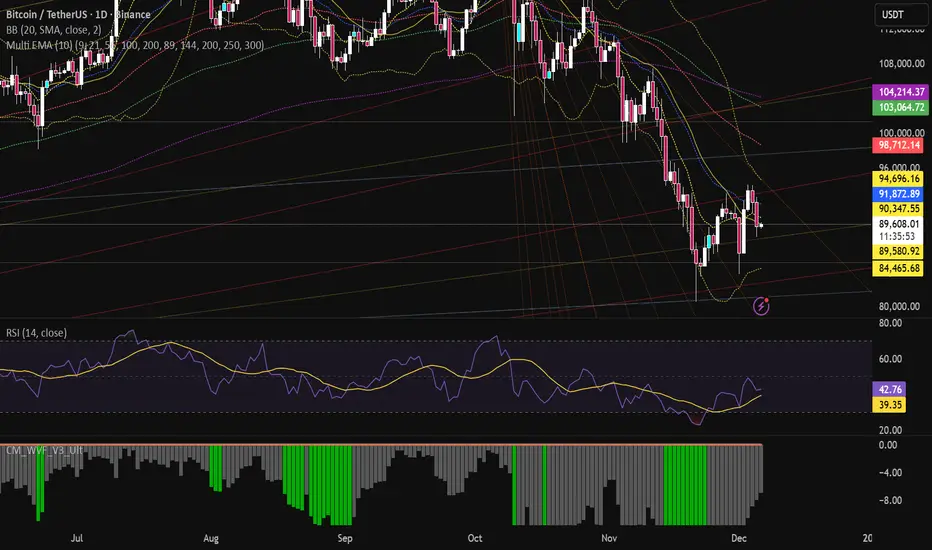
Multi EMA (10)Allows you to add and configure up to 10 EMAs to your chart with a single indicator. Enjoy.Pine Script® indicatorby bruno18211
Trend with ADX, multiple EMAs - Buy & Sell✔ Trend Direction Via DI+ > DI– ✔ Trend Strength Via ADX ✔ Fast Entry Signals 5/8 EMA crossovers ✔ Larger Trend Confirmation 13/48 EMA crossovers ✔ Macro Trend EMA 200 ✔ Intraday Bias VWAP ✔ Visual Trend (background) ✔ Alerts for signals + trend shiftsPine Script® indicatorby RMPM44
Aydan ScalperBy when EMA 8 cross EMA 21 from Below to Abouve and SELL when EMA 21 cross EMA 8 from Abouve to BelovePine Script® indicatorby Aydanman15
50 EMA HLC Tejas50 EMA with All important sources. Made it with 50 EMA and Based on my understanding and observations.Pine Script® indicatorby Owl_6197
MACD Above Signal & Price Above VWAP IndicatorThis strategy provides a buy signal with a green arrow pointing up when three conditions are met. The MACD has to be above the signal line. The settings for MACD can be adjusted, but the default is the standard settings for MACD. The second condition is the price has to be above the VWAP line. The third condition is that the price of the current candle needs to be higher than the HIGH price of the previous candle. Pine Script® indicatorby R39813Updated 10
Price Action Signals Filtered +EMA🚀 Price Action Signals Filtered + EMA (Dual Confirmation) 💡 Indicator Overview This indicator is a powerful tool designed to identify potential trend reversals or continuations using Price Action Pivot signals, but it filters them with an Exponential Moving Average (EMA) to ensure dual confirmation. The indicator's purpose is to generate signals only when a Price Action confirmation aligns with a confirmed market trend (above or below the EMA), thereby reducing noise and increasing signal reliability. ✨ Key Features and Logic 1. Price Action (Pivot) Detection The indicator automatically detects local low (Pivot Low) and local high (Pivot High) points. Pivot Low: A potential market bottom. Pivot High: A potential market top. 2. Price Action Confirmation After a Pivot is detected, the indicator waits for subsequent confirmation from the closing prices of the candles: Bullish Confirmation: After a Pivot Low, the indicator requires N consecutive candles (where N is defined in the settings) to close above the previous candle's close. This indicates buying pressure. **Bearish Confirmation: After a Pivot High, the indicator requires N consecutive candles to close below the previous candle's close. This indicates selling pressure. 3. Trend Filter (EMA) - Dual Confirmation! 🎯 This is the critical component. A confirmed Price Action signal must align with the trend defined by the Exponential Moving Average (EMA): Bullish Signal (Buy): Generated ONLY if the Bullish Price Action Confirmation occurs while the price (Close) is ABOVE the EMA (default 20 periods). Bearish Signal (Sell): Generated ONLY if the Bearish Price Action Confirmation occurs while the price (Close) is BELOW the EMA. This serves as a dual confirmation, ensuring the signal is captured in the direction of the broader market trend. 📈 How to Use Look for the Signal: Wait for the shape (triangle, circle, or arrow) to appear on the chart. Verify Confirmation: Know that the signal has already passed through the dual filter: Price Action and EMA. Bullish signals appear below the bar when the price is ABOVE the EMA. Bearish signals appear above the bar when the price is BELOW the EMA. Risk Management: Always use this indicator in combination with your risk management strategy and technical analysis. 📝 Additional Notes The indicator uses barstate.isconfirmed to accurately plot signals on the candle close. The EMA line is also plotted on the chart for visual trend verification. This indicator is a tool only and does not constitute financial advice. Always perform your own analysis and research.Pine Script® indicatorby Aleksin_Aleksandar311
Pivot Hourly x EMA RibbonHourly Fibonacci Pivot + EMA is an intraday analysis tool that combines hourly Fibonacci-based pivot levels with exponential moving averages (EMAs). It is designed to help traders visualize potential intraday support/resistance zones and short-term trend direction on any timeframe. The indicator calculates pivot levels from hourly price data and then projects Fibonacci extensions and retracements around a central pivot. These levels can be used to see where price has previously reacted and where future reactions may occur. The EMAs provide an additional layer of context by highlighting the prevailing short-term trend and momentum. Key features: Hourly Fibonacci pivot levels (support and resistance zones derived from hourly ranges) Multiple Fibonacci bands to show potential reaction areas above and below the central pivot One or more configurable EMAs to show short-term trend direction and dynamic support/resistance Works on all symbols and intraday timeframes supported by TradingView Typical use: Monitor how price behaves when approaching or rejecting Fibonacci pivot levels Look for confluence between pivot zones and EMA direction or EMA bounces Use the levels as potential areas of interest for trade planning, stop placement, or partial profit zones within your own trading system Also have "C" Label it's mean Candle for example C1 is First Candle of the source timeframe, if the source timeframe set to 4 Hour it will be the first 4h candle, the C2 is the second 4h candle of the day. This script is intended purely as a technical analysis tool and does not generate buy/sell signals or guarantee any particular outcome. It is not financial advice. Always combine it with your own analysis, risk management, and trading plan before making any trading decisions.Pine Script® indicatorby AtomicPipsUpdated 47
Research-Backed Intraday MTF MAsResearch-Backed Intraday Multi-Timeframe Moving Averages A precision-tuned intraday trading indicator that displays four key moving averages across two critical timeframes: 📊 What It Shows: - 1-Hour MAs: 75-period SMA & EMA (institutional flow patterns) - 10-Minute MAs: 200-period SMA & EMA (intraday trend structure) 🎯 Designed For: - Day traders seeking multi-timeframe confluence - Identifying strong trending vs. choppy market conditions - Support/resistance level identification - Momentum and trend alignment signals ✨ Key Features: - Optimized periods based on market structure analysis - Fully customizable colors, transparency, and line widths - Toggle each MA on/off independently - Clean, non-cluttered chart display - Efficient tuple-based data requests 💡 Trading Signals: - Price above all 4 MAs = Strong bullish alignment - Price below all 4 MAs = Strong bearish alignment - Mixed signals = Range-bound conditions, reduce risk Perfect for scalpers, day traders, and swing traders who want institutional-grade moving averages without the noise.Pine Script® indicatorby igaudetteUpdated 4
FAIRPRICE_VWAP_RDFAIRPRICE_VWAP_RD This script plots an **anchored VWAP (Volume Weighted Average Price)** that resets based on the user-selected anchor period. It acts as a dynamic “fair value” line that reflects where the market has actually transacted during the chosen period. FEATURES - Multiple anchor options: Session, Week, Month, Quarter, Year, Decade, Century, Earnings, Dividends, or Splits. - Intelligent handling of the “Session” anchor so it works correctly on both 1m (resets each new day) and 1D (continuous, non-resetting VWAP). - Manual VWAP calculation using cumulative(price * volume) and cumulative(volume), ensuring the line is stable and works on all timeframes. - Optional hiding of VWAP on daily or higher charts. - Offset input for horizontal shifting if desired. - VWAP provides a true “fair price” reference for trend, mean-reversion, and institutional-level analysis. PURPOSE This indicator solves the common problem of VWAP behaving incorrectly on higher timeframes, on synthetic data, or with unusual anchors. By implementing VWAP manually and allowing flexible reset conditions, it functions reliably as an institutional-style fair value benchmark across any timeframe. Pine Script® indicatorby ryandebraalUpdated 10
TREND_34EMA_RDTREND_34EMA_RD - Enhanced 34 EMA Trend Suite (Ryan DeBraal) This indicator overlays a trend-adaptive 34 EMA along with optional ATR-based volatility bands, trend-strength scoring, and crossover alerts. It is built to give a clean, fast visual read on the current trend direction, volatility, and momentum quality. FEATURES ----------------------------------------------------------------------------- • Core 34 EMA Trend Line - Standard EMA calculation (default length 34) - Aqua coloring for clean visibility - Adjustable line thickness • ATR-Based Volatility Bands - Upper and lower bands derived from ATR - Adjustable ATR length and multiplier - Optional shaded channel for volatility visualization - Helps identify trend stability and over-extension • Trend Strength Score - Measures slope of the EMA over a lookback window - Normalizes slope using ATR for consistency across markets - Outputs a 0–100 score - Auto-updating label placed at the latest bar • Gray for weak trend • Orange for moderate trend • Green for strong trend • Optional Crossover Signals - Detects when price crosses above or below the EMA - Can display arrows on the chart - Built-in alert conditions PURPOSE ----------------------------------------------------------------------------- This suite provides a clean, minimalistic way to monitor directional bias, volatility, and trend quality. Ideal for: • Identifying early trend shifts • Confirming trend continuation • Filtering trades based on trend strength • Detecting over-extension using volatility bands Pine Script® indicatorby ryandebraalUpdated 5
REMS - Deep SynergyThis is a more flexible version of the REMS Synergy indicator. Like other indicators in the REMS family, it builds upon the foundations assessing the relationships between RSI, EMAs, MACDs, and Stochastic RSI across multiple timeframes. Designed to help traders identify less frequent, but high probability entries across 2 time frames. Uses 3 levels of confluence indicators for both long and short moves. Features 3 levels of confluence across 2 timeframes. All 3 levels allow filtering of any combination of REMS filters. Features more options and customization than previous REMS Synergy. Includes VWAP and 4 EMAs as optional visual representations. Includes 'Enhanced Candles' than can colour code candlesticks for better visual identification. (off by default) Originally designed with 5 minute and 2 minute timeframes in mind, and pairs well with REMS First Strike and/or REMS Snap Shot indicators. This version features no hard-coded inputs and allows for more freedom than previous version. With the added flexibility comes the ability for the indicator to be more easily stacked.Pine Script® indicatorby KodiakMarketUpdated 31
Multi-Factor Trend Confluence Indicator (PTP V4)Disclaimer: This is a technical analysis tool for educational and informational purposes only. It does not constitute investment advice, financial solicitation, or a recommendation to buy or sell any security or instrument. Trading involves significant risk, and past performance is not indicative of future results. Use at your own risk. KEY Features and Strategic Methodology This is a comprehensive trend and confluence indicator built on multiple factors to identify potential pullbacks within an established trend. • Core Trend Filter: Uses a long-term EMA to confirm the overall market bias. • Fibonacci Pullback Logic: Identifies potential low-risk entry zones by calculating a 61.8% Fibonacci Retracement over a user-defined lookback period. • Multi-Factor Confluence: A signal is generated only when the price touches the Fib zone AND the following factors align (You can edit the script to adjust the confluence conditions.): o RSI is above 50. o Positive DI is above Negative DI (DMI Bullish Crossover). o Price is above the fast EMA. • Consecutive Signal Counter: Includes a unique counter that highlights bars where the confluence conditions have been met for a minimum number of consecutive candles (4 by default), aiding in the validation of strong momentum entries. • Moving Average Visualization: Plots and color-fills 10 WMA, 21 EMA, 42 EMA, and 200 EMA to provide a full market context and visualize momentum shifts. 1. Short-Term Momentum (WMA10 vs. EMA42 Fill) This fill area highlights immediate price acceleration and momentum shifts: • Green Fill (Bullish Momentum): WMA10 > EMA42. • Red Fill (Bearish Momentum): WMA10 < EMA42. 2. Long-Term Market Context (EMA200 vs. EMA42 Fill) This fill area defines the dominant backdrop of the market, essential for strategic positioning: • Green Fill (Bullish Context): EMA200 < EMA42. • Red Fill (Bearish Context): EMA200 > EMA42. EMA200 Line Coloration The EMA200 line color itself also provides a visual cue for the long-term context: • Red Line: When EMA200 > EMA42 (Bearish Context). • Green Line: When EMA200 < EMA42 (Bullish Context). Customization The indicator is highly customizable via the settings menu, allowing users to adjust lengths for EMA, RSI, DMI, Pivot Points, and the specific parameters for the Fibonacci Retracement Strategy (tolerance and candle limits). Pine Script® indicatorby pablo.cortiUpdated 2236
Daily EMA TrendThis show whether price is above or below the set DAILY EMAs that you set. Default is 200, 100, 50 & 20. Pine Script® indicatorby crowewilliam27
Renko ScalperWhat it is- A lightweight Renko Scalper that combines Renko brick direction with an internal EMA trend filter and MACD confirmation to signal high-probability short-term entries. EMAs are used internally (hidden from the chart) so the visual remains uncluttered. Signals- Buy arrow: Renko direction turns bullish AND EMA trend up AND MACD histogram positive. Sell arrow: Renko direction turns bearish AND EMA trend down AND MACD histogram negative. Consecutive same-direction signals are suppressed (only one arrow per direction until opposite signal). Visuals- Buy / Sell arrows (large) above/below bars. Chart background tints green/red after the respective signal for easy glance recognition. Inputs:- Renko Box Size (points) EMA Fast / EMA Slow MACD fast/slow/signal lengths How to use- Add to chart Use smaller Renko box sizes for scalping, larger for swing-like entries. Confirm signal with price action and volume—this indicator is a signal generator, not a full automated system. Use alerts (built in) to receive Buy / Sell arrow notifications. Alerts- Buy Arrow — buySignal Sell Arrow — sellSignal Buy Background / Sell Background — background-color state alerts Recommended settings- Timeframes: 1m–15m for scalping, 5m for balanced intraday. Symbols: liquid futures/currency pairs/major crypto. Disclaimer This script is educational and not financial advice. Backtest and forward test on a demo account before live use. Past performance is not indicative of future results. Use proper risk management.Pine Script® indicatorby ChandraBose200211159
Alper-EMAAlper-EMA Description: This indicator allows you to display 5 customizable EMAs (Exponential Moving Averages) on a single chart. Each EMA can be configured independently with length, color, visibility, and calculation timeframe. Features: 5 fully customizable EMAs Set individual length and color for each EMA Toggle visibility for each EMA Multi-timeframe calculation: e.g., display EMA300 calculated on a 30-minute timeframe while viewing a 1-minute chart Labels display EMA period and timeframe for clarity Adjustable label size: tiny / small / normal / large Clear and readable plot lines Use Cases: Monitor multiple timeframe EMAs simultaneously Analyze trend and support/resistance levels Track EMA crossovers for strategy development Note: This indicator is suitable for both short-term (scalping) and medium-to-long term analysis. The multi-timeframe feature allows you to see different EMA perspectives on a single chart quickly.Pine Script® indicatorby alperdesdicioglu9
EMA 20The EMA 20 (Exponential Moving Average 20) is a simple trend-following indicator designed to smooth price fluctuations and highlight short-term market direction. This script plots a 20-period exponential moving average in red, allowing traders to quickly assess whether price is trading above or below the short-term trend. When price remains above the EMA 20, it often suggests bullish strength; when price falls below it, it may indicate short-term weakness. This indicator is minimal, clear, and useful as a foundational trend reference in any trading system.Pine Script® indicatorby catty969312