Stock Fundamental Performance:EPS and Revenue growth [Dots3Red]This indicator provides a clear and intuitive overview of a company’s revenue and EPS growth, helping you quickly evaluate its financial performance over time.
All data is displayed in a clean, easy-to-read table below the main chart, so you can analyze fundamentals without cluttering price action.
The indicator supports both annual and quarterly data, making it suitable for long-term investors and short-term traders alike.
In addition to raw values, it also shows the percentage change relative to the previous period, allowing you to instantly identify acceleration or deceleration in growth.
To improve visual clarity:
Green values indicate an increase compared to the previous period
Red values indicate a decrease compared to the previous period
This color-coded system makes trend changes immediately visible at a glance.
How to use
By default, the table displays annual data for the last 5 years, offering a long-term perspective on company growth.
You can switch to quarterly data in the settings for a more granular analysis.
Limitations
Due to Pine Engine data request constraints, quarterly data is limited to a maximum lookback of 5 years.
Selecting a longer quarterly period may cause the data to appear out of chronological order. We are actively working on improvements to address this in future updates.
Revenuegrowth
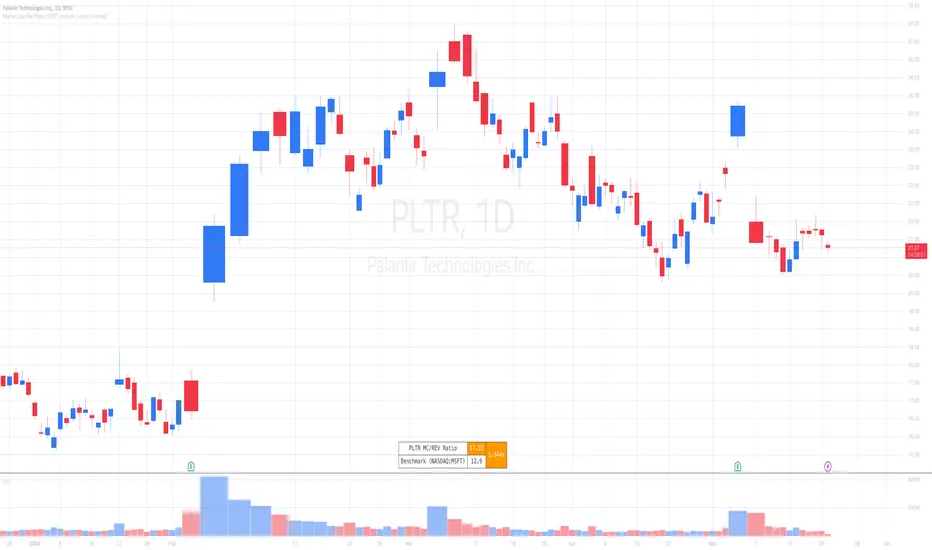
Market Cap / Revenue RatioA variation of the P/S ratio, this script takes the future estimated revenue of the current stock versus it's Market Cap. It then compares the aforementioned Market Cap:Revenue ratio against a market bellwether's corresponding ratio (MSFT by default) to determine the following:
- Light green when the ratio is extremely low (Stock is very undervalued)
- Green when the ratio is low (Stock's multiple is lower by 20-50%)
- Blue when the ratio is close to the benchmark (Stock is fairly valued to benchmark multiple)
- Red when the ratio is high (Stock's mulitple is higher by 50% or more)
- Dark red when the ratio is extremely high (Stock is very overvalued)
CONFIGURABLE
- Full Table: Show the entire calculation table
- Minimalist: Go minimal and show only the ratio and color code
- Show Benchmark Multiple: Show the multiple ratio calculated between the current stock and the benchmark stock (MSFT by default)
NOTES
- When calculating the Market Cap, TradingView sometimes under-reports the number of shares and thus skews the Market Cap too low. This seems to happen for stocks with multiple share classes like GOOGL so be mindful that the data can be wrong for these kinds of stocks. You can check on this by going into the Indicator's Settings and select Show Full Table which will show the number of shares outstanding reported by TradingView.
- For certain stocks such as foreign ADRs, there won't be a future revenue estimate so the script will automatically use the Total Revenue for the most recent Quarter in these cases
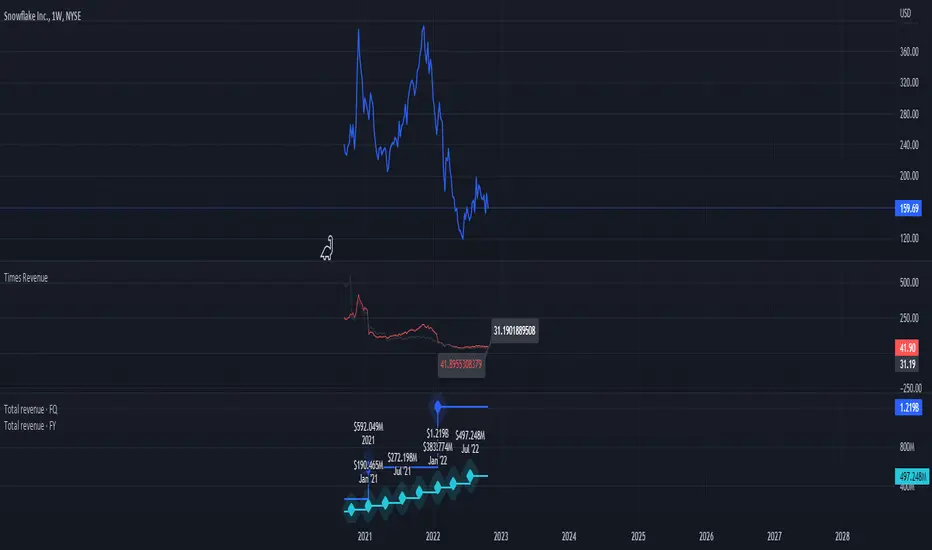
Times-Revenue (Fundamental Metric)Times-revenue is calculated by dividing the selling price of a company by the prior 12 months revenue of the company. The result indicates how many times of annual income a buyer was willing to pay for a company.
In color Red: it shows the last annual metric calculated
In color Gray: it shows the last 4 quarters annualized results
[GTH] RevenueVisually similar to the GTH Earnings indicator, this indicator plots
Reported Revenue (black line)
Difference to Estimated Revenue (colored bars)
Percentage change to the previous Reported Revenue (tags)
Note 1: Although in Tradingview the 'E' tags on the time line display Revenues alongside with Earnings , there is a difference in timing. Revenues are reported quarterly; Earnings reporting dates differ with each stock. Hence, the tags in this indicator are not necessarily aligned with the Earnings reporting dates.
Note 2: It should be obvious that this indicator can only report data provided by Tradingview. Even more obviousy, it can not display revenues of anything else but stocks.
If you find a malfunction, please provide examples. "Does not work" is not helpful.