VolatilityVolatility - The amount of price deviation in the specified time interval.
The calculation is made from the opening point to the closing point, and the maximum and minimum deviation between them is also included. Any timeframes are supported.
Available information: the start date of the calculation (according to the time zone of the exchange), the current volatility from the initial opening point or from the last closing point, the total volatility for all periods.
An indicator of useful use in everyday work.
Thanks for your attention!
Search in scripts for "Volatility"


Volatility Forecast/*==============================================================================
Volatility Forecast — Publishable Documentation
Author: @BB_9791
License: Mozilla Public License 2.0
WHAT THIS INDICATOR SHOWS
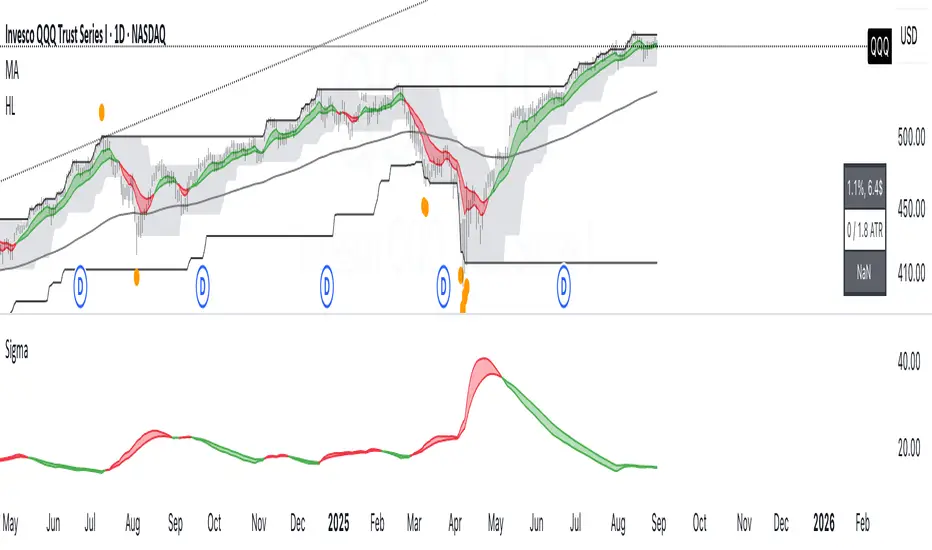
- A daily volatility estimate in percent points, called sigma_day.
- A slow volatility anchor, the 10-year EMA of sigma_day.
- A blended volatility series in percent points:
sigma_blend = (1 − p) * sigma_day + p * EMA_10y(sigma_day)
where p is the Slow weight %, default 30.
- Optional annualization by multiplying by 16, this is a daily-to-annual
conversion used by Robert Carver in his writings.
METHODOLOGY, CREDIT
The estimator follows the approach popularized by Robert Carver
("Systematic Trading", "Advanced Futures Trading Strategies", blog qoppac).
Current daily volatility is computed as an exponentially weighted standard
deviation of daily percent returns, with alpha = 2 / (span + 1).
The slow leg is a long EMA of that volatility series, about 10 years.
The blend uses fixed weights. This keeps the slow leg meaningful through
large price level changes, since the blend is done in percent space first.
MATH DETAILS
Let r_t be daily percent return:
r_t = 100 * (Close_t / Close_{t−1} − 1)
EWMA mean and variance:
m_t = α * r_t + (1 − α) * m_{t−1}
v_t = α * (r_t − m_t)^2 + (1 − α) * v_{t−1}
where α = 2 / (span_current + 1)
Current daily sigma in percent points:
sigma_day = sqrt(v_t)
Slow leg:
sigma_10y = EMA(sigma_day, span_long)
Blend:
sigma_blend = (1 − p) * sigma_day + p * sigma_10y
Annualized option:
sigma_ann = 16 * sigma_blend
INPUTS
- Threshold (percent points): horizontal guide level on the chart.
- Short term span (days): EW stdev span for sigma_day.
- Long term span (days): EMA span for the slow leg, choose about 2500 for 10 years.
- Slow weight %: p in the blend.
- Annualize (x16): plot daily or annualized values.
- Show components: toggles Current and 10y EMA lines.
- The script uses the chart symbol by default.
PLOTS
- Blended σ% as the main line.
- Optional Current σ% and 10y EMA σ%.
- Editable horizontal threshold line in the same units as the plot
(percent points per day or per year).
- Optional EMA 9 and EMA 20 cloud on the blended series, green for uptrend
when EMA 9 is above EMA 20, red otherwise. Opacity is configurable.
HOW TO READ
- Values are percent points of movement per day when not annualized,
for example 1.2 means about 1.2% typical daily move.
- With annualize checked, values are percent points per year, for example 18
means about 18% annualized volatility.
- Use the threshold and the EMA cloud to mark high or low volatility regimes.
NOTES
- All calculations use daily data via request.security at the chart symbol.
- The blend is done in percent space, then optionally annualized, which avoids
bias from the price level.
- This script does not produce trading signals by itself, it is a risk and
regime indicator.
CREDITS
Volatility forecasting method and scaling convention credited to Robert Carver.
See his books and blog for background and parameter choices.
VERSION
v1.0 Initial public release.
==============================================================================*/
Volatility Tsunami RegimeVolatility Tsunami Regime
This indicator identifies periods of extreme volatility compression to help anticipate upcoming market expansions. It detects when volatility is unusually quiet, which historically precedes violent price moves.
The script pulls data from the CBOE VIX and VVIX indices regardless of the chart you are viewing. It calculates the standard deviation of both indices over a user-defined lookback period (default is 20). If the standard deviation drops below specific thresholds, the script flags the market regime as compressed.
The background color changes based on the severity of the compression. A red background signals a Double Compression, meaning both the VIX and VVIX are below their volatility thresholds. An orange background signals a Single Compression, meaning only one of the two indices has dropped below its threshold.
Use this tool to spot the "calm before the storm." When the background is red, volatility is statistically suppressed, making it a prime time to look for breakouts or buy options while premiums are cheap. Conversely, it serves as a warning to tighten stops if you are short volatility.


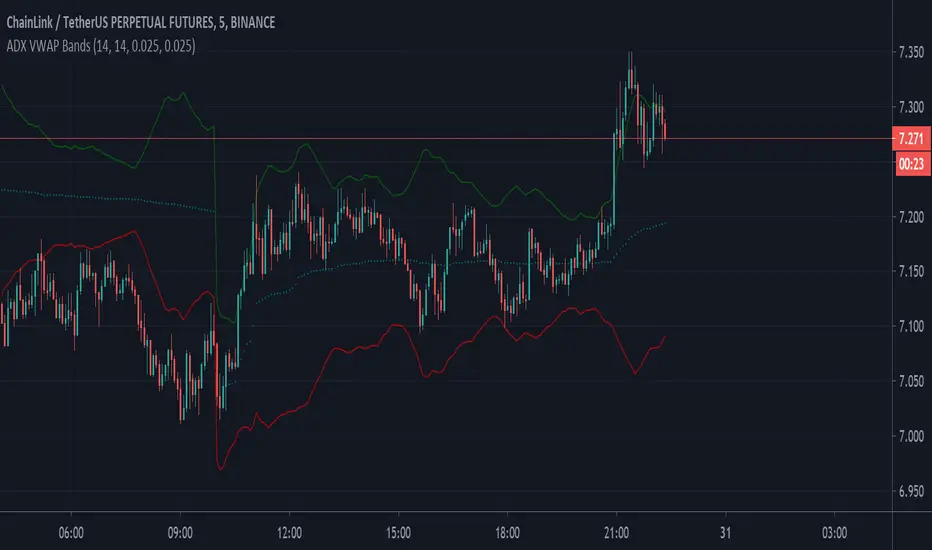
VOLATILITY Based VWAP Bands with Upper% and Lower% BandsVolatility based VWAP Bands with an Upper band x% higher than the normal VWAP and a Lower band x% lower.
The script uses ADX to create much better OVERBOUGHT and OVERSOLD regions.
- Settings Guide -
~ 0.01 in settings = 1% +/- VWAP
~ Step increment of 0.005 to make setting changes easier.


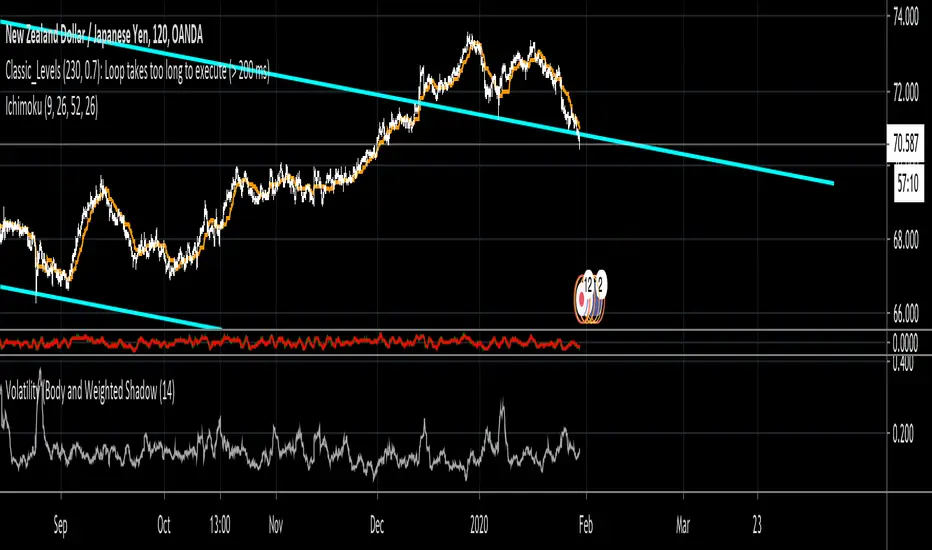
Volatility (Body and Weighted Shadow)- Volatility Indicator
- Replacement for ATR
- As each pair holds a different level of volatility, a stop loss can be set using this indicator rather than via a ratio 2:1, etc. e.g. 2 X Volatility Value = S/L...
- This indicator averages the bodies of candlesticks over a default length of 14 periods. It also considers the length of shadows via a weighted average. This is done as it is assumed that financial institutions tend to move price to levels that do not hold (shadows). Therefore, wick lengths are less significant than the candlestick bodies, so they are weighted to hold less value.
Volatility vs ATRVolatility vs ATR Indicator Description for TradingView
Volatility vs ATR is a powerful custom indicator designed to help traders analyze and compare market volatility with the Average True Range (ATR). This indicator provides valuable insights into the dynamic behavior of asset prices, enabling traders to make informed decisions about market trends, potential reversals, and risk management.
What Does It Measure?
Volatility: Represents the degree of price variation over a given period. Calculated using standard deviation or other measures, it highlights periods of heightened or reduced market activity.
Average True Range (ATR): Measures the average range of price movement over a specific period, providing a sense of the asset's price fluctuations and market activity.
How It Works
The indicator plots both Volatility and ATR on the same chart, making it easy to visualize how these metrics interact.
Rising Volatility often signals increased market uncertainty or the beginning of strong trends.
ATR Spikes typically accompany high volatility, helping identify potential breakout or breakdown scenarios.
By tracking the interplay between these metrics, traders can anticipate shifts in momentum, recognize consolidation phases, and plan trades more effectively.
Key Features
Dual-Line Display: Clearly plots both Volatility (red) and ATR (blue) for easy comparison.
Customizable Periods: Allows you to adjust the lookback period for both metrics to match your trading style.
Versatile Application: Works across all asset classes, including stocks, forex, crypto, and commodities.
Why Use Volatility vs ATR?
Trend Analysis: Identify trending vs. ranging markets by observing the relationship between Volatility and ATR.
Breakout Confirmation: Use Volatility and ATR spikes as confirmation signals for potential breakouts.
Risk Management: Plan stop-loss levels and position sizing based on ATR values.
How to Use It
Add the indicator to your chart.
Look for periods where Volatility diverges from ATR to spot potential market shifts.
Use the indicator in conjunction with price action and other technical tools for a comprehensive analysis.
This indicator is ideal for traders looking to enhance their strategies by understanding market dynamics through the lens of volatility and average price movement.
Let me know if you’d like further refinement!

Volatility Spectrum - Whvntr"Volatility Spectrum" is a useful technical indicator crafted for traders who prioritize precision in volatility analysis. This tool revolutionizes the traditional Average True Range (ATR) concept by offering a nuanced, multi-faceted view of market volatility.
Key Features:
Enhanced Volatility Insights: Seamlessly integrates standard ATR with an average ATR for a more detailed volatility analysis.
Customizable Parameters: Users can tailor the ATR and average ATR lengths to align with various trading styles and timeframes.
Multiple Smoothing Techniques: Options like RMA, SMA, EMA, or WMA are available to customize the ATR's responsiveness.
Dynamic Color Indicators: Unique color gradients visually represent different levels of volatility, aiding in quick and effective analysis.
Configurable Volatility Alerts: Set up alerts for specific high or low volatility conditions to assist in making informed decisions.
Intuitive Backgrounds: The background color shifts in response to volatility levels, offering an instant read on market dynamics .
Personalized Color Settings: Customize the color scheme for high and low volatility indicators to fit personal preferences and trading dashboards.
When and Where to Use:
Diverse Market Application: Suitable for various markets, including stocks, forex, and commodities.
Strategy Enhancement: Integrates with trading strategies for improved risk management and optimized entry/exit points.
Adaptable for All Trading Styles: Effective for both short-term day trading and long-term investment approaches.
Informed Trading Decisions: Best used in conjunction with other indicators for a well-rounded approach to volatility-based trading.
"Volatility Spectrum" is an essential tool for traders looking to enrich their understanding of market volatility. Its adaptability and depth make it a valuable component in any trader's toolkit, suitable for a range of markets and trading strategies.
"While 'Volatility Spectrum' provides valuable insights into market volatility, its indications should not be interpreted as definitive predictions or guarantees of future market behavior."


Volatility Pulse with Dynamic ExitVolatility Pulse with Dynamic Exit
Overview
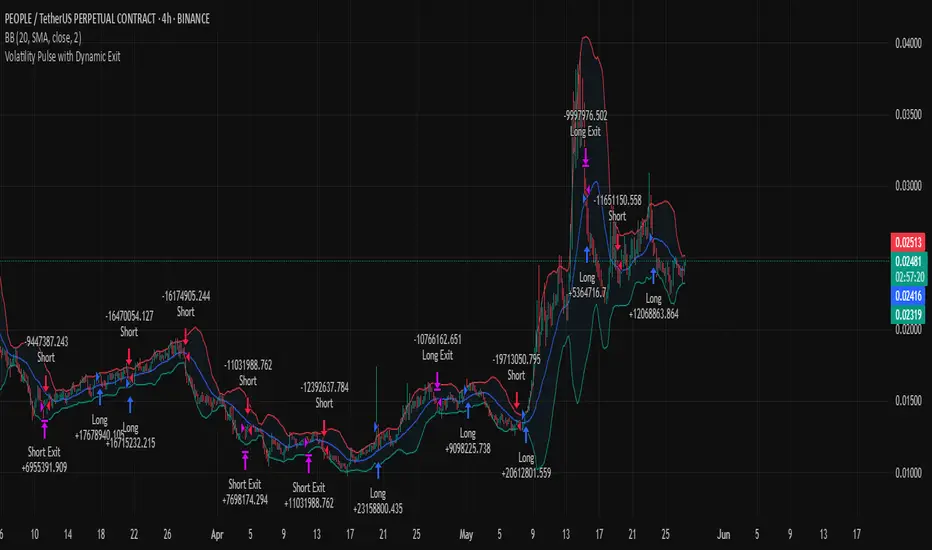
This strategy, Volatility Pulse with Dynamic Exit, is designed to capture impulsive price moves following volatility expansions, while ensuring risk is managed dynamically. It avoids trades during low-volatility periods and uses momentum confirmation to enter positions. Additionally, it features a time-based forced exit system to limit overexposure.
How It Works
A position is opened when the current ATR (Average True Range) significantly exceeds its 20-period average, signaling a volatility expansion.
To confirm the move is directional and not random noise, the strategy checks for momentum: the close must be above/below the close of 20 bars ago.
Low volatility zones are filtered out to avoid chop and poor trade entries.
Upon entry, a dynamic stop-loss is set at 1x ATR, while take-profit is set at 2x ATR, offering a 2:1 reward-to-risk ratio.
If the position remains open for more than 42 bars, it is forcefully closed, even if targets are not hit. This prevents long-lasting, stagnant trades.
Key Features
✅ Volatility-based breakout detection
✅ Momentum confirmation filter
✅ Dynamic stop-loss and take-profit based on real-time ATR
✅ Time-based forced exit (42 bars max holding)
✅ Low-volatility environment filter
✅ Realistic settings with 0.05% commission and slippage included
Parameters Explanation
ATR Length (14): Captures recent volatility over ~2 weeks (14 candles).
Momentum Lookback (20): Ensures meaningful price move confirmation.
Volatility Expansion Threshold (0.5x): Strategy activates only when ATR is at least 50% above its average.
Minimum ATR Filter (1.0x): Avoids entries in tight, compressed market ranges.
Max Holding (42 bars): Trades are closed after 42 bars if no exit signal is triggered.
Risk-Reward (2.0x): Aiming for 2x ATR as profit for every 1x ATR risk.
Originality Note
While volatility and momentum have been used separately in many strategies, this script combines both with a time-based dynamic exit system. This exit rule, combined with an ATR-based filter to exclude low-activity periods, gives the system a practical edge in real-world use. It avoids classic rehashes and integrates real trading constraints for better applicability.
Disclaimer
This is a research-focused trading strategy meant for backtesting and educational purposes. Always use proper risk management and perform due diligence before applying to real funds.
Volatility Radar Volatility Radar
A comprehensive VIX-based dashboard for volatility regime analysis and trade bias confirmation. Designed for options traders who use VIX levels to inform directional bias and identify potential traps in market positioning.
Dashboard Columns
1. 10-Min Rule
Displays your current directional bias based on VIX zone positioning with time-based confirmation.
CALLS (Green): VIX is below the Bullish Chop level — conditions favor call buying / bullish stock positioning
PUTS (Red): VIX is above the Bearish Chop level — conditions favor put buying / bearish stock positioning
CHOP (Yellow): VIX is between the two chop levels — no clear directional edge
Confirmation Logic: The bias must hold for a configurable period (default: 10 minutes) before showing "✓ CONFIRMED". A countdown timer shows time remaining until confirmation. High-velocity moves (spikes or crushes) trigger immediate confirmation. If VIX touches a chop boundary, the timer resets.
2. VIX Levels
Displays four user-configurable VIX thresholds that define the volatility regime zones:
Bearish (Red): Extreme fear — VIX at or above this level signals high volatility / bearish stock conditions
Resist (Orange): Upper chop boundary — resistance level for VIX
Support (Yellow): Lower chop boundary — support level for VIX
Bullish (Green): Low fear — VIX at or below this level signals low volatility / bullish stock conditions
The current zone is highlighted based on where VIX is trading relative to these levels.
3. Options Flow
Displays net options flow sentiment to gauge market positioning. Supports both simulated and real-time OPRA data.
Simulated Mode (Default):
Net Val: Shows simulated flow based on candle direction (bullish candle = positive, bearish = negative) multiplied by volume
Sentiment: BULLISH, BEARISH, or NEUTRAL based on flow direction
- Header displays "Options Flow (Sim)"
Real-Time OPRA Mode:
Vol: Shows actual call and put volumes summed across strikes near ATM (e.g., "C:12.5K P:8.2K")
Sentiment: BULLISH if call volume > put volume, BEARISH if puts dominate
- Header displays "Options Flow 📡"
- Net flow calculated as: `Total Call Volume - Total Put Volume`
⚠️ OPRA Data Requirement
Real-time mode requires an active OPRA data subscription in TradingView. Without this subscription, the options volume data will not populate. Enable "Use Real-Time OPRA Data" in settings and configure the required parameters (see Settings section below).
4. Velocity
Monitors the speed of VIX movement to detect rapid regime changes.
STABLE (Gray): Normal VIX movement
⚡ SPIKE (Red): VIX increased by more than the velocity threshold (default: 0.40 points) over the last 5 bars — rapid fear increase
⚡ CRUSH (Green): VIX decreased by more than the velocity threshold over the last 5 bars — rapid fear decrease
Calculation: `VIX - VIX ` (current VIX minus VIX from 5 bars ago)
5. Trap Detect
Identifies potential positioning traps by comparing VIX regime with options flow direction.
CLEAN (Gray): No divergence detected — flow aligns with VIX regime
⚠️ TRAP (Orange): High VIX + Bullish Flow — warns of potential bull trap; smart money may be selling into retail call buying during elevated fear
🛡️ ABSORB (Yellow): Low VIX + Bearish Flow — institutional absorption pattern; put buying during low VIX may indicate smart money hedging or accumulation
Horizontal Level Lines
Four horizontal lines are automatically drawn on the chart at your configured VIX levels:
1. Green line: Bullish level
2. Yellow line: Bullish Chop (Support) level
3. Orange line: Bearish Chop (Resist) level
4. Red line: Bearish level
Settings
Display Settings
Table Position: Choose where the dashboard appears on your chart
Text Size: Tiny, Small, or Normal
Table Background / Transparency: Customize dashboard appearance
10-Minute Rule
Confirmation Minutes: Time required in a zone before bias is confirmed (default: 10)
Velocity Threshold: Points per 5-bar period to trigger spike/crush detection (default: 0.40)
VIX Levels
Bullish (Green): Low volatility threshold (default: 14)
Bullish Chop (Yellow): Lower chop boundary (default: 16)
Bearish Chop (Orange): Upper chop boundary (default: 20)
Bearish (Red): High volatility threshold (default: 25)
Options Flow Data
Use Real-Time OPRA Data: Toggle between simulated and real-time options data (default: off)
Ticker Override: Manual ticker symbol. Leave blank to auto-detect from chart. Examples: SPY, QQQ, SPXW, NDX. Note: SPX auto-converts to SPXW for options symbols.
Center/Anchor Price: Required for OPRA mode. Enter the current underlying price (e.g., 590 for SPY, 5900 for SPX). This determines the ATM strike for data fetching.
Expiry Date (YYMMDD): Options expiration date in YYMMDD format (e.g., 260117 for Jan 17, 2026). Leave blank to use today's date (0DTE).
Strikes Above/Below ATM: Number of strikes to scan on each side of center price (1-10, default: 5). Higher values capture more flow data but use more API calls.
Strike Step Auto-Detection:
- SPX/SPXW, NDX: $5 strikes
- VIX: $0.50 strikes
- SPY, QQQ, and others: $1 strikes
What's New in This Release
1. Real-Time OPRA Options Flow: New toggle to switch between simulated and real-time options data. When enabled with an OPRA subscription, fetches actual call/put volumes across up to 11 strikes around ATM.
2. Configurable Options Parameters: New settings for ticker override, center price, expiry date, and strike range for precise options data targeting.
3. Horizontal Level Lines: VIX threshold levels are now drawn directly on the chart as colored horizontal lines for quick visual reference
4. Reordered Settings: VIX level inputs now flow logically from Bullish to Bearish
Best Practices
1. Use on VIX chart: Apply this indicator directly to a VIX chart (CBOE:VIX) for best results
2. Wait for confirmation: Don't act on bias until the 10-minute rule confirms
3. Respect velocity signals: Spikes and crushes can indicate regime changes before price confirms
4. Watch for traps: Divergence between flow and VIX regime often precedes reversals
5. Customize your levels: Adjust VIX thresholds based on current market conditions and your trading style
6. OPRA Setup: If using real-time options data, ensure you:
- Have an active OPRA subscription in TradingView
- Set the correct Center/Anchor Price for the underlying you're tracking
- Update the expiry date if trading non-0DTE options
- Match the ticker to your target (SPY for SPY options, leave blank on VIX chart for VIX options)
Disclaimer
This indicator is for educational and informational purposes only. It is not financial advice. Options flow data is simulated by default; real-time OPRA data requires a separate TradingView subscription. Always do your own research and manage risk appropriately.

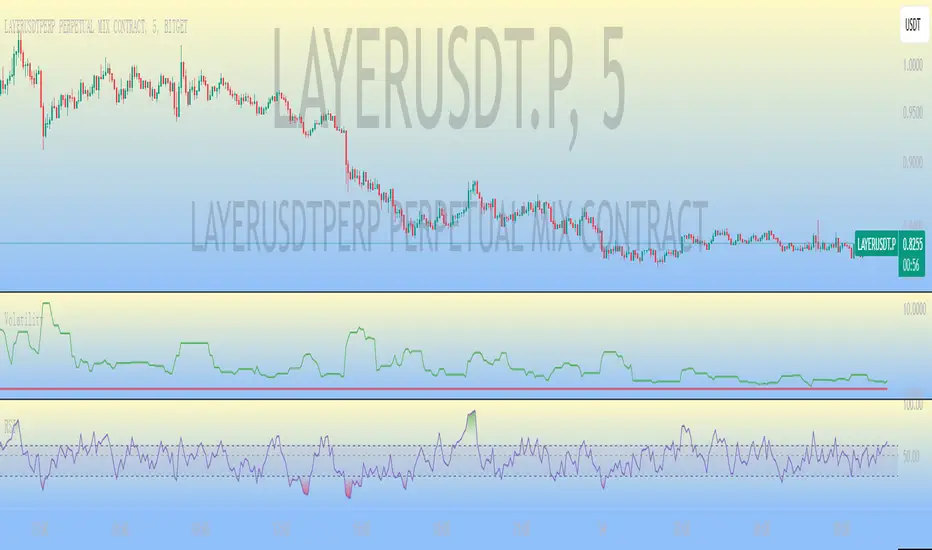
VolatilityThis is a filtering indicator Volatility in the CTA contract of BG Exchange. According to their introduction, it should be calculated using this simple method.
However, you may have seen the problem. According to the exchange's introduction, the threshold should still be divided by 100, which is in percentage form. The result I calculated, even if not divided by 100, still shows a significant difference, which may be due to the exchange's mistake. Smart netizens, do you know how the volatility of BG Exchange is calculated.
The official introduction of BG Exchange is as follows: Volatility (K, Fluctuation) is an additional indicator used to filter out positions triggered by CTA strategy signals in low volatility markets. Usage: Select the fluctuation range composed of the nearest K candlesticks, and choose the highest and lowest closing prices. Calculation: 100 * (highest closing price - lowest closing price) divided by the lowest closing price to obtain the recent amplitude. When the recent amplitude is greater than Fluctuation, it is considered that the current market volatility meets the requirements. When the CTA strategy's position building signal is triggered, position building can be executed. Otherwise, warehouse building cannot be executed.
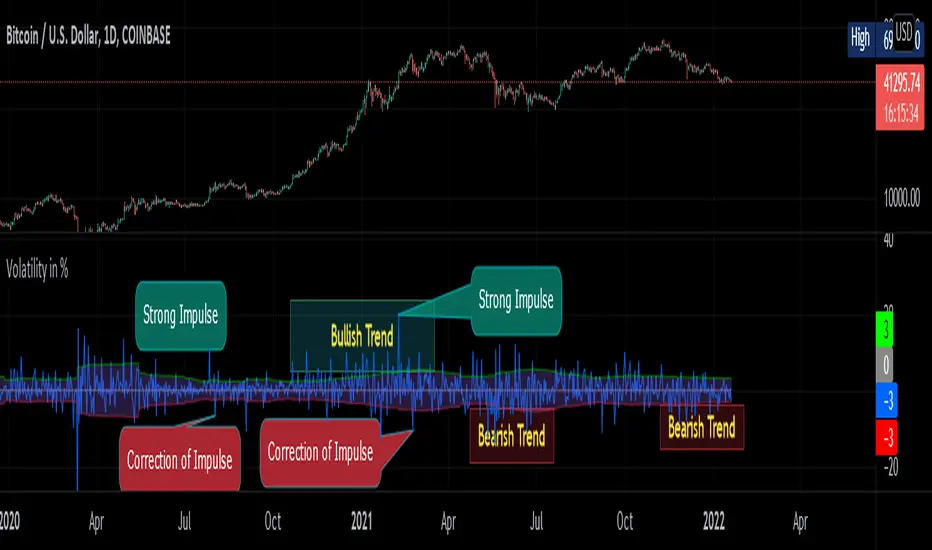
Volatility in % by zdmreVolatility is a statistical measure of the dispersion of returns for market index. In most cases, the higher the volatility, the higher the risk. Volatility is often measured as either the standard deviation or variance between returns from market index.
This indicator helps you identify the direction of the trend by calculating the standard deviation of the movement.
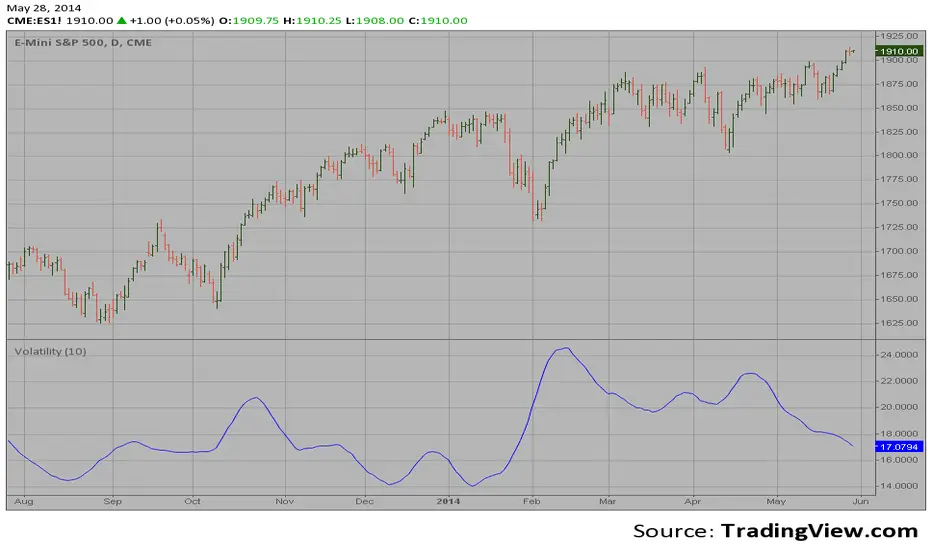
Volatility The Volatility function measures the market volatility by plotting a
smoothed average of the True Range. It returns an average of the TrueRange
over a specific number of bars, giving higher weight to the TrueRange of
the most recent bar.
Volatility ContractionVolatility Contraction is a strong trading setup for Positional Traders. It works on following time frame: Daily, Weekly and Monthly.

Volatility Traders Minds Strategy (VTM Strategy)Volatility Traders Minds Strategy (VTM Strategy)
I found this startegy on internet, with a video explaingin how it works.
Conditions for entry:
1 - Candles must to be above or bellow the 48 MA (Yellow line)
2 - Candles must to break the middle of bollinger bands
3 - Macd must to be above or bellow zero level;
4 - ADX must to be above 25 level
Credits to who developed this startegy (google it).
Thanks to all pinescripters mentined in the code for their snippets.
It could be improved with stop loss based on ATR etc.
I have also a study with alerts.
Please use comment section for any feedback or contact me if you need support.


VolatilityThis script shows three different calculations for volatility.
All three can be used as Stop-Loss...
- Absolute Price Changes
- Maximum Price Fluctuation
- and every one should know Average True Range
The script has a dark and light theme.
And the colors can be changed and each can be deactivated.
On top of that I stumbled over the fact that when MPF crosses over APC
this could result in a significant change in price and could also be used as an entry or exit.
This is also highlighted by default. You can change its background color and you can deactivate it too.
ACP measures volatility over most recent close prices.
This is excellent for comparing volatility.
It includes both frequency and magnitude.
In other words: Sum of differences between second to last close price and last close price as absolute value for 'n' bars.
MPF measures volatility over most recent candles, which could be used as an estimate of risk.
It may also be effective as the basis for a stop-loss or take-profit,
like the ATR but it ignores the frequency of directional changes within the time interval.
In other words: The difference between the highest high and lowest low over 'n' bars.
When you don't know what the ATR is then you can look at this link .

VolatilityFlex LevelsThe VolatilityFlex Levels indicator computes the degree of change (or sigma) by leveraging the selected Volatility Index (such as VIX or any user-specified volatility index). It utilizes this information to graphically represent distinct levels for a designated financial instrument. These levels include -sigma, -3/4sigma, -1/2sigma, -1/4sigma, 1/4sigma, 1/2sigma, 3/4sigma, and sigma.

Volatility StopThe Volatility Stop Indicator is able to define the current trend. When a downward trend is determined a red line above the prices bars is plotted; when an upward trend is determined a green line below the prices bars is plotted. These lines are generally used as trailing stops. The Volatility Stop Indicator is more used as an exit tool than an entry tool. When the price crosses the VStop value, the trend reverses and VStop moves to the other side of price.
We'd like to present you VStop indicator written in Pine Script. Please notice new Pine Script features used in this indicator: variables max_, min_, is_uptrend, vstop. We may refer to previous values of the indicator in the source code (e.g. vstop , is a vstop value on the previous bar) before the actual vstop variable definition. Enjoy and leave your comments!
