Session RangesThis is session range indicator with CLEAN code and CLEAR data presentation. There are other range indicators available but when I looked I found them unreliable or making too much screen clutter. WIth mine you can have 3 ranges on screen, measure to bodies or wickes, customise the period, (set your timezone), colours, labels and all that good stuff...
I'm very happy to share it with everyone (and publishing is a great way to archive my code) but ultimately this indicator is by me, for me. Whilst i added a few bells and whistles for everyone this indicator is precisely designed to:
Show me EASILY see what happened in the Asia session and whether we are breaking out with MINIMAL screen clutter. I only use the 3, 15 and 60 - it won't work on the 1, 5, 120 etc because I dont need it to. How I use it is below.
Search in scripts for "range"
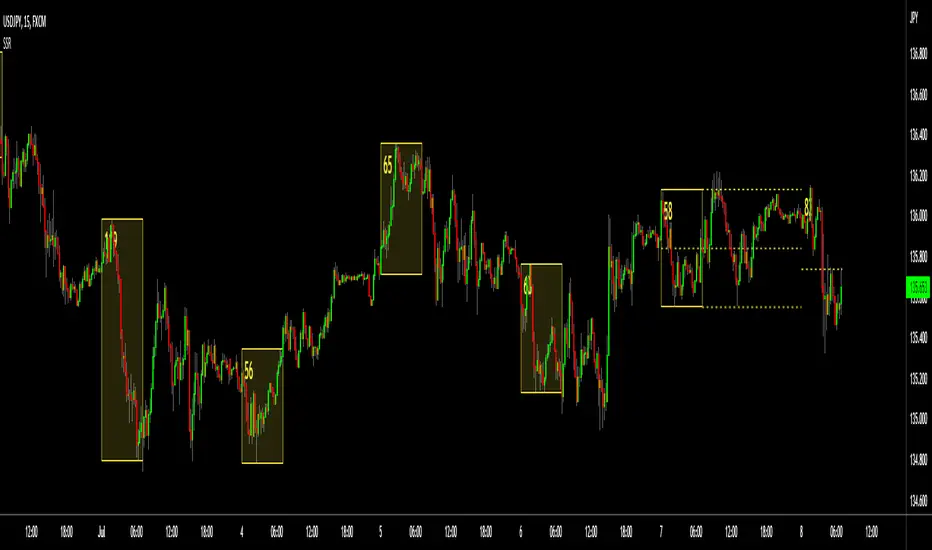
LOSS2PROFIT_Market_RangeFor Breakout Trading..(range trader)
Investor , monthly trader ,weekly trader and daily trader(everyone can use it)..
It show market own range which is created by market/price (not by calculation)..
This are the important decision point which is made by traders(all style)..
Depend upon time frame , most important thing is market opening and market closing..
Entry through market high and market low (important support n resistance)..
Use it wisely according to your strategy.. (logic always works and trust your strategy)
Keep on back testing...
(until you get , what you want)

Eagle Eye Indicator [B]Indicator version with three different modes, Range/Range Additive/Range Normalized.
Colorscheme is the same as the original overlay Project Eagle Eye

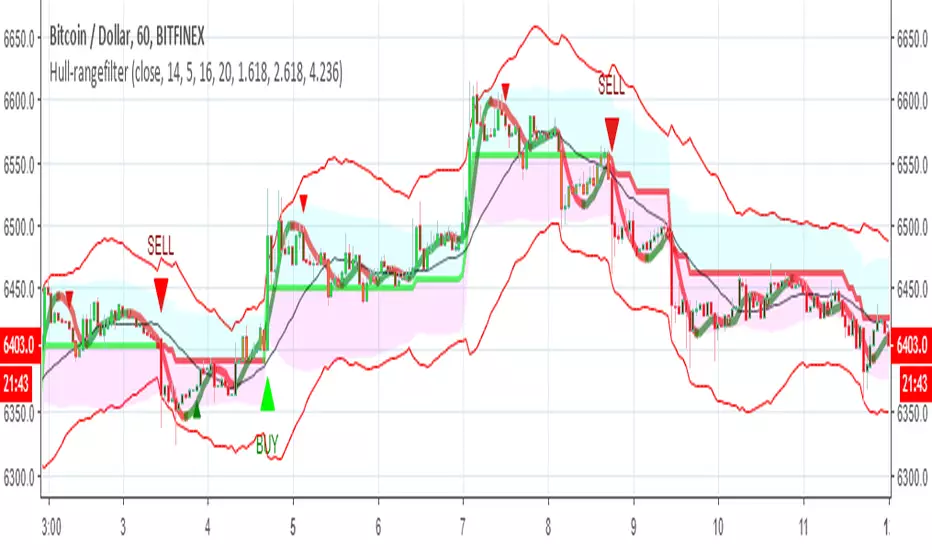
Hull-rangefilterMix of XAvi range filter and Hull fib , seems to be nice hybrid
alerts inside for both systems
for each coin isuugets to optimise the Hull length or the range (now set to 5) and then to test it
Donchian Channel with Range AdditionA Donchian Channel with additional zones at places where its range is smaller than a set amount of atr. Thus it kind of combines with Keltner Channel qualities. Purpose is to set a stop loss wide enough to avoid shaking out of a position. The example chart shows a Philips day chart, where I opened position on 16 juli at 37,50 and set the stop loss at low border level 35,60, on 23 juli was an earnings rapport, the wick of the candle shows that quotes went very low, obviously smart traders had to fill a huge order and hunted for stops, triggering my stop closing the position. next days quotes went a lot better, so I missed the fun. The Donchian Channel was too narrow because quotes had ranged in the previous weeks. If I had placed my stop on the additional low, setting it 5 atr below the high border, my stop would have been safe.

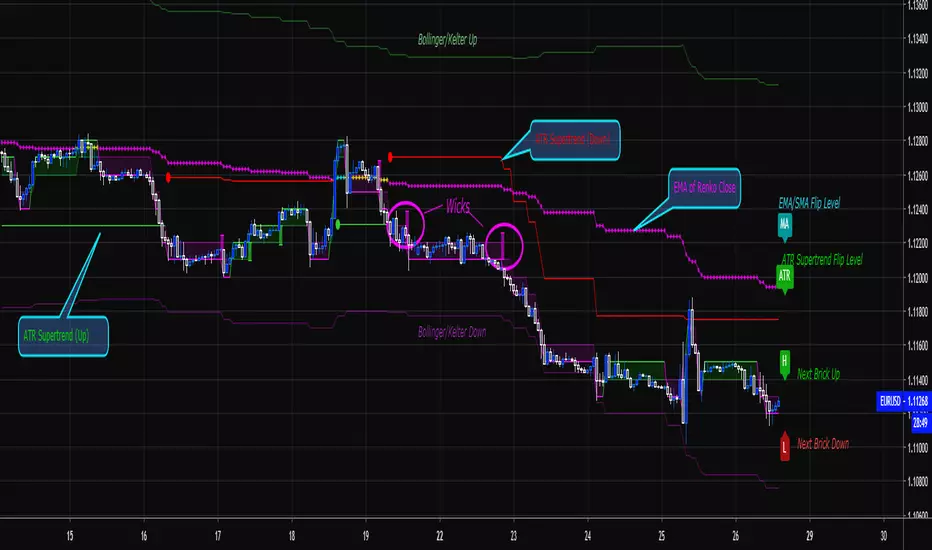
Renko Price Bars Overlay// Shows the price renko bars (or range bars) instead of the PERIOD renko
// bars that are integrated into Trading View. The normal renko bars that
// Trading View offers only consider the drawing of a new brick when the
// price closes above or below the required brick size. This can produce
// misleading charts since depending on the time interval of a chart, new
// bricks may or may not be drawn. True price renko bars will draw a new
// brick immediately upon the price exceeding the next target brick size.
// When running this script in "Traditional" mode, the painting of the
// brick overlay band is INDEPENDENT of the chart interval. If price
// exceeds the required target price for the next brick, the band is
// updated immediately, instead of waiting for the price bar on the chart
// interval to close first. The brick starting anchor point will attempt
// to be a "nice number" at a round interval for the chart ticker. For
// example, if viewing EURUSD with the box size equal to 50 ticks/pips,
// the open and close prices will take the form of 1.2100, 1.2150, 1.2200,
// 1.2250, and so on. This is the same behavior as the normal traditional
// Renko bars in Trading View and other major trading platforms such as
// Meta Trader.
// Use the tick size in traditional mode to specify the block size, in
// ticks. This may give interesting results in FOREX pairs... as the tick
// size in Trading View may be 0.00001 instead of the normal pip size of
// 0.0001, so a 10 pip block size may be '100', and not the expected '10'.
// FOREX futures should work in the manner expected, a 10 pip block size
// will indeed equal 0.0010.
// The "ATR" mode functions differently than the Trading View built in
// version. The block size is updated each time the range is exceeded.
// In Trading View, when using the ATR mode, the ATR is the last ATR
// value calculated on the ENTIRE data interval, and is applied to all
// past data. You can see this when you press the '+' sign of the ticker
// in the top left of the chart window and you will see the brick size
// as a constant, the brick size is not a function of the ever changing
// ATR value of the price action. The block size of this script is not
// updated for each price candle (i.e. each 1HR on a 1HR chart), instead
// it is updated only when the price thresholds are exceeded requiring a
// the band to be updated. At that point the current ATR is considered
// and the brick size is updated.
// Options exist to show the current high and low of the brick, and to
// show the required levels that the price must exceed to draw a new
// brick and update the band.
Please leave comments if you notice any bugs or would like any new features added. I don't find much use for plotting the H/L of the current renko candle, but I have seen some request it in the past.
Cheers.
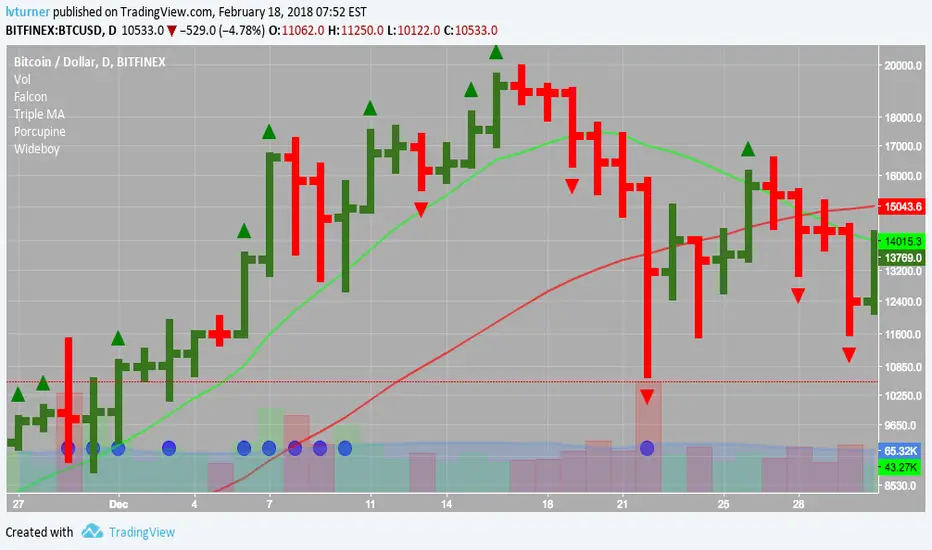
Wideboy - Wide Ranging DaysHighlights wide ranging days with a circle underneath them.
A wide ranging day is defined as where it's true range is greater than twice (configurable by changing input K) the average true range of the preceding 15 days. (Configured by changing the ATR lookback input)
Enjoy!
Forex session - Opening Range- Jayy fixed updatedOpening Range (OR) for Forex 24 hour regular session. This is not for regular market day sessions addressed in a separate script.
This script fixes four issues:
syntax error when code compiles
messed up opening range the day after a holiday Monday
flaky plotting of the opening range and targets that required page reloading
TradingView problems with starting forex session at 1700 hours EST/EDT when using certain securities eg FX_IDC currently (Jan 2017)
Additions in his code are more options for trading range
Time compensation option for some securities that incorrectly start sessions at 1200 hrs instead of 1700 hrs NY time
- this glitch is likely temporary but present when this script update was created
More opening range time period choices
Opening Range Targets:
Opening Range Targets as per Leaf_West
Targets are set at 127% , 162%, 200 %, 262 %, 362%, 423%, 685%, 1109% and 1794% and this can be traded intraday using methods described here charts-by-leaf.com I also have some Leaf West PDFs that describe how the targets are set and how they are traded. There are others that use opening range.
The Time Session Glitch and the Fix:
The script will correctly default to 1700 hrs to 1700hrs EDT/EST session for FXCM.
Strangely some securities appear to erroneously start their session at 1200 hrs ie. My guess is that they are somehow tied to GMT+0 instead of New York time (GMT+5). See this for yourself by selecting EURUSD using the FXCM exchange (FX:EURUSD) and then EURUSD from the IDC exchange (FX_IDC:EURUSD). The FX-IDC session opening range starts 5 hours
before it actually should at 1700 hrs EDT/EST. To correct for this I have implemented an automatic fix (default) and a user selected "5 hour time shift adjust. ment needed on some securities".
There is also a 4 hour time shift button which might be necessary when New York reverts from Eastern Standard Time
to Eastern Daylight Time (1 hour difference) in March (and then back again in November). In the default auto adjust mode you will need to select the 1 hour time shift. That is if this glitch still exists at that time.
I have looked at other scripts, other than my own and where the script is available, that need to use information about the opening bar and all have the same time shift issue
What are the choices for Opening Range?
The dialogue box offers the standard TradingView options.
Also where you see Pick Opening Range 1 to 12 hours , SET TO 0 To USE LINE ABOVE TO DETERMINE OR LENGTH
As the note says a number other than 0 will override the standard options from the line above
The dialogue box below in offers choices by hours 1 to 12. A number greater than 12 will still only give
720 minutes (12 hours) for the length of Opening Range.
What sessions within the FOREX time-frame are available?
The default is 1700 hours to 1700 hours EST/EDT
Check any one (only one) of the time periods to change the opening range period to suit.
New York opens at 8:00 am to 5:00 pm EST (EDT)
Tokyo opens at 7:00 pm to 4:00 am EST (EDT)
Sydney opens at 5:00 pm to 2:00 am EST (EDT)
London opens at 3:00 am to 12:00 noon EST (EDT)
There is a build your own session (click the button to select)
The two lines for inputting session times are almost identical except that the second line starts the be the same as each other.
The default for the build your own session is 2200 hours to 2200 hours. As of the time of publishing this plots EURUSD FX-IDC just right. The GMT+5 and GMT+4 do not apply to this selection.
See my comments above on this strange aberration.
The script originated from work done by Chris Moody. It has changed significantly but there are remnants of that script lurking within.
Script is free to all - that way you can see what is inside
Cheers Jayy

Market Meanness Index-Price ChangesThis is the Market Mean index. It is used to identify if the market is really trending or if it is range bound(random). In theory, a random sample will be mean reverting 75% of the time. This indicator checks to see what how much the market is mean reverting and converts it to a percentage. If the index is around 75 or higher than the price curve of the market is range bound and there is no trend from a statistical standpoint. If the index is below 75 this means the price curve of the market is in fact trending in a direction as the market is not reverting as much as it should if it were truly following a random/range bound price curve.

New Indicator!!! Opening Range_V1Plots the Opening Range for the First Hour for Stocks and Forex. Option to Plot the first 30 Minutes Opening Range, or Both. See first Post for Specifics.

Profile Edge Trading - Range BreakoutOpening Range Breakout (ORB) & Profile Confluence
The indicator is an all-in-one institutional trading system. It combines the volatility of the session open with the structural context of Market Profile (TPO) to identify high-probability breakout entries while filtering out "bull and bear traps."
What It Does
Most ORB strategies fail because they ignore where the market is trading relative to "Value." This indicator solves that by aligning the Opening Range (OR) with the Previous Day’s Value Area (VAH/VAL/POC).
It triggers Buy/Sell marks only when price breaks the opening range and aligns with the broader profile structure, ensuring you are trading with the institutional trend rather than against it.
Key Features
Smart ORB Signals: Automatic Buy/Sell marks based on Opening Range breakouts, filtered by volume and profile structure.
Dual Chart Modes: * Market Profile (TPO): View the historical distribution of price.
Hybrid Candlestick: Toggle to candlesticks for intraday execution while keeping the profile levels visible.
Profile Confluence Filter: Validates breakouts only if they occur relative to the Previous Day High (VAH), Low (VAL), or Point of Control (POC).
Visual Risk Management: Automatically plots Stop Loss (SL) and Take Profit (TP) levels on the chart the moment a signal triggers.
Customizable Reward: Adjust your desired Risk/Reward ratio (e.g., 1:2, 1:3) directly in the input settings.
Multi-Timeframe Logic: Use TPOs for structural context and candlesticks for precise entry timing.
How to Use
Define the Range: Set your Opening Range time (e.g., first 5, 15, or 30 minutes) in the settings.
Risk/Reward Ratio: Input your Reward Ration (e.g., 1.5, 2 )

Volatix Range Map Advanced Volatility-Based Session & Weekly Zones
Volatix Range Map is a professional volatility and session framework designed to help traders visualize daily and weekly price ranges, key balance zones, and probabilistic high/low areas.
Unlike the LITE version, this full version includes:
Multiple anchor options (VWAP or Daily Open)
Multi-day lookback for historical zones
Weekly range and exhaustion levels
Win-rate statistics for High-of-Day / Low-of-Day hits
A full dashboard summarizing session and weekly context
Volatix Range Map empowers traders with actionable market context, helping to plan entries, exits, and risk around volatility-driven zones.
Quick Features (Snapshot):
ATR-based daily and weekly zones
Configurable anchor: VWAP or Daily Open
Expected High / Low zones + Balance zone
Multi-day zone history
Weekly bias & exhaustion levels
Real-time dashboard with statistics
Alerts for HOD / LOD zone hits
Feature Breakdown (In Depth):
1. ATR-Based Volatility Zones
PRO calculates daily and weekly zones using the Average True Range (ATR) of the previous session(s), giving traders probabilistic support and resistance zones.
2. Anchoring Options
VWAP → weighted price reference
Daily Open → classic session anchor
This flexibility allows you to align zones with your preferred intraday methodology.
3. Expected High, Low & Balance Zones
High/Low Expansion Zones → indicate where price is statistically likely to reach
Balance Zone → highlights the consolidation area around the session anchor
Color-coded boxes → green = upside, red = downside, gray = balance
4. Multi-Day & Weekly Context
View historical zones for a configurable number of days (day lookback)
Weekly lines and exhaustion levels provide macro context
Weekly bias shows whether the market is bullish or bearish relative to the weekly open
5. Statistics Engine
Tracks total sessions and hit rates for HOD / LOD zones
Provides real-time percentages to evaluate zone reliability
Helps traders refine entry and exit expectations
6. Dashboard Overview
A built-in dashboard displays:
Zone hit statistics
Session count
Weekly bias
Current anchor selection
This reduces chart clutter and centralizes key information.
7. Alerts
Triggered when price enters Upper / Lower Expansion Zones
Enables monitoring of multiple markets simultaneously
Settings Review:
ATR Lookback
Determines the sensitivity of zone widths. Lower values = tighter zones, higher values = broader zones.
Anchor Mean
Choose between VWAP or Daily Open to define the reference point for your zones.
Display Options
Show Daily Zones → toggle daily boxes
Show Labels → toggle zone text
Zone Lookback (Days) → how many past sessions to show
Show Weekly Lines → weekly range + exhaustion levels
Show Stats Dashboard → on/off
Visual Customization
Color-coded boxes for easy recognition
Balance zone highlighted separately
Best Practices:
Use daily zones for intraday entries; weekly zones for macro context
Combine with trend and momentum analysis for higher-probability setups
Treat balance zones as consolidation / equilibrium areas rather than trade triggers
Use alerts to plan entries near zone edges, not blindly follow them
Evaluate HOD / LOD statistics over time to identify the most reliable markets
Who Volatix Range Map PRO Is For
Intraday and swing traders seeking structured volatility context
Traders who want to plan around statistical expansion/contraction zones
Users looking for dashboard-based analytics instead of visual clutter
Advanced traders requiring multi-day and weekly session awareness
The LITE → PRO smooth upgrade path:
LITE = basic daily zones, free or low-cost entry point
FULL = advanced anchoring, multi-day history, weekly context, stats, alerts
⚠️ Disclaimer
This indicator is for educational and analytical purposes only.
Trading carries inherent risks. Past performance does not guarantee future results. By using Volatix Range Map you acknowledge that all trading decisions are your own. The creators of this indicator are not responsible for any gains or losses resulting from the use of this tool.
✨ Access:
If you find this Volatility tool useful, consider adding it to your favorites and sharing feedback. Check out our other indicators available at our website.
If you'd like access or have any questions, feel free to reach out to me directly via DM.

Finanja RangeFlow📊 Finanja RangeFlow
This indicator provides essential trading levels and market analysis tools to help with your trading decisions.
🌟 Advanced Version Available!
Upgrade to the Pro version for enhanced features:
Advanced signal filtering
Additional features
Exclusive trading tools
🔗 Get Pro Version::
💬 Questions? Comment on our YouTube channel for details
Note: This is the basic/free version. For full features and enhanced performance, consider the Advanced Pro version available on our website.

SMC Range Box + HTF Matrix [AMD] # SMC Range Box + HTF Matrix
## Overview
**SMC Range Matrix** is a comprehensive Smart Money Concepts (SMC) indicator designed for ICT/SMC traders. It combines multi-timeframe range analysis with advanced Fair Value Gap detection, Inverted FVG tracking, Volume Imbalance zones, and AMD (Accumulation-Manipulation-Distribution) phase detection — all in one powerful tool.
---
## 🔥 Key Features
### 📦 Multi-Timeframe Range Boxes
- Display **1H, 4H, and Daily** candle ranges as visual boxes
- Up to **5 boxes per timeframe** for historical context
- **Bullish/Bearish color coding** based on candle direction
- **Time labels** showing when each range started
- **Range size display** in pips/points
- **Sweep markers** when previous highs/lows are taken
### 📊 Fair Value Gaps (FVG)
- **Auto Threshold Filter** — Only shows significant FVGs, filters out noise
- **Multi-Timeframe Support** — Display FVGs from any timeframe on your current chart
- **Smart Mitigation** — FVGs automatically removed when filled (customizable fill %)
- **Near Price Filter** — Only shows FVGs within X ATR of current price
- **Bullish & Bearish FVG** detection with customizable colors
### 🔄 Inverted Fair Value Gaps (IFVG)
- **Automatic IFVG Detection** — When price closes through an FVG, it converts to IFVG
- **Role Reversal Logic**:
- Bullish FVG → Price closes below → Becomes **Bearish IFVG** (Resistance)
- Bearish FVG → Price closes above → Becomes **Bullish IFVG** (Support)
- **Consequent Encroachment (CE) Line** — 50% level marked for optimal entry (ICT concept)
- **IFVG Invalidation** — Automatically removes IFVG when broken
### 📈 Volume Imbalance (VI)
- Detects gaps between consecutive candle bodies
- **Auto-removal** when mitigated
- Separate color settings for bullish/bearish VI
### ⚖️ Equilibrium Lines
- **50% level** of each range box
- Dynamic color based on price position (support/resistance)
- Helps identify premium/discount zones
### 🎯 AMD Phase Detection
- **Accumulation** — Tight range, consolidation phase
- **Manipulation** — Liquidity sweep with rejection
- **Distribution** — Strong directional move
- Labels displayed on each range box
---
## 🎨 Customization
### Theme Presets
- **Ocean** — Cool blue tones
- **Forest** — Natural green shades
- **Monochrome** — Clean grayscale
- **Neon** — Vibrant colors
- **Custom** — Full color control
### Fully Customizable
- Individual colors for each timeframe
- Border width and styles
- Label sizes and visibility toggles
- FVG/VI transparency and borders
---
## ⚙️ Settings Guide
### FVG Settings
| Setting | Description |
|---------|-------------|
| FVG Timeframe | Leave blank for current TF, or select specific timeframe |
| Auto Threshold | Filters insignificant FVGs based on bar movement % |
| Fill % to Remove | FVG removed when filled by this percentage (default 50%) |
| Near Price Filter | Only show FVGs within X ATR from current price |
| Show CE Line | Display 50% Consequent Encroachment line on IFVGs |
### Range Box Settings
| Setting | Description |
|---------|-------------|
| Boxes to Show | Number of historical boxes (1-5) per timeframe |
| Show Sweep Markers | Highlight when previous high/low is swept |
| Show Time Label | Display start time of each range |
---
## 📖 How to Use
### For ICT/SMC Trading:
1. **Identify the range** — Use 4H or Daily boxes to see the current dealing range
2. **Watch for FVGs** — These are potential entry zones
3. **Monitor IFVG formation** — When FVG fails, it becomes support/resistance
4. **Use CE level** — 50% of IFVG is optimal entry per ICT methodology
5. **Check AMD phase** — Understand current market phase before entry
### For Liquidity Trading:
1. Look for **sweep markers** on range boxes
2. Wait for **manipulation phase** detection
3. Enter on **IFVG retest** at CE level
4. Target opposite side of the range
---
## 🔔 Best Practices
- Use **4H boxes** for swing trading context
- Use **1H boxes** for intraday entries
- Enable **Auto Threshold** to reduce FVG clutter
- Set **Fill % to 50-70%** based on your trading style
- Combine with your own bias analysis (HTF trend, news, etc.)
---
## ⚠️ Disclaimer
This indicator is for educational purposes only. It does not constitute financial advice. Always do your own analysis and manage your risk properly. Past performance does not guarantee future results.
---
## 📝 Release Notes
**v8**
- Added LuxAlgo-style FVG detection with Auto Threshold
- Added Multi-Timeframe FVG support
- Improved IFVG logic — proper inversion detection
- Added Consequent Encroachment (CE) line for IFVGs
- Fixed fill tracking to not interfere with inversion
- Added Volume Imbalance detection
- Added AMD phase detection
- Multiple theme presets
---
## 💬 Feedback
If you find this indicator helpful, please leave a like and comment! Your feedback helps improve future versions.
**Tags:** #SMC #ICT #FVG #IFVG #SmartMoney #OrderFlow #LiquiditySweep #AMD #PriceAction #InstitutionalTrading

Price Range AnalyzerPrice Range Analyzer - 365-Day Market Context
Get instant market perspective with key price metrics calculated from daily timeframe data, regardless of your current chart interval.
📊 KEY FEATURES:
- 365-Day High/Low with percentage distance from current price
- Range Position indicator (0-100%) with color-coded zones
- Comparison vs 365-day average price
- ATR-based volatility assessment
- Automatic adaptation for new assets (uses available data)
- Clean, professional table (top-left position)
- Optional visual lines on chart
🎯 WHAT IT SHOWS:
1. 365D High - Highest price in period + % below current
2. 365D Low - Lowest price in period + % above current
3. Range Position - Where price sits in the range:
• 🟢 Very Low (0-20%): Strong buy zone
• 🟢 Low (20-40%): Bullish territory
• 🟡 Mid (40-60%): Neutral zone
• 🟠 High (60-80%): Bearish territory
• 🔴 Very High (80-100%): Strong sell zone
4. vs 365D Average - Distance from mean (reversion signal)
5. Volatility - ATR as % of price (Low/Medium/High)
💡 USE CASES:
- Quick assessment of support/resistance zones
- Identify overbought/oversold conditions
- Mean reversion trading opportunities
- Risk assessment via volatility levels
- Works on ALL timeframes (always uses daily data)
- Perfect for new listings (auto-adjusts to available history)
⚙️ SETTINGS:
- Adjustable lookback period (30-730 days)
- Toggle high/low/average lines on chart
- White background optimized table
Clean, simple, actionable. Know exactly where you stand in the bigger picture at a glance.

Opening Range SetupOpening Range Setup
Track the opening range and identify high-probability breakout setups with precision.
What It Does
This indicator identifies the high and low price range during the first X minutes of the trading
session (5, 15, 30, or 60 minutes) and projects these levels throughout the day. The opening
range acts as dynamic support and resistance, providing key reference points for intraday
trading decisions.
Key Features
✓ Customizable Range Period - Choose from 5, 15, 30, or 60-minute opening ranges
✓ Extension Levels - Display multiples of the range size (0.5x, 1x, 1.5x, 2x) as profit targets
✓ Breakout Detection - Automatically highlights the first candle that breaks above/below the
range
✓ Moving Average Filter - Built-in SMA/EMA trend filter to avoid counter-trend trades
✓ Visual Clarity - Clean box fills, labels, and customizable line styles
✓ Multiple Themes - Dark, Light, Bull/Bear, and Custom color schemes
How to Use
- Long Setup: Wait for price to break above OR High (preferably with price above MA)
- Short Setup: Wait for price to break below OR Low (preferably with price below MA)
- Range Trading: Use OR High/Low as fade levels when price stays within range
- Targets: Use extension levels for profit-taking zones
Settings
- Configurable session time (default: 9:30 AM - 4:00 PM NY)
- Toggle individual lines, fills, and breakout highlights
- Optional MA trend filter with adjustable length and type
Perfect for day traders looking for structured, rule-based setups on futures, stocks, and forex.
---
License: Mozilla Public License 2.0

StO Price Action - Daily Outside BarShort Summary
- Outside Bar indicator with multiple range calculation algorithms
- Highlights where the current range fully engulfs the previous
- Works with Daily candles in Daily, H4, and H1 timeframes only
- Highlights the current bar when it engulfs the previous bar according to the selected method
Full Description
Overview
- Identifies bars where the current period's range fully engulfs the prior period's range
- Offers three algorithms for defining the engulfing range:
- High/Low: uses absolute high and low values
- Open/Close: considers candle direction (bull/bear) and compares opens and closes
- Open/Close II: stricter version with exclusive inequalities for engulfing
- Engulfing behavior is detected automatically and highlighted for easy recognition
- Works on multiple markets but restricted to D, H4, and H1 charts for accuracy
Controls
- Year lookback (YLB) configurable to filter older bars
- Custom background color for highlighting Outside Bars
- Simple toggle interface with minimal chart clutter
Visual Representation
- Highlights engulfing bars with configurable background color
- Color transparency adjustable for clarity
Usage
- Use to identify strong market momentum or potential reversals
- Helps spot high-probability setups based on engulfing price action
Notes
- Only compatible with Daily, H4, and H1 timeframes
- Non-repainting: once an Outside Bar is drawn, it will not adjust retroactively
- Best used as a market structure reference not a direct trade signal

Opening Range Breakout (ORB) with Dual Timezones + Auto-OffOpening Range (Dual TZ) + Auto-Off (Clean)
This indicator plots a clean Opening Range Box (ORB) with ORH/ORL levels and a midline, built for traders who want structure without clutter.
The main feature is Dual Timezone support, meaning you can run two separate Opening Ranges in parallel (TZ1 + TZ2) on the same chart — ideal if you track multiple market opens (e.g., NY + London) from one workspace.
Key Features
• Dual ORB sessions (TZ1 + TZ2)
• Customization of both timezones, ORB principles (that suits you the best)
• Run two independent opening range sessions simultaneously
• Each has its own range calculation, box, ORH/ORL lines, labels, fill, and midline
• Clean output (no targets, no breakout signals)
• Focused on the core OR structure only
• Great for discretionary trading and level-based execution
• Separate Auto-Off for TZ1 and TZ2
• Automatically removes ALL drawings after a user-defined time (minutes after OR end)
• Helps keep charts clean during the rest of the day
• TZ1 and TZ2 can be disabled on different timers
• Historical toggle
• If Show Historical Data = OFF, the script deletes previous session drawings at the next session start
• If ON, prior sessions remain visible
What’s Drawn
• Opening Range box (high/low during session)
• ORH (Opening Range High) line + label
• ORL (Opening Range Low) line + label
• Midline (average of ORH/ORL)
• Highlight fill between ORH/ORL
Typical Use Cases
• Track NY ORB + London ORB at the same time
• Use ORH/ORL as intraday support/resistance anchors
• Keep your chart clean with Auto-Off after your active trading window
Notes
• Works best on the 1/5 minute timeframes (the OR is session-based).
• If both sessions overlap, drawings may overlap as well — that’s expected since both ORBs are active simultaneously.

Golden Session ORB - Execution & Visualization Tool🎯 Optimize Your Execution with Golden Session ORB
The Golden Session ORB is a technical execution tool designed for traders who specialize in Opening Range Breakouts. Its primary goal is to provide a clean, professional visualization of liquidity levels across the three most critical trading sessions: Asia (18:00), NYC Pre-Market (08:00), and the Wall Street Open (09:30).
This script is not an automated signal system. It is a decision-support tool that manages range levels and visual structure, allowing the trader to focus exclusively on price action analysis and high-quality execution.
⏱️ Recommended Timeframes For optimal performance and precise box formation, this indicator should be used on:
1 Minute (1m): Ideal for observing the fine details of range formation and breakout precision.
15 Minutes (15m): Ideal for a clearer structural perspective of the session’s development.
💎 Key Features:
Automatic Multi-Session Structure: Automatically identifies and plots support and resistance levels from the opening minutes of each session.
Dynamic Extended Boxes: Ranges project forward automatically to help you identify key supply and demand zones throughout the day.
"Intention Candle" Visual Aid (Optional): The script highlights candles that show a confluence of volume and trend alignment (EMAs).
Note: These highlighted candles are NOT buy/sell alerts. They are a visual guide to help you identify moments of potential interest based on your own criteria.
📊 Backtesting & Risk Management This tool is perfect for manual backtesting, allowing you to study how price historically reacts to each session's levels.
Trading Recommendation: While opening range breakouts can lead to massive expansions, markets remain volatile. It is highly recommended to secure partial profits during the move and actively manage your risk to protect your capital from sudden price reversals.

Custom Time-Range Breakout with 4x EMA Filter Time-Range Breakout Monitor with 4x EMA FilterThis indicator is a powerful tool designed to capture volatility during specific market hours (like London or New York opens). It monitors a custom price range (High/Low) and tracks whether these levels are breached, using a 4x EMA ribbon as a trend filter.Key Features:Adjustable Range: Define your own start and end time (hours and minutes) to mark the session range.Breakout Tracking: The indicator visually tracks if the High or Low of the session has been taken (Broken) and displays the status in a real-time dashboard.4x EMA Ribbon: Integrated trend filter with specific color coding for quick visual confirmation.Smart Alerts: Built-in alerts for both Bullish (Up) and Bearish (Down) breakouts.EMA Color Legend (Rafał's Setup):EMA PeriodColorRoleEMA 20GrayShort-term momentumEMA 50GreenMedium-term trend confirmationEMA 100YellowIntermediate support/resistanceEMA 200RedLong-term baseline (The "Trendline")How to Use:Set the Session: Input your target range in the settings (e.g., 09:00 - 10:00).Monitor the Dashboard: The top-right table shows "TAK" (YES) or "NIE" (NO) if the levels have been breached during the current day.Confirm the Trend: * Long: Price breaks above the range AND is supported by the Green (50) and Red (200) EMAs.Short: Price breaks below the range AND is trending under the Green (50) and Red (200) EMAs.Settings:Start/End Hour & Minute: Full control over the tracked time window.Alerts: Enable "Wybicie Górą" or "Wybicie Dołem" in the TradingView Alert menu.

Chainbey Ai - Swing High/Low Range📈 Chainbey Ai – Swing High / Swing Low Range
Chainbey Ai – Swing High / Swing Low Range is a clean and powerful market-structure indicator designed to automatically identify key swing levels and visualize the active price range on any chart.
This tool helps traders clearly see where price is reacting, consolidating, or preparing for a breakout.
🔹 What This Indicator Does
✔ Automatically detects the latest confirmed Swing High
✔ Automatically detects the latest confirmed Swing Low
✔ Draws horizontal levels for both swings
✔ Labels levels clearly as “Swing High” and “Swing Low”
✔ Highlights the range between swings using a background fill
✔ Updates dynamically as new market structure forms
🔹 Why It’s Useful
Identify support & resistance without manual drawing
Visualize consolidation zones instantly
Spot breakout and fake-out areas faster
Ideal for range trading, breakout trading, and trend confirmation
Works perfectly with price action, volume, and order-flow concepts
🔹 Best Use Cases
Crypto (Spot & Futures)
Forex
Indices
Commodities (Gold, Silver, Oil)
Timeframes: Works on all timeframes (especially strong on 15M, 30M, 1H)
🔹 How to Trade With It
Buy bias when price holds above Swing Low inside the range
Sell bias when price rejects from Swing High
Breakout confirmation when price closes strongly outside the range
Combine with volume, momentum, or liquidity concepts for higher accuracy
🔹 Customization
Adjust Swing Length to control sensitivity
Enable/disable range background fill
Customize colors and transparency
Extend swing levels to the right for forward guidance
⚠️ Disclaimer
This indicator is a technical analysis tool, not financial advice.
Always manage risk and confirm signals with your own strategy.
🔗 Built by Chainbey Ai
Smart Structure • Clean Levels • Clear Ranges 🚀

Opening Range BoxOPENING RANGE BOX + LEVELS (RTH)
OVERVIEW
This indicator draws the Opening Range for the U.S. Regular Trading Hours session starting at 9:30 AM New York time. It plots the Opening Range High, Low, and Midpoint, and can extend those levels for the rest of the session. It also displays the Opening Range size in points and ticks.
WHAT IT DRAWS
• Opening Range box for the first N minutes of RTH (ex: 5, 10, 15)
• OR High (ORH)
• OR Low (ORL)
• OR Midline (midpoint of ORH/ORL)
• Opening Range value label (range in points + ticks)
KEY FEATURES
• Time-anchored drawings (bar_time) so levels stay accurate on any intraday timeframe
• Configurable Opening Range length in minutes
• Configurable box fill/border colors
• Independent styling for OR High / OR Low / Midline (color, width, line style)
• Line extension modes:
Line extension modes
- To RTH Close
- Right Forever
- For N Minutes
- None
Optional label placement to the LEFT of the Opening Range so it doesn’t block new candles
Option to keep previous sessions’ Opening Ranges visible for context
BEST FOR
• Futures: ES / NQ / MNQ (and other RTH-based products)
• Intraday stocks and ETFs
• OR breakout, rejection/fade, and mean reversion workflows
NOTES
• Intended for intraday charts
• Opening Range is calculated strictly inside the selected time window (no extra bars)
• Session is America/New_York, 09:30–16:00

ATR Bands (MA Distance)ATR Bands (MA Distance) plots volatility-based bands at a multiple of ATR away from a selected moving average.
Unlike percentage envelopes or standard deviation bands, this indicator measures distance from the moving average using ATR, representing the market’s normal “breathing range” rather than statistical probability.
Key Features
The center line is a selectable moving average (EMA, SMA, RMA/Wilder, or WMA).
Upper and lower bands are calculated as:
Moving Average ± ATR × Multiplier
Band width automatically adapts to changing market volatility.
Designed for consistent use across different markets and timeframes without parameter re-optimization.
Non-repainting: all values are calculated only from confirmed historical bars.
Intended Use
ATR Bands (MA Distance) is best used as a context and preparation tool , not as a direct entry or exit signal.
Typical use cases include:
Identifying areas where price is extended relative to its recent volatility.
Visualizing normal vs. stretched price distance from the moving average.
Supporting range-based analysis or trade preparation when combined with other indicators (e.g., oscillators).
Important Notes / How NOT to Use
This indicator does NOT generate buy or sell signals by itself .
Touching or crossing a band does not imply an automatic reversal.
In strong trending markets, price may stay outside the bands for extended periods.
ATR Bands should not be interpreted as overbought/oversold levels on their own.
This indicator does NOT repaint. Once a bar is closed, its values will not change.
For best results:
Use ATR Bands as a preparation zone, then wait for confirmation from your own entry logic.
Disable or ignore band-based mean-reversion ideas during strong trend conditions.
Concept Summary (Short)
ATR Bands (MA Distance) visualize how far price has moved from its moving average in terms of volatility, without repainting and without relying on percentage deviation or statistical assumptions.
Optional Short Description (Preview)
Volatility-based, non-repainting ATR bands plotted at a distance from a moving average.
Designed for market context and trade preparation — not standalone signals.
