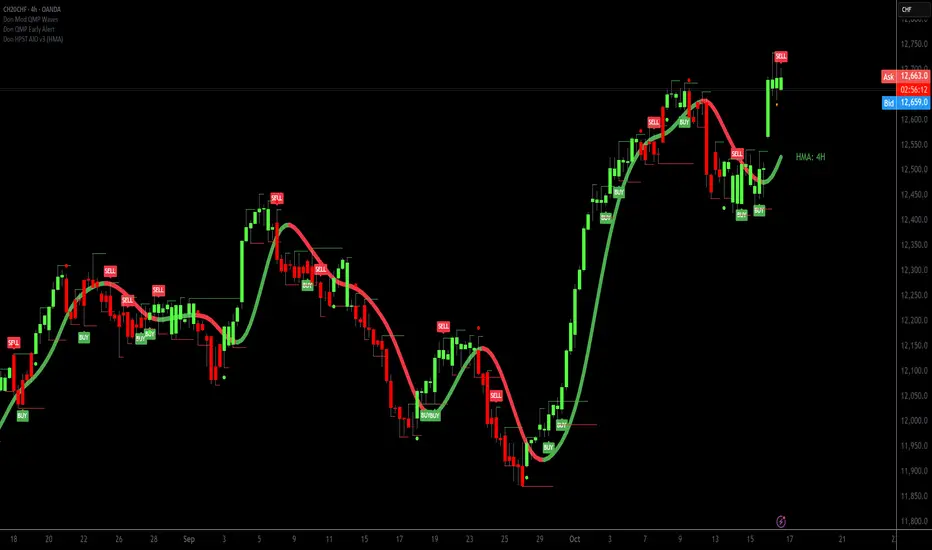
WRS signalsKey Features:
Buy and Sell Signals:
Buy Signals: Generated when the shorter-period HMA crosses above the longer-period HMA, indicating a bullish trend.
Sell Signals: Generated when the shorter-period HMA crosses below the longer-period HMA, indicating a bearish trend.
Signals are filtered to avoid multiple signals being triggered on the same bar using a cooldown period.
Trend Strength and Trend Box:
The script calculates trend strength based on the distance between the two HMAs, which is normalized into a percentage.
A trend strength box is displayed on the chart, showing whether the trend is bullish, bearish, or neutral.
The box also shows a reversal warning when the trend strength falls below a certain threshold, indicating a potential reversal.
Dynamic Target Lines (TP1 & TP2):
Target 1 (TP1) and Target 2 (TP2) are automatically calculated based on the ATR (Average True Range) and a user-defined risk/reward ratio.
TP1 is the first target for profit-taking, calculated as a multiple of the ATR.
TP2 is the secondary target (runner), calculated as a larger multiple of the ATR.
The target lines are drawn as dotted for TP1 and dashed for TP2, and they are updated dynamically based on price movements.
Alerts for Buy and Sell Signals:
Alert Conditions are set for Buy and Sell signals, allowing you to create alerts in TradingView.
Alerts can be customized with messages like "Buy Signal: {{ticker}} at {{close}}" or "Sell Signal: {{ticker}} at {{close}}".
Trend Health Indicator:
If the trend strength is low (below a user-defined threshold), the script will display a reversal warning.
This warning is triggered when the trend is losing strength and a potential reversal might be approaching.
How to Use the Script:
Adding to TradingView:
Copy and paste the script into the Pine Script editor in TradingView.
Click on Add to Chart to apply it to your chart.
Interpreting the Signals:
Buy Signal: When the script generates a buy signal, a green label with the text “Buy” will appear below the bar, indicating a potential entry point.
Sell Signal: When a sell signal is generated, a red label with the text “Sell” will appear above the bar, signaling a potential exit point.
Understanding Target Lines (TP1 & TP2):
The script will plot two target lines for each trade: TP1 and TP2. These lines represent your profit-taking levels.
TP1 (Target 1): A conservative target, usually the first area to take partial profits.
TP2 (Target 2): A more aggressive target for those holding onto a position.
The target lines are plotted as dotted (for TP1) and dashed (for TP2).
Trend Strength Box:
The box on the chart will display the current trend (Bullish, Bearish, or Neutral) along with the strength of the trend.
If the trend strength drops below a threshold, the box will display a reversal warning, indicating that the trend may be weakening.
Setting Alerts:
You can set alerts in TradingView for Buy and Sell signals:
Click on the alarm clock icon in the TradingView interface.
Create an alert for either Buy Signal or Sell Signal.
Choose the condition to be triggered when the respective signal occurs.
Customize your alert message with details such as the ticker, price, and trend (for example, "Buy Signal: {{ticker}} at {{close}}").
Customizable Inputs:
Length (HMA Period): Adjust the period for the Hull Moving Average (HMA) to fine-tune the sensitivity of the buy and sell signals.
Risk/Reward Ratios: Define the risk/reward ratios for TP1 and TP2. These ratios determine how far the target lines will be set from the entry price.
Trend Strength Warning Level: Set the threshold at which the script will trigger a reversal warning if the trend strength falls below this level.
Cooldown Period for Signals: Prevent multiple buy or sell signals from being triggered on the same bar by setting a cooldown period.
Example Use Case:
Trend Analysis: Use this script to identify bullish and bearish trends based on the Hull Moving Averages and set corresponding buy and sell signals.
Take-Profit Strategy: Use the dynamic target lines (TP1 and TP2) to plan your profit-taking strategy. These targets adjust based on volatility and provide potential exit points.
Reversal Warning: When the trend shows signs of weakening, the trend strength box will alert you to the possibility of a trend reversal, helping you manage risk.
Conclusion:
This script offers a comprehensive buy/sell signal system combined with dynamic profit targets (TP1 and TP2), all while tracking the strength of the trend and providing a reversal warning when necessary. It's a useful tool for trend-following traders and those looking to manage their trades more effectively using built-in risk/reward ratios and target levels.
Feel free to adjust the HMA length, risk/reward ratios, and other inputs to fit your trading strategy!
Hull Moving Average (HMA)

GFC MAs suitePlots six configurable moving averages (5, 10, 20, 50, 100, 200 by default) using a user-selected MA type (SMA, EMA, WMA, VWMA, or Hull) overlaid on price.
Assumptions: Uses close price as the source, applies the same MA type to all lengths, runs on the chart timeframe and exchange timezone, and is intended for visual trend and structure analysis.
By GlutenFreeCrypto

Dual MTF B-Xtrender EMAsMTF B-Xtrender Color EMAs
Dual moving averages that change color based on multi-timeframe B-Xtrender histogram signals
This indicator applies B-Xtrender histogram logic (inspired by the original B-Xtrender oscillator) to color two independent moving averages based on different timeframe trend conditions. It provides a unique visual way to see trend alignment across multiple timeframes directly on your price chart.
What It Does
The indicator plots two customizable moving averages (EMA, SMA, or HMA) where each line changes color based on whether the B-Xtrender histogram is above or below zero on its respective timeframe:
Fast MA (default 34 EMA): Colors based on daily B-Xtrender signals
Light blue when B-Xtrender histogram > 0 (bullish)
Light purple when B-Xtrender histogram < 0 (bearish)
Slow MA (default 155 EMA): Colors based on 3-day B-Xtrender signals
White when B-Xtrender histogram > 0 (bullish)
Dark orange when B-Xtrender histogram < 0 (bearish)
B-Xtrender Logic
This indicator uses the B-Xtrender histogram calculation:
Short-term Xtrender: RSI of (EMA 5 - EMA 20), with RSI period of 15, minus 50
The histogram crossing above/below zero determines bullish/bearish coloring
Each MA independently evaluates its own timeframe's B-Xtrender signal
Key Features
✓ Multi-Timeframe Analysis: Each MA can reference different timeframes for B-Xtrender signals
✓ Flexible MA Types: Choose between EMA, SMA, or HMA for both fast and slow lines
✓ Customizable Lengths: Adjust MA periods to fit your trading style
✓ Independent Signals: Fast and slow MAs color independently based on their respective timeframes
✓ Clean Overlay: Thin lines that don't clutter your chart
✓ Optional Bar Coloring: Can enable bar colors based on fast MA signal
How To Use
Trend Alignment: When both MAs show bullish colors (light blue + white), it suggests alignment across timeframes
Divergence: When MAs show different colors, it indicates potential timeframe divergence
Customization: Adjust timeframes to match your trading strategy (e.g., 1H + 4H for intraday, or Daily + Weekly for swing trading)
Visual Enhancement Tip
For better visual distinction between bullish and bearish conditions, you can manually adjust the line styles after adding the indicator to your chart:
Click the indicator settings (gear icon)
Go to the "Style" tab
When the MAs display their bearish colors (light purple for Fast MA, dark orange for Slow MA), change those plot styles from "Solid" to "Dashed"
This creates a clear visual: solid lines = bullish, dashed lines = bearish
This optional styling makes trend changes instantly recognizable at a glance.
Settings
Fast MA Length (default: 34)
Fast MA Type (EMA/SMA/HMA)
Fast MA Timeframe (default: Daily)
Slow MA Length (default: 155)
Slow MA Type (EMA/SMA/HMA)
Slow MA Timeframe (default: 3-Day)
Optional bar coloring
Notes
B-Xtrender histogram parameters are fixed: Short L1=5, L2=20, L3=15, Long L1=20, L2=15
This is a visual trend tool, not a standalone trading system
Works on all timeframes and instruments
Colors are customizable in indicator settings after adding to chart
Credit: This indicator incorporates B-Xtrender oscillator logic as its signal mechanism, applied in a multi-timeframe moving average context.

Ocean's Zero-Point [Pro]Ocean's Zero-Point – The Physics of Market Tension
Stop chasing price. Start trading the snap.
Ocean's Zero-Point is a next-generation oscillator designed for precision mean-reversion trading. Unlike standard RSI or Stochastic indicators that rely on lagging momentum averages, this tool measures Market Tension, the statistical distance between price and its "Fair Value."
It doesn't just tell you if the market is moving; it tells you how "stretched" the rubber band is and the exact moment it's about to snap back.
🌊 Key Features
The Zero-Point Engine (Statistical Tension) - Markets are elastic. They expand and contract around a mean. Standard indicators fail because they don't account for volatility. This engine uses a normalized Z-Score Algorithm to calculate exactly how many Standard Deviations price has moved away from the baseline.
The Logic: When the wave hits +2.0 or -2.0, the market is statistically overextended (the rubber band is fully stretched).
Result: You identify true extremes, filtering out weak fluctuations.
Zero-Lag Baseline (HMA) - To find the "Zero Point" (Fair Value), precision is key.
Standard Indicators: Use SMA or EMA, which lag behind price.
This Tool: Uses the Hull Moving Average (HMA).
Result: The baseline reacts almost instantly to price changes, ensuring the tension reading is always synchronized with the current market tick.
Liquid Flow Visualization - Designed for instant readability. The indicator uses a dynamic Liquid Gradient system to visualize market energy.
Gold Energy (Bottom): Deep oversold tension. Represents "Discount" zones and potential bullish reversals.
Sky Blue Energy (Top): Peak bullish tension. Represents "Premium" zones and potential bearish reversals.
Liquid Glow: Fills the area between the wave and the zero line, allowing you to gauge momentum density at a glance.
Fractal Pivot Detection (Internal Logic) - The engine continuously scans for fractal pivot points within the tension wave to identify structural turning points in real-time.
⚙️ Settings & Customization
Tension Length: Controls the lookback period for the Fair Value baseline.
Snap Sensitivity: Adjusts the Standard Deviation threshold (Mult). Higher values = Rarer, stronger signals. Lower values = More frequent scalping signals.
Visuals: Fully customizable "Bullish Energy" (Sky Blue) and "Bearish Energy" (Gold) colors.

HMA Fibo Trend RibbonHMA Fibo Trend Ribbon - Fibonacci Trend Indicator
📊 Indicator Description
This is a trend indicator based on the harmony of Fibonacci numbers. The indicator uses seven Hull Moving Averages with periods corresponding to the Fibonacci sequence: 8, 13, 21, 34, 55, 89, 144. This mathematical harmony allows the indicator to perfectly align with natural market cycles and wave structures.
🎯 Fibonacci Philosophy in Market Analysis
The Fibonacci sequence is not just a set of numbers, but a fundamental pattern found in nature, art, and financial markets. Using these periods provides:
Natural alignment with market cycles
Multifractal analysis (covering different wave levels)
Harmonious interaction between timeframes
Universal application across all timeframes
🔧 Indicator Settings
Visual Settings:
Show Main Line - Show main line (HMA 144 - golden ratio)
Show Ribbon Lines - Show the remaining 6 Fibonacci lines
Show Trend Change Labels - Show trend change labels
Show Info (Trend %) - Show info label with trend percentage
Ribbon Opacity - Ribbon transparency (0-100%)
🎨 Visualization of Fibonacci Structure
Color Harmony:
Each HMA line corresponds to a specific Fibonacci level
Collective movement creates the "Fibonacci Ribbon"
Color differentiation based on direction
Info Label:
Displays consensus of 7 Fibonacci levels
Percentage ratio of bullish/bearish lines
Color coding of the trend
📊 Interpretation of Fibonacci Signals
Consistency Levels:
7/7 lines in one direction - Perfect Fibonacci harmony
5-6/7 lines - Strong trend
3-4/7 lines - Consolidation/transition phase
0-2/7 lines - Opposite trend
🚀 Advantages of Fibonacci Approach
Natural harmony with market cycles
Universal - works on any asset and timeframe
Predictive power - anticipates reversal zones
Period synergy - signal amplification when aligned
Minimal lag - HMA responds better than regular MAs
⚡ Implementation Features
Technical Details:
Algorithm: Hull Moving Average (optimized for speed)
Periods: Pure Fibonacci sequence
Calculation: Consensus of 7 harmonic levels
Visualization: Intuitive color scheme
Performance:
Optimized for TradingView
Minimal system load
Support for all chart types
⚠️ Usage Recommendations
Combine with other Fibonacci tools
Verify signals on different timeframes
Use for trade entry filtering
Test on historical data before live trading
✍️ Author: A-Swift
📅 Version: 1.0 Fibonacci
🔗 Code: Open Source (MPL 2.0)
🧮 Basis: Fibonacci Sequence (8, 13, 21, 34, 55, 89, 144)
Fibonacci Fact:
The number 144 in the Fibonacci sequence is the square of its ordinal number (12²) and represents perfect harmony in market cycles. This makes the HMA with period 144 particularly significant for determining the main trend.

HMA 9/50 Crossover + RSI 50 Filter1. The Core Indicators
HMA 9 (Fast): Acts as the primary trigger line. Its unique calculation minimizes lag compared to standard moving averages, allowing for faster entries.
HMA 50 (Slow): Defines the medium-term trend direction and acts as the "anchor" for crossover signals.
RSI 14: Serves as a "momentum gate." Instead of traditional overbought/oversold levels, we use the 50 midline to confirm that the directional strength supports the crossover.
2. Entry Conditions
Long Entry: Triggered when the HMA 9 crosses above the HMA 50 AND the RSI is greater than 50.
Short Entry: Triggered when the HMA 9 crosses below the HMA 50 AND the RSI is less than 50.
3. Execution & Reversal
This strategy is currently configured as an Always-in-the-Market system.
A "Long" position is automatically closed when a "Short" signal is triggered.
To prevent "pyramiding" (buying multiple positions in one direction), the script checks the current position_size before opening new entries.
How to Use
Timeframe: Optimized for 3-minute (3m) candles but can be tuned for 1m to 15m scalping.
Settings: Use the Inputs panel to adjust HMA lengths based on the volatility of your specific asset (e.g., shorter for stable stocks, longer for volatile crypto).
Visuals:
Aqua Line: HMA 9
Orange Line: HMA 50
Green Background: Bullish RSI Momentum (> 50)
Red Background: Bearish RSI Momentum (< 50)
Risk Disclosure
Whipsaws: This strategy is likely to underperform in sideways markets.
Backtesting: Past performance does not guarantee future results. Always test this strategy in the Strategy Tester with appropriate commission and slippage settings before live use.

Smart MA Zone Crossover [HMA-EMA]Smart MA Zone Crossover is a trend-following indicator designed to capture early momentum shifts using the crossover between Hull Moving Average (HMA) and Exponential Moving Average (EMA).
The indicator visually highlights trend direction using a dynamic colored zone, making it easy to identify bullish and bearish market phases at a glance.
🔸 Step 1: Moving Average Calculation
HMA (Hull Moving Average) → Faster, smoother, reacts quickly to price
EMA (Exponential Moving Average) → Stable trend reference
Both MA lengths are **fully adjustable** from the settings panel.
🔸 Step 2: Trend Detection
Bullish Trend: HMA is above EMA
Bearish Trend: HMA is below EMA
The area between the two averages is filled with color to visually represent the current trend state.
Step 3: Signal Generation (Non-Repainting)
Signals are generated **only on confirmed crossovers**:
✅ BUY Signal- HMA crosses above EMA
❌ SELL Signal-HMA crosses belowEMA
Signals do **not repaint** and appear only once per crossover.
🔸 Step 4: Visual Customization
Users can enable or disable:
* Moving average lines
* Colored MA zone fill
* Buy/Sell arrows
* Buy/Sell text labels
This allows the indicator to remain **minimal or detailed**, depending on user preference.
🔹 Key Features
✔ Non-repainting logic
✔ Clean crossover-based signals
✔ Customizable HMA & EMA lengths
✔ Optional MA zone fill
✔ Buy/Sell arrows & labels
✔ Works on all timeframes
✔ Beginner-friendly & scalper-ready
🔹 Best Use Cases
* Trend confirmation
* Momentum trading
* Scalping & intraday trading
* Swing trend filtering
For best results, combine with:
* Support & resistance
* Volume
* Higher-timeframe trend
🔹 Disclaimer
This indicator is provided for **educational purposes only**.
It is **not financial advice**. Always backtest and use proper risk management before trading live markets.

Sultan Weekly Level Manager XAUUSDThis script is a comprehensive "Level Management Utility" designed to help traders efficiently map, monitor, and react to their weekly Support and Resistance plans.
Instead of manually drawing rectangles and lines every week, this tool allows traders to input their specific price levels (Buy Zones, Sell Zones, and Invalidation Levels) into the settings. The script then automatically renders these zones, sets up alert conditions, and provides essential technical context (Trend and Momentum) in a single workspace.
Why this is a "Manager" (Use Case): Many traders execute "Level-to-Level" plans. This script streamlines that workflow by:
Visual Automation: Instantly drawing standardized zones based on user inputs.
Context Integration: Unlike simple drawing tools, this script integrates EMA Trend Filters (50/200 EMA) and RSI Momentum monitoring directly alongside the manual levels. This allows the trader to see if a price level is being approached with high momentum (RSI Overbought/Oversold) or against the major trend (EMA Cross), reducing the risk of blind limit orders.
Dashboard: A mini-dashboard tracks the current status (e.g., "Inside Buy Zone 1") so traders can assess the state of their plan at a glance.
How to Use:
Step 1: Open the settings and input your weekly Buy/Sell zone coordinates (High and Low prices). Note: The default values are placeholders; you must update them based on your analysis.
Step 2: Use the Trend Context (EMAs) to decide if you are trading with the flow or against it.
Step 3: Use the Momentum Context (RSI) to wait for overbought/oversold conditions before entering a zone.
Features:
Customizable Zones: 2 Buy Zones, 1 Sell Zone, 1 Invalidation Line.
Confluence Tools: Integrated 50/200 EMA and RSI readout.
Alerts: Built-in alert conditions trigger when price enters any of your defined zones.
Credits:
EMA and RSI logic are based on standard open-source library calculations.
Zone plotting logic utilizes standard Pine Script drawing functions.

Trinity Ultimate 10 MA Ribbons)I got tired of trying to find a multi MA ribbon that could also color change and allow different types, if it exists then I could not find it... So here it is...
The **Trinity Ultimate 10 MA Ribbon** is a highly customizable, professional-grade moving average ribbon that combines extreme flexibility with beautiful visual feedback. Designed for traders who want full control without sacrificing clarity, it allows you to build a ribbon using up to ten completely independent moving averages — each with its own length, type, color, thickness, and visibility setting — while automatically coloring both the lines and the fills according to bullish or bearish conditions.
### Key Features
- Ten fully independent moving averages that can be mixed and matched exactly as you want.
- Each MA has its own selectable type: EMA (default), SMA, WMA, HMA, RMA, VWMA, or ALMA — perfect for combining fast EMAs with a slow HMA or a classic 200-period SMA.
- Every single MA line automatically changes color in real time: bright green when price is above the MA (bullish) and red when price is below the MA (bearish), making trend strength instantly visible across all timeframes.
- Smart, reactive ribbon fills that appear only between consecutive enabled MAs. Turn any MA on or off and the fills instantly adjust — no gaps, no broken bands, no manual rework.
- Nine layered fills with individually adjustable transparency (default is gradually increasing transparency from the fastest to the slowest MA), creating a smooth, depth-like ribbon effect that looks stunning on any chart background.
- Fill color itself is dynamic: green for bullish candles (close > open) and red for bearish candles, or you can customize both colors to any shade you prefer.
- Full control over every visual element: base colors, line thickness (1–10), lengths, and show/hide toggles for each of the ten MAs.
- Clean and lightweight code that compiles instantly in Pine Script v5 and works on all markets and timeframes without lag.
In short, this is the most flexible and visually informative moving-average ribbon available on TradingView today. Whether you want a classic 9-EMA ribbon, a Guppy-style multiple-timeframe setup, a hybrid EMA/HMA mix, or just three or four key levels, the indicator adapts perfectly while always telling you at a glance where the bulls and bears are in control.

Supertrend + MACD + HMAIndicator Description: Supertrend + MACD + HMA
General Summary
It is a composite technical indicator that combines three analysis tools to generate buy and sell signals in institutional trading. It uses confirmation from multiple indicators to increase the precision of market entries.
Components
1. Supertrend (ST)
Function: Identifies the main market trend (bullish or bearish)
Parameters: ATR Length 10, Factor 3.0
Visualization:
Green line = Bullish trend
Red line = Bearish trend
Semi-transparent green/red background that fills the area according to direction
How it works: Uses ATR (Average True Range) to calculate dynamic support and resistance bands
2. MACD (Moving Average Convergence Divergence)
Function: Measures price momentum and direction
Parameters: Fast 18, Slow 144, Signal Smoothing 9
Components:
MACD Line (orange): Difference between two EMAs
Signal Line (purple): EMA of the MACD
Histogram (green/red columns): Difference between MACD and its signal
Green = Positive histogram (bullish momentum)
Red = Negative histogram (bearish momentum)
3. HMA 100 (Hull Moving Average)
Function: Identifies support/resistance level and price direction
Parameters: Length 100
Visualization: Blue thick line
Characteristics:
Less lag than traditional moving averages
Price > HMA = Bullish trend
Price < HMA = Bearish trend
Signal Logic
🟢 BUY SIGNAL
Generated when ANY of these conditions is met:
Total Confluence:
MACD positive (histogram > 0)
Price above HMA 100
Supertrend in Bullish mode
Supertrend Change:
Supertrend changes from Bearish to Bullish
MACD remains positive
Price above HMA
Price Crossover:
Price crosses above HMA (at candle close)
Supertrend is in Bullish mode
MACD is positive
🔴 SELL SIGNAL
Generated when ANY of these conditions is met:
Total Confluence:
MACD negative (histogram < 0)
Price below HMA 100
Supertrend in Bearish mode
Supertrend Change:
Supertrend changes from Bullish to Bearish
MACD remains negative
Price Crossover:
Price crosses below HMA (at candle close)
Supertrend is in Bearish mode
MACD is negative
Important Features
✅ Single Signal Per Type
Once a BUY is generated, no other BUY is generated until a SELL appears
Avoids multiple entries in the same direction
✅ Crossover Detection
The indicator generates signals at candle close when price crosses HMA
Allows capturing quick market moves
✅ Trend Changes
Detects when Supertrend changes direction
Provides early exits from the market
✅ Automatic Alerts
Push notifications when BUY or SELL is generated
Ideal for automated trading

Responsive ADX (RADX)Introducing the new Responsive ADX (RADX), running with a (length = 9) and exactly how it differs from the standard built-in ADX you see on TradingView chart.
This indicator is still a true ADX at its core — it measures trend strength from 0 to 100 and uses the classic +DI and –DI lines to show direction — but it has been carefully "tuned" to react noticeably faster while staying smooth and usable. With the length set to 9, it is one of the most responsive versions you can run without turning into noise.
How it behaves differently from the normal (Wilder) ADX
Normal ADX is lagging, now this version gives you the same trend-strength reading 4–8 bars earlier than the built-in ADX. On a daily chart that can easily be 4–8 calendar days of earlier warning. On a 4-hour chart it’s 16–32 hours earlier. That head-start is the whole point.
The ADX line rises and falls much quicker.
When a new trend actually starts, you will often see this Fast ADX cross above 18–20 while the built-in ADX is still sleeping below 15. Conversely, when a trend dies, this version drops faster, so you’re not left holding a dead trade for an extra week.
The +DI and –DI lines are almost identical to the original, but lightly smoothed with a 5-period EMA (you can turn this off). This makes the DI crossovers cleaner and reduces whipsaws without adding meaningful lag.
The final ADX smoothing uses a lightweight Hull-style technique instead of Wilder’s very slow RMA. This is the main “secret sauce” that removes roughly half the lag while keeping the line smooth and readable.
Values are realistic and tradable.
With length 9 you will typically see:
– 0–18 = flat / chop
– 15–20 = emerging trend (background starts colouring)
– 20–50 = strong trend (most people take this as confirmation)
– above 50–60 only in very powerful moves (same as normal ADX)
The aqua / purple background only appears when both conditions are met: the correct DI is on top and Fast ADX is above your chosen “weak-to-trending” level (default 18).
This prevents the background from flashing on and off in sideways markets — exactly the same logic you liked in the original Trinity ADX, but now much earlier.
In very simple terms
Think of the normal built-in ADX as a diesel truck — reliable but slow to accelerate and slow to stop. Fast Responsive ADX with length 9 is the same truck with a turbocharger — same destination and same load capacity, but it gets up to speed twice as fast and brakes earlier when the road turns.
We would recommend people who switch to this version keep the (length 9–12) because the edge in timing is obvious on the chart.
That’s it — this is a new more responsive version, still-logical ADX!

Hull Moving Averages x 4Default Hull Lengths Included
The defaults are:
HMA 14
HMA 35
HMA 55
HMA 89
These are classic Fibonacci-style progression lengths, which work well for trend structure.

Aarika MultiTimeFrame (AMTF)Hello Traders,
In this indicator, we're using MTF concept. I have kept the same MA type (you have option to choose type like EMA, SMA, HMA, etc from dropdown list) for both the MA length (choose your both lengths wisely to get the maximum output).
You must backtest different lengths, timeframe and MA type that suits your trading style. Given here is the default settings which i think works excellent on BTC. But again i'm not a financial advisor so please check-back and look for this indicator as a trend finder. Trade only if you have sufficiently backtested, watched their live moves and if suits your trading style!
✅ Pros of MTF (Why Traders Use It)
1. Trend clarity: The higher timeframe filters out noise and shows the real direction of the market.
2. Reduced false signals: Lower timeframe indicators often give too many signals.
MTF keeps you trading only in the higher timeframe direction.
3. Better entries: You can align HTF trend, LTF trigger, This results in higher-quality trades.
4. Helps avoid chop: Markets are usually messy on lower charts. HTF trends cut through the noise.
5. Works across all markets: Crypto, forex, stocks — MTF improves signal reliability everywhere.
❌ Cons of MTF (What You Must Be Aware of)
1. Signals come late: Since HTF candles take longer to form, signals may lag.
2. Fewer trade opportunities: Filtering signals reduces frequency. High accuracy but lower quantity.
3. Beginners may find multi-timeframe correlation harder to learn.
4. Wrong TF combinations may give bad results: Not all timeframe pairs work well.
Example: 1D + 5m is too far apart; the trend becomes irrelevant.
Happy trading!
#ShareMarketSaga

paigep.llc - SuperMASuperMA is a multi-layered moving-average and candle-coloring system that combines SMA, EMA, and optional HMA logic to help traders visualize trend shifts, pullbacks, and momentum changes in a clean, structured way.
The script includes multiple modules: trend-based moving averages, pullback signals, exit logic, and an optional HMA cross engine.
📌 Core Features
1. Full SMA + EMA Framework
The indicator plots multiple moving averages (8, 9, 13, 20, 50, 200) using both SMA and EMA calculations. Each line automatically colors bullish or bearish based on its relationship to the 200-period baseline.Users can toggle SMAs and EMAs independently for clearer chart control.
2. Main Trend Entry & Exit Logic (8×200 and 8×20)
Built-in crossover logic detects:
Main Entry: SMA 8 crossing above/below EMA 200
Main Exit: SMA 8 and SMA 20 cross (with an option to choose which SMA is treated as the “fast” leg)
A “first exit only” option allows the script to ignore additional exit signals until a new trend regime begins.
3. Pullback Module (20 SMA Interaction)
Pullback entries and exits occur when price crosses the 20 SMA during existing trend conditions.
This includes:
Pullback entries through the 20 SMA
Pullback exits back across the 20 SMA
Labels and candle colors are available for all pullback events.
4. Optional HMA Cross Module
A separate module allows traders to use two Hull Moving Averages (HMA) with customizable:
Lengths
Independent timeframes
Line colors
Cross-based entries and exits
This module has its own events, labels, and optional candle coloring.
5. Advanced Candle Coloring System
Candle coloring is layered in priority order, based on:
Main trend entries
Main exits
HMA entries
HMA exits
Pullback entries
Pullback exits
Trend-only candles (based on SMA 8 relative to EMA 200)
Users may also independently color wicks and borders.
6. Configurable Alerts (Fully Decoupled from Visuals)
Alerts are available for all major events, including:
Main Entries (8×200)
Main Exits (8×20)
Pullback Entries and Exits
HMA Entries and Exits
Bull or Bear Trend candles
Any colored candle event
Alerts can fire on bar close only or intrabar, depending on user preference.
📌 Use Cases
SuperMA helps traders visualize:
Trend direction using SMA/EMA structure
Momentum shifts through HMA crosses
Pullback zones around the 20 SMA
Early regime transitions based on the 8×200 relationship
Candle-level context through color-coded bars
The indicator works across all markets and timeframes.
⚠️ Note
This tool is for visual and analytical assistance only. It does not guarantee future performance and should be combined with additional analysis and risk management.

paigep.llc - SuperMA
SuperMA is a multi-layered moving-average and candle-coloring system that combines SMA, EMA, and optional HMA logic to help traders visualize trend shifts, pullbacks, and momentum changes in a clean, structured way.
The script includes multiple modules: trend-based moving averages, pullback signals, exit logic, and an optional HMA cross engine.
📌 Core Features
1. Full SMA + EMA Framework
The indicator plots multiple moving averages (8, 9, 13, 20, 50, 200) using both SMA and EMA calculations. Each line automatically colors bullish or bearish based on its relationship to the 200-period baseline. Users can toggle SMAs and EMAs independently for clearer chart control.
2. Main Trend Entry & Exit Logic (8×200 and 8×20)
Built-in crossover logic detects:
Main Entry: SMA 8 crossing above/below EMA 200
Main Exit: SMA 8 and SMA 20 cross (with an option to choose which SMA is treated as the “fast” leg)
A “first exit only” option allows the script to ignore additional exit signals until a new trend regime begins.
3. Pullback Module (20 SMA Interaction)
Pullback entries and exits occur when price crosses the 20 SMA during existing trend conditions.
This includes:
Pullback entries through the 20 SMA
Pullback exits back across the 20 SMA
Labels and candle colors are available for all pullback events.
4. Optional HMA Cross Module
A separate module allows traders to use two Hull Moving Averages (HMA) with customizable:
Lengths
Independent timeframes
Line colors
Cross-based entries and exits
This module has its own events, labels, and optional candle coloring.
5. Advanced Candle Coloring System
Candle coloring is layered in priority order, based on:
Main trend entries
Main exits
HMA entries
HMA exits
Pullback entries
Pullback exits
Trend-only candles (based on SMA 8 relative to EMA 200)
Users may also independently color wicks and borders.
6. Configurable Alerts (Fully Decoupled from Visuals)
Alerts are available for all major events, including:
Main Entries (8×200)
Main Exits (8×20)
Pullback Entries and Exits
HMA Entries and Exits
Bull or Bear Trend candles
Any colored candle event
Alerts can fire on bar close only or intrabar, depending on user preference.
Use Cases
SuperMA helps traders visualize:
Trend direction using SMA/EMA structure
Momentum shifts through HMA crosses
Pullback zones around the 20 SMA
Early regime transitions based on the 8×200 relationship
Candle-level context through color-coded bars
The indicator works across all markets and timeframes.
⚠️ Note
This tool is for visual and analytical assistance only. It does not guarantee future performance and should be combined with additional analysis and risk management.

EMA CrossMoving averages based trend indicator
Plots
Hull Moving average 34
Simple MA 200
Exponential MA 5
Signals on crossing and turn around points.

Hull VWMA Crossover StrategyA simple variation on the Hull Moving Average which reacts faster to high volume events, making it more responsive in those cases than even the standard Hull average -- CREDIT GOES TO Saolof - -- Edited into a strategy with some more options that im going to continue to refine. LMK if theres any features or confluence you want me to add -- cheers!

Dami's HMA Strategy"Dami's HMA Strategy: Dynamic Crossover with Momentum Filter"
Key Points to Include:
Foundation: The strategy is based on the Hull Moving Average (HMA), noted for its speed and reduced lag, making it ideal for identifying trend inflection points early.
Enhanced Logic: Unlike a simple moving average crossover, this strategy incorporates a momentum filter. A signal is only triggered if the HMA crossover coincides with a candle moving in the direction of the new trend (bullish candle for Long, bearish candle for Short). This aims to confirm the impulse and avoid false entries during consolidation periods or 'weak' crossovers.
100% Market Coverage System: It is a continuous reversal system. Every new signal (Long or Short) closes the opposite position, ensuring the trader is always positioned in the direction indicated by the HMA.
Complementary Visualization: It includes the 8-Period High/Low Bands (Dami's Bands) to provide visual context of the recent price range, although they do not affect trading orders.
Adjustment and Optimization: The HMA length (hma_len=9 by default) is the key parameter to optimize based on the specific pair and timeframe. Higher values will generate fewer signals and be slower, while lower values (like the current 9) make it more sensitive.

Buy/Sell Hull Crossover Signals (Fast & Slow)This indicator generates buy and sell signals using fast- and slow-period Hull Moving Averages (HMAs). A bullish signal occurs when the fast HMA crosses above the slow HMA, while a bearish signal triggers when it crosses below. To reduce repainting, you can optionally require confirmation on bar close.
The script includes visual tools such as a color-shifting ribbon between HMAs, optional background shading to show market regime, and lightweight buy/sell labels for quick signal recognition. Alerts are built in so you can automate notifications when crossover conditions occur.
Designed to be simple, responsive, and easy to layer into existing strategies, this indicator helps traders spot momentum shifts and trend transitions with clarity.

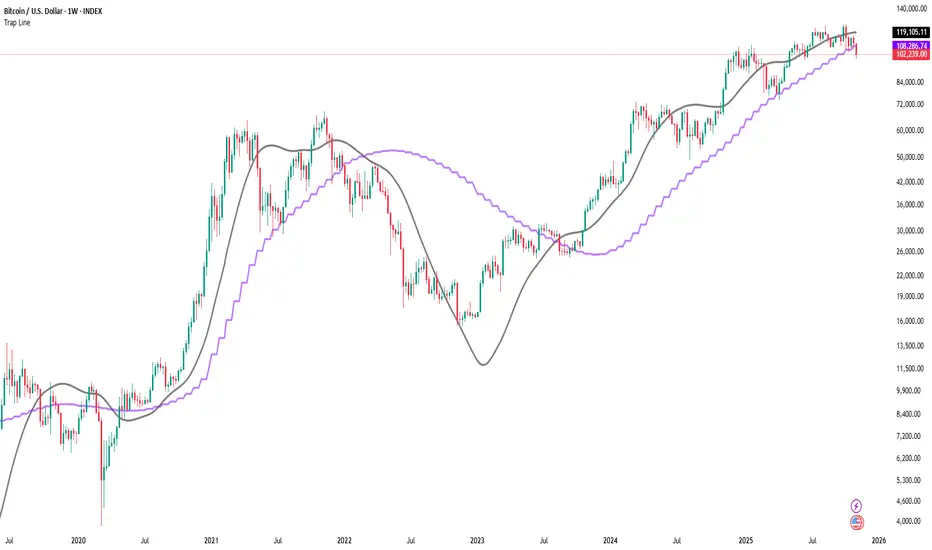
Trap LineOverview
Trap Line is a higher-timeframe trend framework designed to define market regimes using smoothed weekly (1W) and three-week (3W) baselines. Price trading above the line reflects a bullish regime; price below the line reflects a bearish one. The goal is regime discipline—stay aligned with the dominant higher-timeframe direction and avoid late, emotional entries. All parameters are fixed to ensure consistent behavior across symbols.
Core logic (concepts, not full code)
• Computes a Hull-type moving average on 1W and 3W closes (with optional linear-regression pre-filtering) and projects them onto lower timeframes via interpolation.
• Produces a smooth, lag-reduced structural baseline that tracks the weekly trend path.
• Observing price vs. the baseline highlights potential trap zones—temporary breaches that often fail without a confirmed weekly close.
• The 3-Week Trap Line adds a macro confirmation layer and is hidden by default in the Style tab to keep charts clean.
Inputs
• Parameters (length, smoothing type, regression toggle, interpolation mode) are fixed to prevent overfitting and preserve repeatability.
How to read it
• Above the line => bullish regime.
• Below the line => bearish regime.
• A confirmed weekly close through the line suggests a regime transition.
• A weekly close above the line with a green candle supports bullish continuation; a weekly close below the line with a red candle supports bearish continuation.
• Intraweek deviations near the line are often noise and may fade.
Practical use cases
• Weekly bias filter for swing/position frameworks.
• Regime confirmation across related assets or sectors.
• Portfolio overlay: favor long exposure in bullish regimes; reduce risk in bearish regimes.
• Combine with volume or ATR-based tools to assess trend quality.
Best practices
• Wait for the weekly close before declaring regime flips.
• Avoid overreacting to intraweek moves around the baseline.
• Combine with structure analysis (HH/HL vs. LH/LL) and higher-timeframe S/R.
• Use standard time-based candles; avoid interpreting signals on Heikin Ashi, Renko, Kagi, Point & Figure, or Range charts.
Technical notes
• Built on locked higher-timeframe data (1W and 3W).
• Interpolation is used to render HTF structure smoothly on lower charts.
• Non-repainting : values finalize when the higher timeframe closes; lower-TF plotting is interpolated, not forward-looking.
Who it is for
• Traders who want a consistent, rules-based higher-timeframe bias filter.
• Systematic users who prefer fixed-parameter baselines for regime context.
Limitations & disclosures
• Closed-source; educational and analytical use only.
• Not financial advice. Markets involve risk; past performance does not guarantee future results.
Release notes
• Includes the 3-Week Trap Line (3W). It is hidden by default in the Style tab; enable it if you want an additional macro confirmation layer.
• Fixed-parameter design (no user-tweakable inputs) for consistent behavior across symbols.
• Non-repainting values finalize on 1W/3W candle close.
Originality & why closed-source
This is not a reimplementation of public open-source scripts. Trap Line uses a specific combination of higher-timeframe Hull smoothing, optional linear-regression pre-filtering, and lower-timeframe interpolation designed to expose trap zones (temporary regime breaches that often fail without a confirmed weekly close). The integration and thresholds are proprietary and tuned to retain weekly structure with reduced lag. The source is closed to protect this implementation.
Integration, not a mashup
Trap Line is a single, self-contained framework. It does not merely merge other indicators; its components are integrated to produce a unified higher-timeframe baseline (1W/3W) with a defined reading protocol (above/below line, weekly-close confirmation, optional candle-color confirmation).
Indicator, not a strategy
This publication provides an indicator overlay , not a trading strategy. It includes no backtests, position logic, performance claims, or risk assumptions. Use it as an analytical bias filter within your own risk management.
Comparison to common tools
Compared to standard MAs or SuperTrend-style bands, Trap Line prioritizes (1) higher-timeframe structure fidelity, (2) reduced lag via HMA-type smoothing, and (3) explicit weekly-close confirmation to avoid premature regime flips. The optional 3-Week line acts as a macro confirmation layer and is hidden by default in the Style tab.
WSH - Calvin / Scott EMA'sProvides EMA's as described by Calvin Hill along with some other EMA's including Hull, SSMA and some settings to turn on or off some of the noise.

Colored HMASimply a colored HMA. Perfect for trend following systems in combination with other indicators.