Patternz Screener DBPPatternz Screener is Breakout of box
This indicator forms triangle based on candle open close and then paints it breakout either on upside or downside
it is impossible to scan each stocks whether it have broken breakout so i have used his script and converted into screener
This indicator helps you identify which stocks are breaking above or below patternz box
Multi timeframe - 5,15,30,60,120,240,Day,Week and Month
Can add upto 40 - Stocks , commodities ,indices
Search in scripts for "screener"

BlueswimmersMinorsBoxV1sloth288Something different to what you usually see in the pine world Part 2
This is an add on to BlueswimmersMajorBoxV1sloth288.
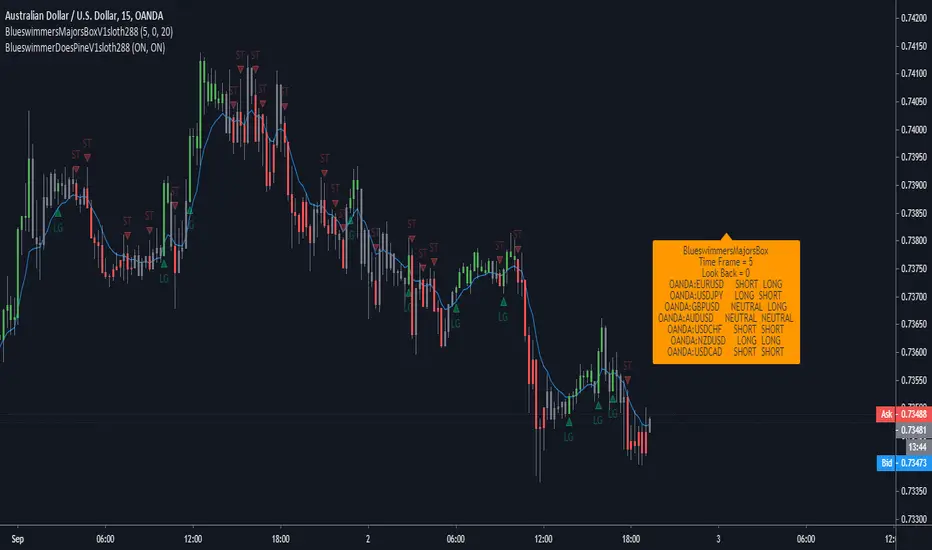
Custom currency screener, to be used with BlueswimmerDoesPine at the same time. to get an idea of whats going on change lookback setting to 0, and go to minute candles.
But in a nutshell.
With lookback being 1, and if currency pair says NEUTRAL LONG, it means last close of candle the long signal happened.
With lookback being 0, and if currency pair says NEUTRAL LONG, it means last candle was neutral and current candle is sitting at long.
If scalping minute candles. Have trading screen split in two, BlueswimmersMajorsBoxV1sloth288 on one side, and BlueswimmerDoesPine on the other. that way when flicking between different charts the indicator does not need to load security data over and over again. This is also the reason why the time frame setting is there, so on the screener it can be just loaded to low time frames, and to double check a trade on the other screen you can zoom out to larger time frames and not reloading data over and over again.

BlueswimmersMajorsBoxV1sloth288Something different to what you usually see in the pine world.
Custom currency screener, to be used with BlueswimmerDoesPine at the same time. to get an idea of whats going on change lookback setting to 0, and go to minute candles.
But in a nutshell.
With lookback being 1, and if currency pair says NEUTRAL LONG, it means last close of candle the long signal happened.
With lookback being 0, and if currency pair says NEUTRAL LONG, it means last candle was neutral and current candle is sitting at long.
If scalping minute candles. Have trading screen split in two, BlueswimmersMajorsBoxV1sloth288 on one side, and BlueswimmerDoesPine on the other. that way when flicking between different charts the indicator does not need to load security data over and over again. This is also the reason why the time frame setting is there, so on the screener it can be just loaded to low time frames, and to double check a trade on the other screen you can zoom out to larger time frames and not reloading data over and over again.
Short Squeeze Screener _ SYLGUYO//@version=5
indicator("Short Squeeze Screener — Lookup Table", overlay=false)
// ===========================
// TABLEAU INTERNE DES DONNÉES
// ===========================
// Exemple : remplace par tes données réelles
var string tickers = array.from("MARA", "BBBYQ", "GME")
var float short_float_data = array.from(28.5, 47.0, 22.3)
var float dtc_data = array.from(2.3, 15.2, 5.4)
var float oi_growth_data = array.from(12.0, 22.0, 4.0)
var float pcr_data = array.from(0.75, 0.45, 1.1)
// ===========================
// CHARGEMENT DU TICKER COURANT
// ===========================
string t = syminfo.ticker
var float short_f = na
var float dtc = na
var float oi = na
var float pcr = na
// Trouve le ticker dans la base
for i = 0 to array.size(tickers) - 1
if array.get(tickers, i) == t
short_f := array.get(short_float_data, i)
dtc := array.get(dtc_data, i)
oi := array.get(oi_growth_data, i)
pcr := array.get(pcr_data, i)
// ===========================
// SCORE SHORT SQUEEZE
// ===========================
score = 0
score += (short_f >= 30) ? 1 : 0
score += (dtc >= 7) ? 1 : 0
score += (oi >= 10) ? 1 : 0
score += (pcr <= 1) ? 1 : 0
plot(score, "Short Squeeze Score", linewidth=2)

Perfect Trade Screener – Merthan KRYPTO PRO (v6) for cryptoPerfect Trade Screener – Merthan KRYPTO PRO (v6) for crypto

RSL Screener Column//@version=5
indicator("RSL Screener Column", shorttitle="RSL", overlay=false)
sma26 = ta.sma(close, 26)
rsl = close / sma26
plot(rsl)

GOD MODE HUNT v2.0 — SCREENER ULTIME 2025test screener pour détecter les crypto basée sur des règles strict

Daily Oversold Swing ScreenerThat script is a **Pine Script Indicator** designed to identify potential **swing trade entry points** on a daily timeframe by looking for stocks that are **oversold** but still in a **healthy long-term uptrend**.
It screens for a high-probability reversal setup by combining four specific technical conditions.
Here is a detailed breakdown of the script's purpose and logic:
---
## 📝 Script Description: Daily Oversold Swing Screener
This Pine Script indicator serves as a **momentum and trend confirmation tool** for active traders seeking short-to-intermediate-term long entries. It uses data calculated on the **Daily** timeframe to generate signals, regardless of the chart resolution you are currently viewing.
The indicator is designed to filter out stocks that are in a strong downtrend ("falling knives") and only signal pullbacks within an established uptrend, which significantly increases the probability of a successful swing trade bounce.
### 🔑 Key Conditions for a Signal:
The indicator generates a buy signal when **all four** of the following conditions are met on the Daily timeframe:
#### 1. Oversold Momentum
* **Condition:** `rsiD < rsiOS` (Daily RSI is below the oversold level, typically **30**).
* **Purpose:** Confirms that the selling pressure has been extreme and the stock is temporarily out of favor, setting up a potential bounce.
#### 2. Momentum Turning Up
* **Condition:** `rsiD > rsiPrev` (Current Daily RSI value is greater than the previous day's Daily RSI value).
* **Purpose:** This is the most crucial filter. It confirms that the momentum has **just started to shift upward**, indicating that the low may be in and the stock is turning away from the oversold region.
#### 3. Established Uptrend (No Falling Knives)
* **Condition:** `sma50 > sma200 and closeD > sma50` (50-day SMA is above the 200-day SMA, AND the current daily close is above the 50-day SMA).
* **Purpose:** This is a **long-term trend filter**. It ensures that the current oversold condition is just a **pullback** within a larger, structurally bullish market (50 > 200), and that the price is still holding above the short-term trend line (Close > 50 SMA). This effectively screens out weak stocks in continuous downtrends.
#### 4. Price at Support (Bollinger Bands)
* **Condition:** `closeD <= lowerBB` (Daily Close is less than or equal to the lower Bollinger Band).
* **Purpose:** Provides a secondary measure of extreme price deviation. When the price touches or breaches the lower band, it suggests a significant move away from the mean (basis), often signaling strong statistical support where price is likely to revert.
### 📌 Summary of Signal
The final signal (`signal`) is triggered only when the market is confirmed to be **in a healthy long-term trend (Condition 3)**, the price is at an **extreme support level (Condition 4)**, the momentum is **oversold (Condition 1)**, and most importantly, the **momentum has begun to reverse (Condition 2)**.

Nifty 500 Liquidity Momentum ScreenerTesting screener for momentum stocks in nifty 500 weekly time frame

RSI Screener TF + HTF (20 symbols, S/R + $Volume + ATR, Toggles)This script builds a table-style screener for up to 20 symbols and shows:
RSI (TF + HTF)
Uses a configurable intraday timeframe (default 1H) and a higher timeframe (default 1D)
RSI is displayed relative to the 50 line:
Above 50 → shown as a positive value (e.g. 56)
Below 50 → shown as a negative value (e.g. -45)
Cells are color-coded for overbought / oversold / neutral
Support / Resistance Proximity (TF + HTF)
Calculates recent support and resistance using a lookback window
Shows a 0–100% “S&R” value:
100% = price sitting on support
0% = price sitting at resistance
Mid values are neutral
Background color shifts for support zone / resistance zone / neutral
ATR % Regime (TF + HTF)
Converts ATR into a percentage of price
Colors the cell to show low / normal / high volatility regimes (quiet vs explosive conditions)
Dollar Volume (TF)
Uses close × volume and displays dollar volume in millions ($M)
Heat-colored based on relative volume vs its own average (hot / neutral / cold)
Sorting & Layout
Table can be sorted by:
RSI TF, RSI HTF
S&R TF, S&R HTF
ATR TF, ATR HTF
Volume TF
Sort direction: Ascending / Descending
Option to show full mode (Symbol + Price + all metrics) or compact mode (metrics only)
All columns (RSI, S&R, ATR, Volume, HTF columns) can be toggled on/off per your needs
Customization
Fully configurable colors, text size, table position (left/center/right)
User can adjust the RSI period, S/R lookback, ATR period, volume lookback and thresholds
Default setup is optimized for 1H + 1D swing/active trading, but timeframes are editable
This tool is meant as a dashboard to quickly see:
Which names have bullish vs bearish RSI regimes (signed vs 50)
Which ones are sitting on support or resistance
Where volatility is contracting or expanding
Where money/volume is flowing right now.

MTRA Pro+ ScreenerMTRA Pro+ Screener an analysis tool that provides traders with critical market structure information on up to 10 instruments simultaneously. This indicator consolidates momentum direction, trend analysis, range relationships, and volatility metrics into a single dashboard.
## Key Features
- Customizable display with adjustable positioning, colors, and sizing
**Momentum & Trend Tracking**
- Real-time momentum direction via 5-period SMA slope analysis
- Short-term trend direction using 10-period SMA slope analysis
- Color-coded visual representation for quick interpretation
**Range Relationship Analysis**
- Current bar analysis relative to previous period (Inside, Outside, 2Up, 2Dn)
- Three-period historical view of recent price action patterns
- Immediate identification of breakout and consolidation scenarios
**ATR-Based Volatility Analysis**
- Real-time ATR percentage calculations showing current range vs. average
- Visual distinction between normal (<100% ATR) and extended (>100% ATR) conditions
- Identification of potential exhaustion zones for risk management
**Intraday ATR Levels**
- Dynamic support/resistance levels based on current timeframe ATR
- Real-time upper and lower boundaries for precise entries/exits
- Customizable line styles integrated with price scale
## Practical Applications
- **Context Assessment**: Quickly gauge market conditions across multiple intraday timeframes
- **Exhaustion Detection**: Identify overextended moves when ATR exceeds 100%
- **Confluence Analysis**: Spot potential setups when timeframes align
- **Risk Management**: Some traders will use ATR levels for dynamic stops and position sizing
- **Breakout Confirmation**: Distinguish false breakouts from genuine momentum shifts
## Configuration Options
- Full dashboard positioning and color customization
- Individual timeframe toggles
- Adjustable ATR periods and sensitivity thresholds
- Multiple line styles for level visualization

Recent Comparative RS and Screener by Munjal PatelThis script shows relative strength of Stock Compared to NIFTY 500
If stock has relative strength and has gone up too much, it will say Failed (Too Old:X Days)
If stock has just got relative strength in last 60 days, it was say PASS
This indicator is also useful for screening stocks,
Select your Watchlist, select this indicator and Data Filter Outout Above or Equal, Value, 1 and SCAN
You will have list of stock which have just started to show Relative Strength.

NIFTY FNO Stock Screener Sector-wiseNSE FNO STOCK SCREENER SECTOR WISE. Open indicator and select sector. find which sector is moving upward or downward today. select specific sector and you will see all stock list in selected sector. you will show buy and sell signal in particular sector. open stock which show buy or sell signal and check your requirement for buy or sell . you can also used for options also to buy as per required signal
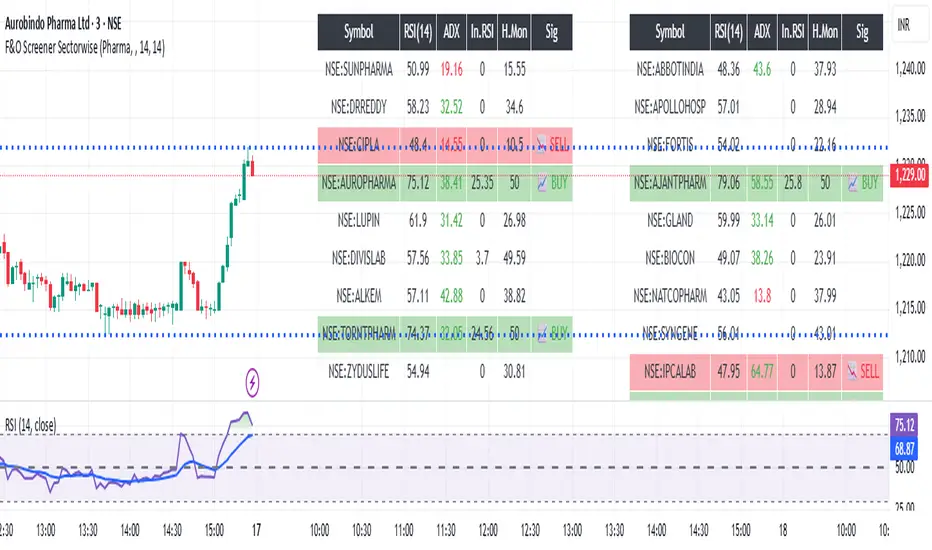
Nifty FNO Stock Screener Sector wise (Protected)NSE FNO STOCK SCREENER SECTOR WISE. Open indicator and select sector. find which sector is moving upward or downward today. select specific sector and you will see all stock list in selected sector. you will show buy and sell signal in particular sector. open stock which show buy or sell signal and check your requirement for buy or sell . you can also used for options also to buy as per required signal

TFU Multi-Symbol Screener + VWAP + Table Size Option + Blank RowTFU Multi-Symbol Screener + VWAP + Table Size Option + Blank Row

ADX Below 13 ScreenerSimple indicator made for use in Pine Screener that sets value to "1" if ADX has gone below 13 in the last 5 trading bars.


Market Screener - NarwingThis is a 20 cryptocurrency market screener, it's goal is to provide a broad view of the state of cryptocurrencies using 4 key components
1. ROC
2. Sharpe Ratio
3. Sortino Ratio
4. Omega Ratio
All these metrics are calculated twice with two different lengths, 7 day and 30 days
This allows for broad market screening instead of focusing on one particular asset
This tool is meant for research purposes only, never invest money you can't afford to lose

Days Above MA Since Last Breach (10/20/50/200) — v6 ScreenerIt identifies the number of days above a certain MA since the last breach. Mostly helpful for use with pine screener
MCX RSI Screener (5m,15m,1D)A complete multi-timeframe RSI screener designed for MCX commodities.
It automatically fetches RSI values from 5-minute, 15-minute, and 1-day timeframes for up to 10 selected MCX symbols — all in one compact table.
Market Structure ICT Screener [TradingFinder] BoS ChoCh🔵 Introduction
Market Structure is the foundation of every Smart Money and ICT based trading model. It describes how price moves through a sequence of highs and lows, forming clear phases of expansion, retracement and reversal. Understanding this structure allows traders to read institutional order flow and align their positions with the true direction of liquidity.
Two of the most critical components in Market Structure are the Break of Structure (BOS) and Change of Character (CHOCH). A BOS represents trend continuation, confirming strength within the current direction. In contrast, CHOCH also known as a Market Structure Shift (MSS) signals the first sign of a trend reversal or liquidity shift where order flow begins to change from bullish to bearish or vice versa.
Because the market is fractal, structure can exist at multiple levels known as Major (External) and Minor (Internal). Major structure defines the overall trend on higher timeframes while minor or internal structure reveals short term swings and early reversals within that larger move.
🔵 How to Use
Understanding Market Structure starts with identifying how price interacts with previous swing highs and swing lows. Every trend in the market, whether bullish or bearish, is built from a sequence of impulsive and corrective moves. Impulsive legs show strong displacement in the direction of liquidity flow, while corrective legs represent temporary pullbacks as the market rebalances before the next expansion. Recognizing these sequences is essential for reading the story of price and anticipating what may happen next.
A Break of Structure (BOS) occurs when price decisively moves beyond a previous structural point by breaking above the last high in an uptrend or falling below the last low in a downtrend. This event confirms that the current trend remains intact and that liquidity has been successfully taken from one side of the market. A BOS acts as confirmation of continuation and reflects strength within the existing directional bias.
A Change of Character (CHOCH) appears when price violates structure in the opposite direction of the prevailing trend. This is the first signal that market sentiment and order flow may be shifting. For example, during a downtrend if price breaks above a previous high, it indicates that sellers are losing control and a potential bullish reversal may be developing. In an uptrend, when price drops below a recent low, it suggests a possible bearish transition.
Because the market is fractal, structure exists across multiple layers. Major structure reflects the dominant movement visible on higher timeframes and defines the broader directional bias. Minor or internal structure represents smaller swings within that move and helps identify early transitions before they appear on the higher timeframe. When internal and external structures align, they offer a high probability signal for trend continuation or reversal.
By observing BOS and CHOCH across both internal and external structures, traders can clearly visualize when the market is expanding, contracting or preparing to shift direction. This structured understanding of price movement forms the foundation for precise trend analysis and high quality decision making in any Smart Money or ICT based trading approach.
🔵 Settings
🟣 Display Settings
Table on Chart : Allows users to choose the position of the signal dashboard either directly on the chart or below it, depending on their layout preference.
Number of Symbols : Enables users to control how many symbols are displayed in the screener table, from 10 to 20, adjustable in increments of 2 symbols for flexible screening depth.
Table Mode : This setting offers two layout styles for the signal table :
Basic : Mode displays symbols in a single column, using more vertical space.
Extended : Mode arranges symbols in pairs side-by-side, optimizing screen space with a more compact view.
Table Size : Lets you adjust the table’s visual size with options such as: auto, tiny, small, normal, large, huge.
Table Position : Sets the screen location of the table. Choose from 9 possible positions, combining vertical (top, middle, bottom) and horizontal (left, center, right) alignments.
🟣 Symbol Settings
Each of the 20 symbol slots comes with a full set of customizable parameters :
Symbol : Define or select the asset (e.g., XAUUSD, BTCUSD, EURUSD, etc.).
Timeframe : Set your desired timeframe for each symbol (e.g., 15, 60, 240, 1D).
Pivot Period : Set the length used to detect swing highs and lows. Shorter values increase sensitivity, longer ones focus on major structures.
🔵 Conclusion
Mastering Market Structure and understanding the relationship between BOS and CHOCH allows traders to see the market with greater clarity and confidence. These two elements reveal how liquidity moves through different phases of expansion and retracement and how institutional order flow shifts between accumulation and distribution.
By analyzing both internal and external structures, traders can align short term and long term perspectives and anticipate where price is most likely to react. The ability to read these structural shifts helps identify continuation points, reversals and areas where liquidity is engineered or collected.
Incorporating Market Structure into a consistent trading process transforms the way a trader views the chart. Instead of reacting to random movements, each swing, break and shift becomes part of a logical framework that reflects the true behavior of the market. Understanding BOS and CHOCH is not just a concept but a complete language of price that guides every professional decision in Smart Money and ICT based trading.

Multi-Strategy Trading Screener SummaryI only combined famous scripts, all thanks to wonderful scripts and community out there .
ThankYou !
------
Core Architecture
Multi-Symbol Analysis: Tracks up to 5 configurable tickers simultaneously
Multi-Timeframe Support: Each symbol can use different timeframes
Real-Time Dashboard: Color-coded table displaying all signals and analysis
Trend Validation: All signals include trend alignment confirmation
Integrated Trading Strategies
1. Breaker Blocks (Order Blocks)
Detects institutional order blocks using swing analysis
Tracks when blocks are broken and become "breaker blocks"
Monitors retests of broken levels
Shows trend alignment (✓ aligned, ⚠️ misaligned)
2. Chandelier Exit
ATR-based trend-following exit system
Provides BUY/SELL signals based on dynamic stop levels
Uses configurable ATR multiplier and lookback period
3. Smart Money Breakout
Channel breakout detection with volatility normalization
Identifies accumulation/distribution phases
Generates persistent BUY/SELL signals on breakouts
4. Trendline Breakout
Dynamic trendline detection using pivot highs/lows
Calculates trendline slopes and breakout points
Provides BUY signals on upward breaks, SELL on downward breaks
Dashboard Columns Explained
Symbol: Ticker being analyzed
Trend: Overall SuperTrend direction (🟢 UP / 🔴 DOWN / ⚪ FLAT)
Timeframe: Analysis timeframe with clock icon
Breaker Block: Type (Bullish/Bearish) with trend alignment indicator
Status: Price position relative to breaker block (Inside/Approaching/Far)
Retests: Number of times the broken level was retested (indicates level strength)
Volume: Volume associated with the order block formation
Chandelier: BUY/SELL signals from Chandelier Exit strategy
Smart Money: BUY/SELL signals from breakout detection
Trendline: BUY/SELL signals from trendline breakouts
Key Features
No HOLD States: All signals show definitive BUY (🟢) or SELL (🔴) only
Persistent Signals: Signals remain active until opposite conditions trigger
Color Coding: Visual distinction between bullish (green) and bearish (red) signals
Trend Alignment: Enhanced accuracy through trend confirmation logic
This screener provides a comprehensive view of market conditions across multiple strategies, helping identify high-probability trading opportunities when signals align.

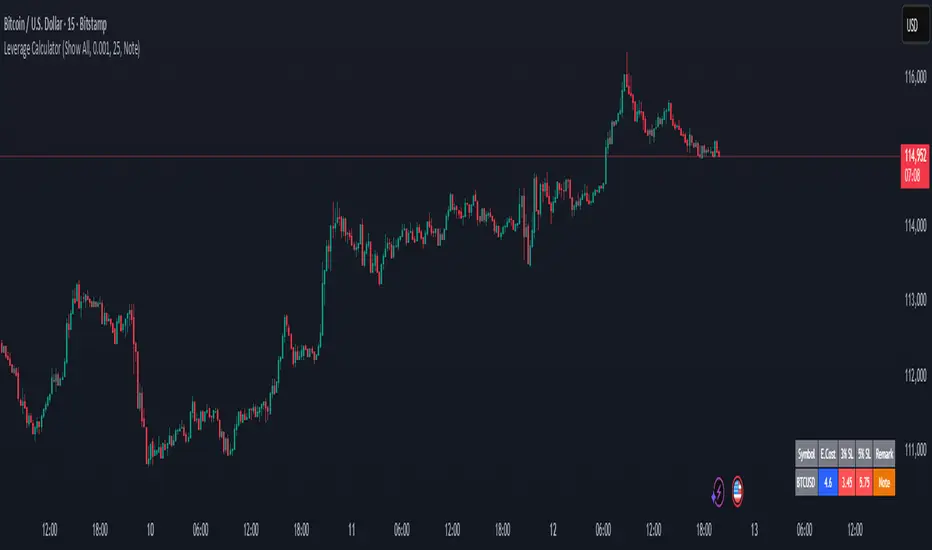
Margin Cost Calculator Screener - Taylor V1.2# Leverage Position Cost Calculator & Stop Lose Cost Screener #
Designed to provide traders with crucial insights into their leveraged positions directly on the TradingView chart.
Key Features:
> Dynamic Display: Choose to view only the estimated entry cost, or a comprehensive overview including potential losses at specific stop-loss levels, and a custom remark.
> Contract Size Input: Easily specify the contract size for your trades.
> Leverage Level Input: Set your desired leverage level, with helpful tooltips explaining the margin requirements for various leverage ratios (e.g., 25x, 10x, 5x) and an included fee estimate.
> Cost Calculation: Accurately calculates the estimated entry cost for your position based on the current market price, contract size, and leverage.
> Stop-Loss Projections: It projects potential losses for stop-loss orders set at 3% and 5% below the entry price, helping you manage risk effectively.
> Clear Table Visualization: All calculated data is presented in a clean, organized table anchored to the bottom-left of your chart, making it easy to reference at a glance.
> Symbol Identification: Automatically displays the short ticker symbol for the asset you are analyzing.
This tool is invaluable for traders who utilize leverage and need a quick, visual way to understand their financial exposure and potential outcomes before entering or managing a trade.