Sector Rotation & Money Flow Dashboard📊 Overview
The Sector Rotation & Money Flow Dashboard is a comprehensive market analysis tool that tracks 39 major sector ETFs in real-time, providing institutional-grade insights into sector rotation, momentum shifts, and money flow patterns. This indicator helps traders identify which sectors are attracting capital, which are losing favor, and where the next opportunities might emerge.
Perfect for swing traders, position traders, and investors who want to stay ahead of sector rotation and ride the strongest trends while avoiding weak sectors.
🎯 What This Indicator Does
Tracks 39 Major Sectors: From technology to utilities, cryptocurrencies to commodities
Calculates Multiple Timeframes: 1-week, 1-month, 3-month, and 6-month performance
Advanced Momentum Metrics: Proprietary momentum score and acceleration calculations
Relative Strength Analysis: Compare sector performance against any benchmark index
Money Flow Signals: Visual indicators showing where institutional money is moving
Smart Filtering: Pre-built strategy filters for different trading styles
Trend Detection: Emoji-based visual system for quick trend identification
💡 Key Features
1. Performance Metrics
Multiple timeframe analysis (1W, 1M, 3M, 6M)
Month-over-month change tracking
Relative strength vs benchmark index
2. Advanced Analytics
Momentum Score: Weighted composite of recent performance
Acceleration: Rate of change in momentum (second derivative)
Money Flow Signals: IN/OUT/TURN/WATCH indicators
3. Strategy Preset Filters
🎯 Swing Trade: High momentum opportunities
📈 Trend Follow: Established uptrends
🔄 Mean Reversion: Oversold bounce candidates
💎 Value Hunt: Deep value opportunities
🚀 Breakout: Emerging strength
⚠️ Risk Off: Sectors to avoid
4. Customization
All 39 sector ETFs can be customized
Adjustable benchmark index
Flexible display options
Multiple sorting methods
📋 Settings Documentation
Display Settings
Show Table (Default: On)
Toggles the entire dashboard display
Table Position (Default: Middle Center)
Choose from 9 positions on your chart
Options: Top/Middle/Bottom × Left/Center/Right
Rows to Show (Default: 15)
Number of sectors displayed (5-40)
Useful for focusing on top/bottom performers
Sort By (Default: Momentum)
1M/3M/6M: Sort by specific timeframe performance
Momentum: Weighted recent performance score
Acceleration: Rate of momentum change
1M Change: Month-over-month improvement
RS: Relative strength vs benchmark
Flow: IN First: Prioritize sectors with inflows
Flow: TURN First: Focus on reversal candidates
Recovery Plays: Oversold sectors recovering
Oversold Bounce: Deepest declines with positive signs
Top Gainers/Losers 3M: Best/worst quarterly performers
Best Acc + Mom: Combined strength score
Worst Acc (Topping): Sectors losing momentum
Filter Settings
Strategy Preset Filter (Default: All)
All: No filtering
🎯 Swing Trade: Mom >5, Acc >2, Money flowing in
📈 Trend Follow: Positive 1M & 3M, RS >0
🔄 Mean Reversion: Oversold but improving
💎 Value Hunt: Down >10% with recovery signs
🚀 Breakout: Rapid momentum surge
⚠️ Risk Off: Declining or topping sectors
Custom Flow Filter: Use manual flow filter
Custom Flow Signal Filter (Default: All)
Only active when Strategy Preset = "Custom Flow Filter"
IN Only: Strong inflows
TURN Only: Reversal signals
WATCH Only: Recovery candidates
OUT Only: Outflow sectors
Active Flows Only: Any non-neutral signal
Hide Low Volume ETFs (Default: Off)
Filters out illiquid sectors (future enhancement)
Visual Settings
Show Trend Emojis (Default: On)
🚀 Breakout (Strong 1M + High Acceleration)
🔥 Hot Recovery (From -10% to positive)
💪 Steady Uptrend (All timeframes positive)
➡️ Sideways/Ranging
⚠️ Warning/Topping (Up >15%, now slowing)
📉 Falling (Negative + declining)
🔄 Bottoming (Improving from lows)
Compact Mode (Default: Off)
Removes decimals for cleaner display
Useful when showing many rows
Min Data Points Required (Default: 3)
Minimum data points needed to display a sector
Prevents showing sectors with insufficient data
Relative Strength Settings
RS Benchmark Index (Default: AMEX:SPY)
Index to compare all sectors against
Can use SPY, QQQ, IWM, or any other index
RS Period (Days) (Default: 21)
Lookback period for RS calculation
21 days = 1 month, 63 days = 3 months, etc.
Sector ETF Settings (Groups 1-39)
Each sector has two inputs:
Symbol: The ticker (e.g., "AMEX:XLF")
Name: Display name (e.g., "Financials")
All 39 sectors can be customized to track different ETFs or markets.
📈 Column Explanations
Sector: ETF name/description
1M%: 1-month (21-day) performance
3M%: 3-month (63-day) performance
6M%: 6-month (126-day) performance
Mom: Momentum score (weighted average, recent-biased)
Acc: Acceleration (momentum rate of change)
Δ1M: Month-over-month change
RS: Relative strength vs benchmark
Flow: Money flow signal
↗️ IN: Strong inflows
🔄 TURN: Potential reversal
👀 WATCH: Recovery candidate
↘️ OUT: Outflows
—: Neutral
🎮 Usage Tips
For Swing Traders (3-14 days)
Use "🎯 Swing Trade" filter
Sort by "Acceleration" or "Momentum"
Look for Flow = "IN" and Mom >10
Confirm with positive RS
For Position Traders (2-8 weeks)
Use "📈 Trend Follow" filter
Sort by "RS" or "Best Acc + Mom"
Focus on consistent green across timeframes
Ensure RS >3 for market leaders
For Value Investors
Use "💎 Value Hunt" filter
Sort by "Recovery Plays" or "Top Losers 3M"
Look for improving Δ1M
Check for "WATCH" or "TURN" signals
For Risk Management
Regularly check "⚠️ Risk Off" filter
Sort by "Worst Acc (Topping)"
Review holdings for ⚠️ warning emojis
Exit sectors showing "OUT" flow
Market Regime Recognition
Bull Market: Many sectors showing "IN" flow, positive RS
Bear Market: Widespread "OUT" flows, negative RS
Rotation: Mixed flows, some "IN" while others "OUT"
Recovery: Multiple "TURN" and "WATCH" signals
🔧 Pro Tips
Combine Filters + Sorting: Filter first to narrow candidates, then sort to prioritize
Multi-Timeframe Confirmation: Best setups show alignment across 1M, 3M, and momentum
RS is Key: Sectors outperforming SPY (RS >0) tend to continue outperforming
Acceleration Matters: Positive acceleration often precedes price breakouts
Flow Transitions: "WATCH" → "TURN" → "IN" progression identifies new trends early
Regular Scans:
Daily: Check "Acceleration" sort
Weekly: Review "1M Change"
Monthly: Analyze "RS" shifts
Divergence Signals:
Price up but Acceleration down = Potential top
Price down but Acceleration up = Potential bottom
Sector Pairs Trading: Long sectors with "IN" flow, short sectors with "OUT" flow
⚠️ Important Notes
This indicator makes 40 security requests (maximum allowed)
Best used on Daily timeframe
Data updates in real-time during market hours
Some ETFs may show "—" if data is unavailable
🎯 Common Strategies
"Follow the Flow"
Only trade sectors showing "IN" flow with positive RS
"Rotation Catcher"
Focus on "TURN" signals in sectors down >15% from highs
"Momentum Rider"
Trade top 3 sectors by Momentum score, exit when Acceleration turns negative
"Mean Reversion"
Buy sectors in bottom 20% by 3M performance when Δ1M improves
"Relative Strength Leader"
Maintain positions only in sectors with RS >5
Not financial advice - always do additional research
Search in scripts for "track"
EAOBS by MIGVersion 1
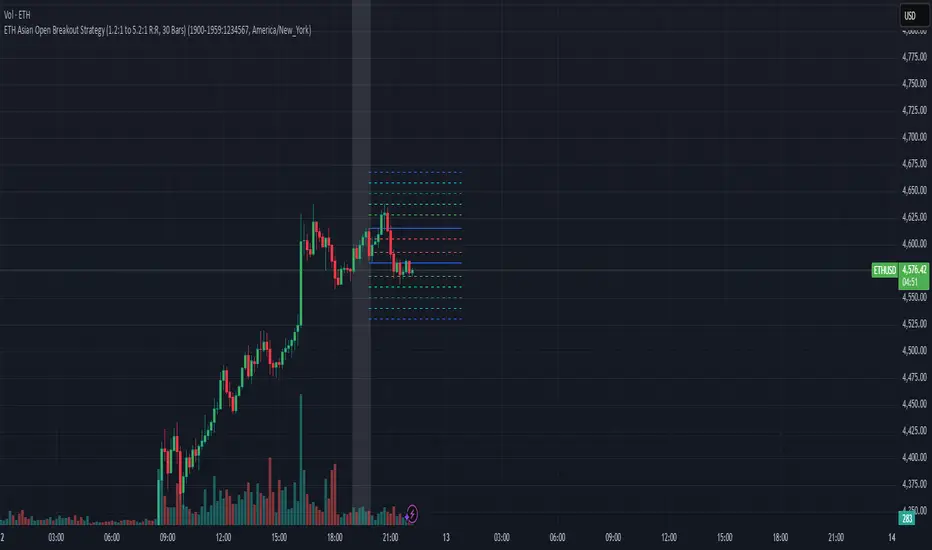
1. Strategy Overview Objective: Capitalize on breakout movements in Ethereum (ETH) price after the Asian open pre-market session (7:00 PM–7:59 PM EST) by identifying high and low prices during the session and trading breakouts above the high or below the low.
Timeframe: Any (script is timeframe-agnostic, but align with session timing).
Session: Pre-market session (7:00 PM–7:59 PM EST, adjustable for other time zones, e.g., 12:00 AM–12:59 AM GMT).
Risk-Reward Ratios (R:R): Targets range from 1.2:1 to 5.2:1, with a fixed stop loss.
Instrument: Ethereum (ETH/USD or ETH-based pairs).
2. Market Setup Session Monitoring: Monitor ETH price action during the pre-market session (7:00 PM–7:59 PM EST), which aligns with the Asian market open (e.g., 9:00 AM–9:59 AM JST).
The script tracks the highest high and lowest low during this session.
Breakout Triggers: Buy Signal: Price breaks above the session’s high after the session ends (7:59 PM EST).
Sell Signal: Price breaks below the session’s low after the session ends.
Visualization: The session is highlighted on the chart with a white background.
Horizontal lines are drawn at the session’s high and low, extended for 30 bars, along with take-profit (TP) and stop-loss (SL) levels.
3. Entry Rules Long (Buy) Entry: Enter a long position when the price breaks above the session’s high price after 7:59 PM EST.
Entry price: Just above the session high (e.g., add a small buffer, like 0.1–0.5%, to avoid false breakouts, depending on volatility).
Short (Sell) Entry: Enter a short position when the price breaks below the session’s low price after 7:59 PM EST.
Entry price: Just below the session low (e.g., subtract a small buffer, like 0.1–0.5%).
Confirmation: Use a candlestick close above/below the breakout level to confirm the entry.
Optionally, add volume confirmation or a momentum indicator (e.g., RSI or MACD) to filter out weak breakouts.
Position Size: Calculate position size based on risk tolerance (e.g., 1–2% of account per trade).
Risk is determined by the stop-loss distance (10 points, as defined in the script).
4. Exit Rules Take-Profit Levels (in points, based on script inputs):TP1: 12 points (1.2:1 R:R).
TP2: 22 points (2.2:1 R:R).
TP3: 32 points (3.2:1 R:R).
TP4: 42 points (4.2:1 R:R).
TP5: 52 points (5.2:1 R:R).
Example for Long: If session high is 3000, TP levels are 3012, 3022, 3032, 3042, 3052.
Example for Short: If session low is 2950, TP levels are 2938, 2928, 2918, 2908, 2898.
Strategy: Scale out of the position (e.g., close 20% at TP1, 20% at TP2, etc.) or take full profit at a preferred TP level based on market conditions.
Stop-Loss: Fixed at 10 points from the entry.
Long SL: Session high - 10 points (e.g., entry at 3000, SL at 2990).
Short SL: Session low + 10 points (e.g., entry at 2950, SL at 2960).
Trailing Stop (Optional):After reaching TP2 or TP3, consider trailing the stop to lock in profits (e.g., trail by 10–15 points below the current price).
5. Risk Management per Trade: Limit risk to 1–2% of your trading account per trade.
Calculate position size: Account Size × Risk % ÷ (Stop-Loss Distance × ETH Price per Point).
Example: $10,000 account, 1% risk = $100. If SL = 10 points and 1 point = $1, position size = $100 ÷ 10 = 0.1 ETH.
Daily Risk Limit: Cap daily losses at 3–5% of the account to avoid overtrading.
Maximum Exposure: Avoid taking both long and short positions simultaneously unless using separate accounts or strategies.
Volatility Consideration: Adjust position size during high-volatility periods (e.g., major news events like Ethereum upgrades or macroeconomic announcements).
6. Trade Management Monitoring :Watch for breakouts after 7:59 PM EST.
Monitor price action near TP and SL levels using alerts or manual checks.
Trade Duration: Breakout lines extend for 30 bars (script parameter). Close trades if no TP or SL is hit within this period, or reassess based on market conditions.
Adjustments: If the market shows strong momentum, consider holding beyond TP5 with a trailing stop.
If the breakout fails (e.g., price reverses before TP1), exit early to minimize losses.
7. Additional Considerations Market Conditions: The 7:00 PM–7:59 PM EST session aligns with the Asian market open (e.g., Tokyo Stock Exchange open at 9:00 AM JST), which may introduce higher volatility due to Asian trading activity.
Avoid trading during low-liquidity periods or extreme volatility (e.g., major crypto news).
Check for upcoming events (e.g., Ethereum network upgrades, ETF decisions) that could impact price.
Backtesting: Test the strategy on historical ETH data using the session high/low breakouts for the 7:00 PM–7:59 PM EST window to validate performance.
Adjust TP/SL levels based on backtest results if needed.
Broker and Fees: Use a low-fee crypto exchange (e.g., Binance, Kraken, Coinbase Pro) to maximize R:R.
Account for trading fees and slippage in your position sizing.
Time zone Adjustment: Adjust session time input for your time zone (e.g., "0000-0059" for GMT).
Ensure your trading platform’s clock aligns with the script’s time zone (default: America/New_York).
8. Example Trade Scenario: Session (7:00 PM–7:59 PM EST) records a high of 3050 and a low of 3000.
Long Trade: Entry: Price breaks above 3050 (e.g., enter at 3051).
TP Levels: 3063 (TP1), 3073 (TP2), 3083 (TP3), 3093 (TP4), 3103 (TP5).
SL: 3040 (3050 - 10).
Position Size: For a $10,000 account, 1% risk = $100. SL = 11 points ($11). Size = $100 ÷ 11 = ~0.09 ETH.
Short Trade: Entry: Price breaks below 3000 (e.g., enter at 2999).
TP Levels: 2987 (TP1), 2977 (TP2), 2967 (TP3), 2957 (TP4), 2947 (TP5).
SL: 3010 (3000 + 10).
Position Size: Same as above, ~0.09 ETH.
Execution: Set alerts for breakouts, enter with limit orders, and monitor TPs/SL.
9. Tools and Setup Platform: Use TradingView to implement the Pine Script and visualize breakout levels.
Alerts: Set price alerts for breakouts above the session high or below the session low after 7:59 PM EST.
Set alerts for TP and SL levels.
Chart Settings: Use a 1-minute or 5-minute chart for precise session tracking.
Overlay the script to see high/low lines, TP levels, and SL levels.
Optional Indicators: Add RSI (e.g., avoid overbought/oversold breakouts) or volume to confirm breakouts.
10. Risk Warnings Crypto Volatility: ETH is highly volatile; unexpected news can cause rapid price swings.
False Breakouts: Breakouts may fail, especially in low-volume sessions. Use confirmation signals.
Leverage: Avoid high leverage (e.g., >5x) to prevent liquidation during volatile moves.
Session Accuracy: Ensure correct session timing for your time zone to avoid misaligned entries.
11. Performance Tracking Journaling :Record each trade’s entry, exit, R:R, and outcome.
Note market conditions (e.g., trending, ranging, news-driven).
Review: Weekly: Assess win rate, average R:R, and adherence to the plan.
Monthly: Adjust TP/SL or session timing based on performance.
RS Alpha α | viResearchRS Alpha α | viResearch
Conceptual Foundation and Strategy Innovation
RS Alpha α is a dynamic, multi-asset crypto allocation engine designed for precision rotation among trending major assets. Grounded in intra-asset relative strength and enhanced by real-time trend classification, this model moves beyond static filters—adapting allocations to prevailing momentum and volatility regimes.
The strategy is purpose-built to extract tactical alpha in high-beta environments while minimizing whipsaw and drawdowns during uncertain conditions. It achieves this via a systematic, multi-layer filter stack: statistical ranking, trend validation, and risk-adjusted performance scoring.
Technical Architecture and Signal Composition
Relative Strength Matrix:
Assets are scored using a comprehensive 7x7 ratio matrix comparing each asset’s relative momentum against all others. Each row contributes to a cumulative trend score, identifying the top-performing names based on cross-asset strength.
Trend Filters (Multi-Timeframe Adaptive):
Each candidate must pass intra-trend classification (12H, 8H, 4H) and optionally a macro trend regime filter using a user-defined market benchmark (e.g., BTC or ETH on 1D).
Beta & Alpha Filter:
Assets are further screened using custom beta and alpha calculations versus a benchmark. When enabled, only assets showing above-median beta and alpha values are retained.
Optional Risk Ratios:
Sharpe, Sortino, and Omega ratio filters are included (opt-in) for forward testing purposes. These risk metrics refine selection in volatile regimes but are not required for core functionality.
Equity Engine & Allocation Logic:
A real-time system equity curve grows based on rate of change (ROC) from allocated assets, with support for:
100% single asset allocation
50/50 equal split if scores match closely
80/20 weighted allocation based on dominance
Performance Tracking and Alerts
System Equity Visualization: Real-time equity plotted using dynamic coloring tied to the primary asset allocation.
Drawdown Table: Tracks max equity drawdown since a user-defined start date.
Dominant Asset Panel: Displays current allocation format (100%, 80/20, or 50/50) and scoreboard of all considered assets.
Allocation Alerts: Sends alerts when asset rotation occurs, with clear breakdowns of new weightings and symbol changes.
Timeframe Guard: Warns users if running on anything other than the recommended 1D timeframe.
Customization and UX Enhancements
Asset Inclusion Toggle: Easily exclude assets from rotation by changing their input to "USDT".
Background Overlay (Optional): Background color highlights the dominant asset dynamically, with adjustable transparency.
User Switches for All Visual Modules: Toggle individual elements such as alerts, drawdown, dominant tables, or error messages.
Use Case and Target Audience
This tool is ideal for:
Active crypto portfolio managers seeking structured, rule-based asset rotation
Tactical traders who value adaptability and clarity in allocation shifts
Swing traders operating within medium to high-beta environments
It thrives particularly during bull trends, sector rotations, or when paired with macro regime filters like market confidence signals.
Summary
RS Alpha α provides a comprehensive, data-driven framework for crypto asset rotation. It combines statistical rigor with real-time responsiveness, offering high customization and strong risk awareness. Designed for professionals and advanced retail traders alike, it’s both a decision-support tool and a visual performance dashboard.
⚠️ Always validate any strategy with proper backtesting and forward tracking. While RS Alpha α provides robust signal logic, it is one component in a larger portfolio and risk management process.
Midnight 30min High/LowMidnight 30min High/Low — Overnight Liquidity Range Tracker
Capture the Overnight Session: A Strategic Level Identification Tool from Professional Trading Methodology
This indicator captures the high and low prices during the critical 30-minute midnight session (12:00-12:30 AM EST) and projects these levels forward as key support and resistance zones. These overnight ranges often contain significant liquidity and serve as crucial reference points for intraday price action, representing areas where institutional activity may have established important levels.
🔍 What This Script Does:
Identifies Critical Overnight Session Levels
- Automatically detects the 12:00-12:30 AM EST session window
- Captures the highest and lowest prices during this 30-minute period
- Projects these levels forward for multiple trading days
Creates Dynamic Support/Resistance Zones
- Extends midnight high/low levels as horizontal lines with customizable projection periods
- Fills the area between high and low to create a visual trading range
- Updates automatically each trading day with new overnight levels
Provides Clear Visual Reference Points
- Optional session start markers (●) highlight when the midnight session begins
- Color-coded lines distinguish between high and low levels
- Transparent fill area creates an easy-to-identify trading zone
Real-Time Level Tracking
- Updates levels in real-time during the active midnight session
- Maintains historical levels for reference and backtesting
- Compatible with data window for precise level values
⚙️ Customization Options:
Extend Days (1-30):** Control how many days forward the levels are projected (default: 5 days)
High Line Color:** Customize the midnight high line color (default: blue)
Low Line Color:** Customize the midnight low line color (default: orange)
Fill Color:** Adjust the transparency and color of the range area (default: light aqua, 80% transparency)
Show Session Markers:** Toggle yellow session start indicators on/off (default: enabled)
💡 How to Use:
Deploy on lower timeframes (1m-15m) for precise level identification and reaction monitoring**
Watch for key price interactions:
- Rejection at midnight high levels (potential resistance)
- Bounce from midnight low levels (potential support)
- Range-bound trading between the high and low levels
Combine with liquidity concepts:
- Monitor for stop hunts above/below these levels
- Look for false breakouts that snap back into the range
- Use as confluence with other ICT concepts like FVGs and Order Blocks
Strategic Applications:
- Range trading between midnight levels
- Breakout confirmation when price closes decisively outside the range
- Support/resistance validation for entry and exit planning
🔗 Combine With These Tools for Complete Market Structure Analysis:
✅ First FVG — Opening Range Fair Value Gap Detector.
✅ ICT Turtle Soup (Liquidity Reversal)— Spot stop hunts and false breakout scenarios
✅ ICT Macro Zones (Grey Box Version)- It tracks real-time highs and lows for each Silver Bullet session
✅ ICT SMC Liquidity Grabs and OBs- Liquidity Grabs, Order Block Zones, and Fibonacci OTE Levels, allowing traders to identify institutional entry models with clean, rule-based visual signals.
Together, these tools create a comprehensive Smart Money Concepts (SMC) framework — helping traders identify, anticipate, and capitalize on institutional-level price movements with precision and confidence during critical overnight sessions.
ICT HTF Candles [Pro] (fadi)The ICT HTF Candles shows you multi-timeframe price action by plotting up to six higher timeframe candles on your chart, scaled to real price levels. Set candle counts per timeframe or toggle them off for a clean view, saving you time switching between charts. This helps you spot trends and reversals quickly, align trades with the market’s direction, and time setups like sweeps or bounces better. From scalping on the 1m to swinging on the 4H, it simplifies ICT and Smart Money Concepts (SMC), revealing trend shifts and institutional moves clearly. Once you use it, trading without this clarity just won’t feel right.
Key Features:
In-Depth Price Action Levels
These levels track ICT PD arrays and confluences across timeframes, making it easy to see how price action flows from higher timeframes and what your setup faces. Is your 5m trade about to run into a 1H bearish order block? Did it bounce off a higher timeframe FVG and create an SMT with a correlated asset? They make your chart a clear roadmap to market structure, helping you find strong setups, save time, and align with institutional moves:
Change in State of Delivery (CISD): In ICT trading, CISD marks potential reversal levels on each timeframe by showing the open of the highest series of up (green) candles for a bullish shift or the open of the lowest series of down (red) candles for a bearish shift. These levels are set at the opening price of the first candle in those runs, highlighting where the market turns. The indicator makes these levels easy to spot across timeframes, so you can track reversal points clearly. You can set your own confirmation criteria—a close or wick above/below the CISD line (bearish/bullish) or a close or wick above/below the high/low—to verify the CISD level cross. When confirmed, there is a high probability that we have a change in trend, and a reversal order block forms. CISD helps you track these reversal levels and confirm market shifts, making multi-timeframe analysis straightforward.
Order Blocks: When a CISD level cross is confirmed, the price is now below a series of up (green) candles or above a series of down (red) candles, marking these candles as order blocks that usually support the new trend direction. The indicator shows these levels clearly across timeframes, making it easy to spot high-probability reversal or consolidation areas. Keep in mind that price may sometimes move to mitigate an imbalance, so use your best judgment based on your multi-timeframe analysis to confirm they meet your trading criteria.
Trend Bias: Traders often struggle figuring out market bias—guessing the trend wrong, losing on trades against the flow, or missing how lower and higher timeframes line up. The Trend Bias feature tracks order blocks and change in state of delivery, displaying bullish or bearish trends for each timeframe to help you choose trades that go with the market’s direction. The indicator shows these trends clearly across timeframes, so you can quickly see if the 5m matches the 1H or if you’re going against the bigger trend. This makes it easier to avoid bad trades and make decisions faster, keeping you on track with setups that follow the main trend.
Immediate Rebalance: When looking at price action, you’ll see the market doesn’t usually leave behind many Fair Value Gaps (FVGs). That’s because the market is efficient and always rebalancing any inefficiencies. When the market starts a strong move, the last candle will usually close above the previous candle high (for up moves) or below the low (for down moves). At this point, the market will do one of two things: immediately rebalance by retracing first, or have a small retracement but leave behind an FVG. The Immediate Rebalance feature tracks rebalance levels across multiple timeframes, clearly showing where price rebalances. This helps traders have a better expectation of how the market may need to retrace and anticipate Power of Three (PO3) setups by being ready for a Judas swing to rebalance the imbalance.
Fair Value Gaps and Volume Imbalances: If the market fails to immediately rebalance, it will usually attempt to come back and rebalance it at a later time. FVGs and VIs give you a clear area where the price might be heading if it starts breaking structure on lower timeframes. These inefficiencies—price gaps (FVGs) or aggressive moves (VIs)—show where the market’s working to fix imbalances. The Fair Value Gaps and Volume Imbalances feature tracks these levels across timeframes.
Previous Candle Levels: The Previous Candle Levels feature marks the high, low, and middle of the prior candle on each timeframe, helping you identify key price levels for sweeps, bounces, or breakouts. It tracks the candle’s high and low as its extremes and the middle as the 50% mark, which you can set to calculate using the high-to-low range or the open-to-close range. These levels can provide tradable setups on lower timeframes.
Smart Money Techniques (SMT): What’s an ICT indicator without an SMT feature to track cracks in correlated assets? The ICT HTF Candles monitors your chosen correlated assets, like EUR/USD and GBP/USD or SQ and NQ, for signs of strength or weakness to use as confluence with other features and build the case for A+ setups. The SMT feature spots divergences when one asset makes a higher high or lower low while the other doesn’t follow, hinting at potential reversals or market shifts. It tests SMT using two immediate candles, since higher timeframes (HTFs) create larger gaps on lower timeframes. Traders can easily see these divergence levels, like a 15m SMT lining up with a 1H order block or CISD, helping you confirm high-probability setups and strengthen trade entries with multi-timeframe confluence.
LotSize CalculatorLotSize Calculator Documentation
Overview
The LotSize Calculator is a powerful TradingView indicator designed to help traders calculate optimal position sizes based on risk management principles. It provides a visual representation of trade setups, including entry points, stop losses, and take profits, while calculating the appropriate lot size based on your risk preferences.
Key Features
Automatic lot size calculation based on risk amount
Support for multiple asset classes (forex, commodities, indices, etc.)
Visual R-multiple levels (1R to 5R)
Real-time position tracking with drawdown and run-up statistics
Customizable visual elements and display options
Input Parameters
Risk Management Settings
Risk Amount Type: Choose between risking a fixed amount in dollars ($) or a specific lot size.
Risk Amount: The amount you want to risk on the trade (in dollars if Risk Amount Type is set to $, or in lots if set to Lots).
Overwrite TP: Optional setting to automatically set take profit at a specific R-multiple (1R, 2R, 3R, 4R, or 5R).
Table Comments: Optional field to add personal notes to the position table.
Trade Setup Levels
Trigger Price: The price at which your trade will be entered.
Stop Loss: Your predetermined exit price to limit losses.
Take Profit: Your target price to secure profits.
Time Of Setup Start Bar: The starting time for your trade setup window.
Display Settings
Plot Position Labels: Toggle to show/hide position information labels on the chart.
Plot Position Table: Toggle to show/hide the position information table.
Show Money: Toggle to display monetary values ($) in the labels and table.
Show Points: Toggle to display point values in the labels and table.
Show Ticks: Toggle to display tick values in the labels and table.
Visual Appearance
Entry Color: Color for entry level line and labels.
Take Profit Color: Color for take profit level line and labels.
Stop Loss Color: Color for stop loss level line and labels.
Label Text Color: Color for text in the position labels.
Table Background: Background color for the position information table.
Table Text: Text color for the position information table.
R Labels: Color for the R-multiple level labels.
Table Position: Position of the information table on the chart (options: Bottom Right, Bottom Left, Bottom Middle, Top Right, Top Middle).
How to Use
Basic Setup
Set your entry price in the "Trigger Price" field.
Set your stop loss level in the "Stop Loss" field.
Set your take profit level in the "Take Profit" field.
Choose your risk amount type ($ or Lots) and enter the risk amount.
Optionally, select an R-multiple for automatic take profit calculation.
Understanding the Display
The indicator will show:
Horizontal lines for entry, stop loss, and take profit levels
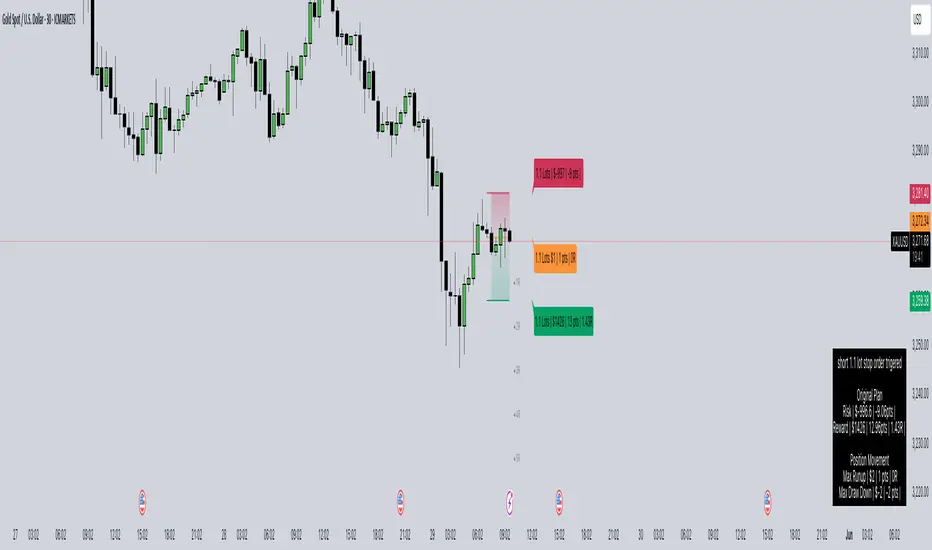
Colored zones between entry and take profit (potential profit zone) and between entry and stop loss (potential loss zone)
R-multiple levels based on your risk (1R, 2R, 3R, 4R, 5R)
A table displaying:
Position type (long/short) and size
Original risk and reward figures
Maximum run-up and drawdown during the trade
Trade Monitoring
Once a trade is triggered (either by price crossing a stop entry or reaching a limit entry), the indicator tracks:
Current position value
Maximum run-up (highest profit seen)
Maximum drawdown (largest loss seen)
Trade outcome when take profit or stop loss is hit
Advanced Features
Asset Type Detection
The LotSize Calculator automatically detects the type of asset being traded (forex, commodity, index, etc.) and adjusts calculations accordingly to ensure accurate position sizing.
R-Multiple Visualization
R-multiples help visualize potential reward relative to risk. For example, 2R means the potential reward is twice the amount risked. The indicator displays these levels directly on your chart for easy reference.
Adaptive Position Labels
Position labels adjust their display based on trade direction (long or short) and include relevant information about risk, reward, and current position status.
Best Practices
Always confirm your risk is appropriate for your account size (typically 1-2% of account per trade).
Use the R-multiple visualization to ensure your trades offer favorable risk-to-reward ratios.
The indicator works best when used alongside your existing strategy for entry and exit signals.
Customize the visual appearance to match your chart theme for better visibility.
Troubleshooting
If position calculations seem incorrect, verify that the indicator is detecting the correct instrument type.
For forex pairs, ensure your broker's lot size conventions match those used by the indicator.
The indicator may need adjustment for certain exotic instruments or markets with unusual tick sizes.
Market SurferOverview
If you're ready to surf the charts, Market Surfer is your perfect board 🏄♂️
This is my personal go-to indicator, designed to be a true Swiss Army knife for technical analysis - packed with powerful tools that deliver clear signals straight out of the box.
Market Surfer is heavily inspired by Market Cipher and Traders Reality .
Key Features
Market Waves : Visual representation of cyclical price movements to identify trend strength and potential reversals.
Money Flow : Highlights periods of buying and selling pressure, signaling shifts in market sentiment.
Trend Tracker : Real-time trend detection powered by EMA-based analysis, with color-coded signals for bullish and bearish phases.
Vector Candles : Enhanced candle coloring that indicates when market makers and high-frequency traders join the game, helping to identify significant market moves.
Dynamic Alerts : Configurable alerts for key market events, including trend changes, money flow transitions, and vector candle formations.
How It Works
Wave Theory Analysis : Detects cyclical market movements to highlight potential trend continuations or reversals.
PVSRA Analysis : Identifies vector candles when volume surges significantly relative to historical averages, indicating the presence of large institutional players.
EMA Trend Tracking : Tracks the 50-period EMA to determine overall market momentum and colorizes bars accordingly.
Money Flow Indexing : Uses Heikin-Ashi candle structures to measure buying and selling intensity over time.
Recommendations
Although Market Surfer is versatile and works across all markets and timeframes, I recommend:
Use it on 1H timeframe for mid-term trades and 1D timeframe for long-term ones.
Buy when green and sell when red - keep it simple.
Study vector candles before relying on them - they reveal institutional footprints.
Do not use leverage - trade with clarity and peace of mind.
And most importantly - sleep well.
Statistical AMDOverview
The Statistical AMD ("Accumulation, Manipulation, Distribution") is a real-time statistical analyzer and visual segmentation tool for price action.
It identifies and tracks the structure of major movements within higher timeframe candles — breaking them into three key phases:
Manipulation (M): Early-stage liquidity sweeps.
Distribution (D): Mid-phase trending moves.
Accumulation (A): Late-stage compression zones.
The tool records and visualizes where highs and lows form relative to the open of a larger candle (e.g., 1-hour) and aggregates statistical behavior across sessions.
This is not a predictive indicator — it is a segmentation and statistical probability builder for real-time and historical analysis.
What It Does
Tracks High/Low Timing:
Identifies when the high and low occur during each higher timeframe candle (like hourly).
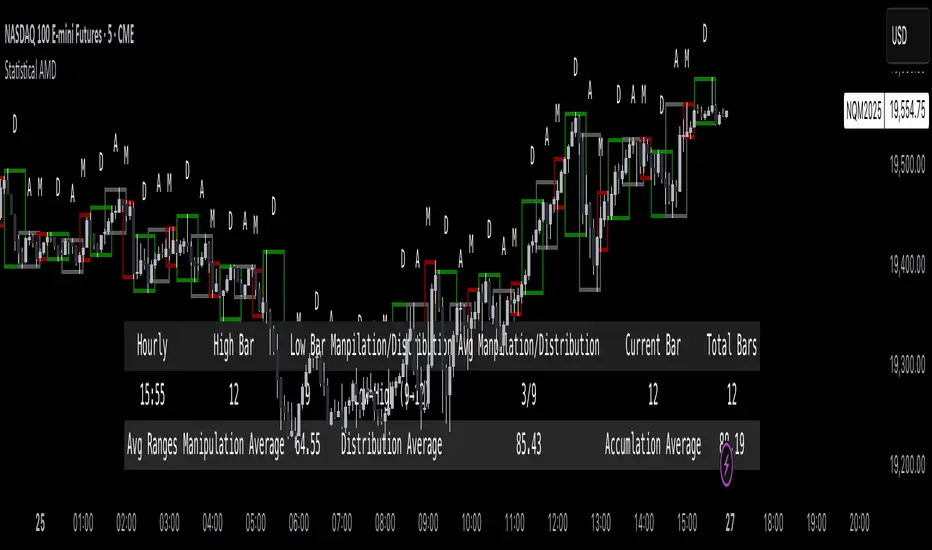
Plots Box Structures:
Color-coded boxes for each phase:
Red = Manipulation
Green = Distribution
White = Accumulation
Displays Statistical Table:
Average timing of highs and lows
Current vs historical bar position tracking
Average ranges for each phase
Historical Aggregation:
Aggregates hundreds of candles' data to build probabilistic expectations.
Live Updates:
Boxes dynamically expand as price evolves within each phase.
Key Settings
HTF Reference:
Select the higher timeframe to analyze (Default: 1 Hour).
Manually Input Legs:
Customize leg sizes for manipulation, distribution, and no-trade zones.
Defaults:
Manipulation Leg = 3 bars
Distribution Leg = 6 bars
No Trade Zone = 6 bars
Ideal For
Liquidity and Manipulation Traders:
Those analyzing sweep behaviors, fakeouts, and structural rotations.
Time-based Statistical Analysts:
Users who build mean-reversion or breakout models based on timing patterns.
ICT, Smart Money Concept (SMC) Traders:
Traders who track sweep → displacement → compression cycles.
Scalpers and Intraday Traders:
Anyone needing microstructural framing inside large candles.
Important Notes
Higher timeframe anchoring is critical.
Make sure you align the "HTF Reference" with your intended analysis frame (e.g., if you scalp on 1-min, set HTF to 1H or 4H).
The tool doesn’t predict future moves directly — it helps build a contextual, statistically-backed map of where you are inside the cycle.
Manual input flexibility allows tailoring for different asset volatility.
Final Thought
If you're trading without understanding the internal phases of a candle — you're navigating blind.
Statistical AMD arms you with objective, historical data about how and when price tends to expand, manipulate, and compress — so you can act with probability on your side.
Rotation Phase Signal OnlyHow to Use the “Rotation Phase Signal Only” Script
(Floating Dashboard Version)
This version gives you a clean, unobtrusive way to monitor the market regime and rotation instructions on any chart — whether you’re tracking your dividend ETFs, growth funds, or defensive positions.
✅ What It Does
This script tracks:
SPY:TLT — Stocks vs. Bonds (macro equity trend)
QQQ:XLU — Growth vs. Defensive (sector risk appetite)
It calculates weekly EMAs of these ratios to determine which phase we are in:
Phase Signal Interpretation Reallocation Action
GROWTH Stocks & growth sectors lead Add MTUM, VUN, XMTM / Trim income assets
INCOME Stocks weak, growth holding Add HHIS, HYLD, QQQY / Trim growth
DEFENSIVE Bonds and defensives lead Add HPYT, HPYT.U, ZGLD / Exit most equity
NEUTRAL Mixed or unclear signals Hold / minor rebalancing only
🧱 Key Features of This Version
Feature Description
📊 Floating Table Always visible in the top-right corner of the chart
🔄 Dynamic Updates Adjusts weekly as the regime changes
✅ Use On Any Ticker You can run this on DFN, QQQY, HYLD, etc.
🔔 Built-In Alerts Alerts trigger when the phase changes
🗓️ Weekly Workflow (Suggested)
Open Your Main Chart
Use this on any ticker — your dividend ETFs, growth ETF, or even individual stocks.
Check the Floating Table
PHASE: The current regime (GROWTH, INCOME, DEFENSIVE, or NEUTRAL)
ADD: What ETFs to accumulate
SELL: What ETFs or sectors to trim or rotate out of
Take Action
Rebalance or allocate new capital based on the table guidance.
Set Alerts (Optional)
Click “🔔 Alerts” in TradingView
Set up alerts for when the Phase changes
Example: “Alert me when Phase = DEFENSIVE”
🔔 Example Alert Setup
Click on Alerts
Choose:
Condition: Rotation Phase Signal Only
Value: GROWTH or INCOME or DEFENSIVE
Choose alert type: pop-up, email, webhook, etc.
💡 Pro Tips
Use this alongside your Dividend or Income Dashboards for smarter reinvestment decisions.
MARKET SYNERGY ANALYZER# MARKET SYNERGY ANALYZER v2.0
Current Date and Time (UTC): 2025-04-04 00:20:33
Author: Timur İnci
## INTRODUCTION
The Market Synergy Analyzer is an advanced technical analysis tool designed to bridge the gap between traditional market analysis and cross-market correlation studies. This sophisticated indicator provides traders and analysts with a comprehensive view of market relationships, particularly focusing on the synergy between BIST (Borsa Istanbul) indices and cryptocurrency markets.
### Core Purpose
- Identifies market correlations across different asset classes
- Tracks relative strength between markets
- Provides normalized price comparison
- Offers multi-timeframe analysis through customizable EMAs
## DEVELOPMENT
### Technical Implementation
1. **Multi-Market Data Processing**
- Real-time data fetching from BIST indices
- Cryptocurrency market integration
- Cross-market price normalization
2. **Advanced Technical Indicators**
- Four-layer EMA system (5, 14, 34, 233 periods)
- Normalized price ratios
- Percentage difference calculations
- Real-time market synergy detection
3. **Visualization Components**
- Color-coded EMA lines for trend identification
- Normalized candlestick charts
- Visual correlation indicators
### Key Features
- **Market Coverage:**
- 30+ BIST indices including XU100, XU030, XU050
- Major cryptocurrency pairs (BTC/USD, BTC/TRY, BTC/EUR)
- Sector-specific indices
- **Analysis Tools:**
- Relative strength comparison
- Cross-market correlation metrics
- Trend deviation alerts
- Multi-timeframe analysis
## CONCLUSION
### Practical Applications
1. **For Traders:**
- Identify market leading sectors
- Spot divergences between markets
- Time entry and exit points
- Track relative market strength
2. **For Portfolio Managers:**
- Monitor sector rotations
- Assess market correlations
- Optimize portfolio diversification
- Track market breadth
3. **For Risk Managers:**
- Monitor market relationships
- Track systemic risk indicators
- Identify potential market disruptions
- Assess cross-market impacts
### Benefits
- **Enhanced Decision Making:**
- Data-driven market analysis
- Reduced emotional bias
- Systematic approach to market analysis
- Comprehensive market view
- **Risk Management:**
- Early warning system for market changes
- Cross-market risk assessment
- Trend deviation alerts
- Portfolio exposure monitoring
- **Market Insights:**
- Deep market understanding
- Sector rotation identification
- Correlation analysis
- Market leadership tracking
### Target Users
1. Professional Traders
2. Portfolio Managers
3. Market Analysts
4. Risk Managers
5. Institutional Investors
## TECHNICAL REQUIREMENTS
- Platform: TradingView
- Pine Script Version: 6.0
- Data Feed: Real-time market data
- Recommended Timeframes: All
- Memory Usage: Optimized (500 bars back)
## FUTURE DEVELOPMENTS
1. Machine Learning Integration
2. Advanced Pattern Recognition
3. Additional Market Coverage
4. Enhanced Alert System
5. Custom Reporting Features
[AlbaTherium] MTF Volatility Edge Zones Premium for Price Action Volatility Edge Zones Premium for Price Action (HTF)
The MTF Volatility Edge Zones Premium for Price Action is an advanced Multiple Timeframes (MTF) trading indicator that combines the power of volume analysis with price action, designed to reveal key volatility zones and assess market participants’ engagement levels . This tool offers unique insights into the dynamics of higher timeframes (HTF), helping traders identify critical zones of decision-making, such as potential reversals, continuations, or breakout areas.
Introduction to the MTF Volatility Edge Zones Premium
This indicator is built upon a deep understanding of the interaction between price action and volume. By mapping volume data onto price action, Volatility Edge Zones Premium (HTF) pinpoints areas of heightened market engagement. These zones represent where buyers and sellers have shown significant activity, allowing traders to identify market intent and anticipate key movements.
Key Features:
Higher Timeframe Analysis: Focuses on significant price and volume interactions over HTFs (e.g., 4H, Daily, Weekly) for a broader perspective on market trends.
Volatility Zones : Highlights areas where market participants show increased activity, signaling potential market turning points or strong continuations.
Volume-Driven Insights: Tracks the behavior of aggressive buyers and sellers, showing their engagement levels relative to price changes.
Overlayon Price Action: Provides a clear and actionable visual representation of volatility and engagement zones directly on price charts.
Chapter 1: Understanding Volatility and Engagement
1.1 Volatility Edge Zones
Volatility Edge Zones are areas where price and volume interact to signal potential changes in market direction or momentum. These zones are derived from high-volume clusters where significant market activity occurs.
1.2 Participant Engagement
Market participants can be categorized based on their level of engagement in these zones:
Aggressive Buyers: Represented by sharp spikes in volume and upward price action.
Aggressive Sellers: Represented by high volume during downward price movement.
Passive Participants: Identified in zones of consolidation or low volatility.
By isolating these behaviors, traders can gain a clearer picture of market sentiment and the relative strength of buyers versus sellers.
Chapter 2: The Principle of Volume and Price Interplay
2.1 Volume as a Leading Indicator
Volume often precedes price movements, and the Volatility Edge Zones Premium captures this relationship by overlaying volume activity onto price charts. This allows traders to:
Identify where volume supports price movement (trend confirmation).
Spot divergences where price moves without volume support (potential reversals).
2.2 The Role of Higher Timeframes
HTFs filter out market noise, revealing macro trends and key levels of engagement. The indicator uses this perspective to highlight long-term volatility zones, helping traders align their strategies with the broader market context.
Chapter 3: Visualizing Volatility Edge Zones
3.1 Color-Coded Zones for Engagement
The indicator uses a color-coded system to represent volatility zones and market engagement levels. These colors correspond to different market conditions:
Red Zones: High selling pressure and aggressive bearish activity.
Blue Zones: High buying pressure and aggressive bullish activity.
Yellow Zones: Transitional zones, representing indecision or balance between buyers and sellers.
White Zones: Neutral areas, where low engagement is observed but could serve as potential breakout points.
3.2 Key Metrics Tracked
Volume Clusters: Areas of concentrated buying or selling activity.
Directional Bias: Net buying or selling dominance.
Momentum Shifts: Sudden changes in volume relative to price action.
These metrics provide actionable insights into market dynamics, making it easier to predict key movements.
Chapter 4: Practical Applications in Trading
4.1 Identifying High-Impact Zones
By focusing on HTFs, traders can use the Volatility Edge Zones Premium to identify high-impact areas where market participants are most engaged. These zones often align with:
Support and Resistance Levels: High-volume areas that act as barriers or catalysts for price movement.
Breakout Points: Zones of heightened volatility where price is likely to escape consolidation.
4.2 Detecting Bull and Bear Campaigns
The indicator highlights early signs of bullish or bearish campaigns by analyzing volume surges in critical volatility zones. These campaigns often signal the beginning of significant trends.
Chapter 5: Real-World Examples and Strategies
5.1 Spotting Market Reversals
Real-world examples demonstrate how the indicator can identify volatility zones signaling potential reversals, allowing traders to enter positions early.
5.2 Riding the Trend
By tracking volatility zones in alignment with HTF trends, traders can maximize profit potential by entering during periods of high engagement and riding the trend until it weakens.
Conclusion
The MTF Volatility Edge Zones Premium for Price Action is an essential tool for traders looking to master market dynamics through a combination of volume and price action analysis. By focusing on higher timeframes and overlaying volatility zones onto price charts, this indicator provides unparalleled insights into market participant engagement.
Whether you’re trading intraday, swing, or long-term strategies, the MTF Volatility Edge Zones Premium equips you with the information needed to make confident and precise trading decisions. Stay tuned as we continue to enhance this tool for even greater accuracy and usability.
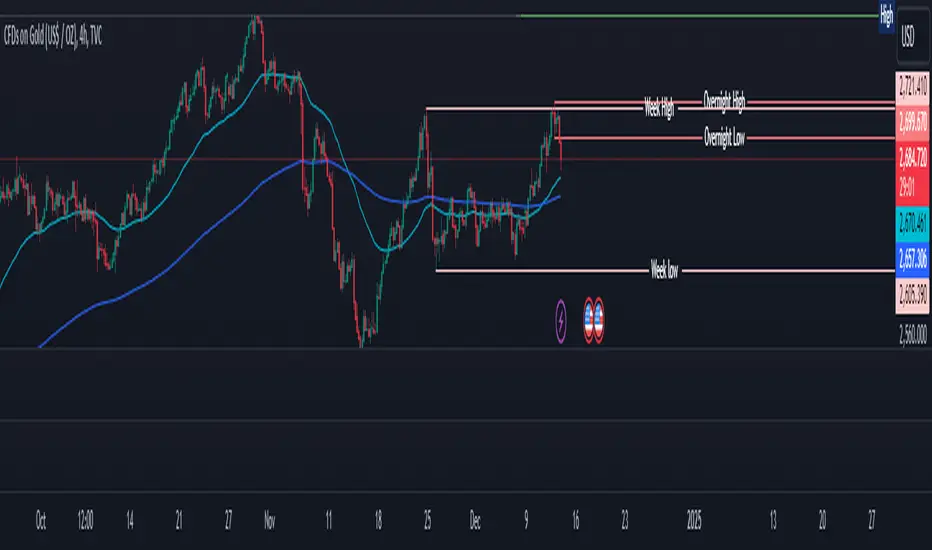
Overnight High/LowThe script identifies the Overnight High (the highest price) and Overnight Low (the lowest price) for a trading instrument during a specified overnight session. It then plots these levels on the chart for reference in subsequent trading sessions.
Key Features:
Time Settings:
The script defines the start (startHour) and end (endHour + endMinute) times for the overnight session.
The session spans across two calendar days, such as 5:00 PM (17:00) to 9:30 AM (09:30).
Tracking High and Low:
During the overnight session, the script dynamically tracks:
Overnight High: The highest price reached during the session.
Overnight Low: The lowest price reached during the session.
Reset Mechanism:
After the overnight session ends (at the specified end time), the script resets the overnightHigh and overnightLow variables, preparing for the next session.
Visual Representation:
The script uses horizontal dotted lines to plot:
A green line for the Overnight High.
A red line for the Overnight Low.
These lines extend to the right of the chart, providing visual reference points for traders.
How It Works:
Session Detection:
The script checks whether the current time falls within the overnight session:
If the hour is greater than or equal to the start hour (e.g., 17:00).
Or if the hour is less than or equal to the end hour (e.g., 09:30), considering the next day.
The end minute (e.g., 30 minutes past the hour) is also considered for precision.
High and Low Calculation:
During the overnight session:
If the overnightHigh is not yet defined, it initializes with the current candle's high.
If already defined, it updates by comparing the current candle's high to the existing overnightHigh using the math.max function.
Similarly, overnightLow is initialized or updated using the math.min function.
Post-Session Reset:
After the session ends, the script clears the overnightHigh and overnightLow variables by setting them to na (not available).
Line Drawing:
The script draws horizontal dotted lines for the Overnight High and Low during and after the session.
The lines extend indefinitely to the right of the chart.
Benefits:
Visual Aid: Helps traders quickly identify overnight support and resistance levels, which are critical for intraday trading.
Automation: Removes the need for manually plotting these levels each day.
Customizable: Time settings can be adjusted to match different markets or trading strategies.
This script is ideal for traders who use the overnight range as part of their analysis for breakouts, reversals, or trend continuation strategies.
Magnificent 7 Overall Percentage Change with MA and Angle LabelsMagnificent 7 Overall Percentage Change with MA and Angle Labels
Overview:
The "Magnificent 7 Overall Percentage Change with MA and Angle Labels" indicator tracks the percentage change of seven key tech stocks (Apple, Microsoft, Amazon, NVIDIA, Tesla, Meta, and Alphabet) and displays their overall average percentage change on the chart. It also provides a moving average of this overall change and calculates the angle of the moving average to help traders gauge the momentum and direction of the overall trend.
How it works:
Real-Time Percentage Change: The indicator calculates the percentage change of each of the "Magnificent 7" stocks compared to their previous day's closing price, giving a snapshot of the market's performance.
Overall Average: It then computes the average of the seven stocks' percentage changes to reflect the broader movement of these major tech companies.
Moving Average: The indicator offers a choice of four types of moving averages (SMA, EMA, WMA, or VWMA) to smooth the overall percentage change, allowing traders to focus on the trend rather than short-term fluctuations.
Slope and Angle Calculation: To provide additional insights, the indicator calculates the slope of the moving average and converts it into an angle (in degrees). This can help traders determine the strength of the trend—steeper angles often indicate stronger momentum.
Key Features:
Percentage Change of the "Magnificent 7":
Tracks the percentage change of Apple (AAPL), Microsoft (MSFT), Amazon (AMZN), NVIDIA (NVDA), Tesla (TSLA), Meta (META), and Alphabet (GOOGL) on the current chart's timeframe.
Overall Average Change:
Computes the average percentage change across all seven stocks, giving a combined view of how the most influential tech stocks are performing.
Customizable Moving Averages:
Offers four types of moving averages (SMA, EMA, WMA, VWMA) to provide flexibility in tracking the trend of the overall percentage change.
Angle Calculation:
Measures the angle of the moving average in degrees, which helps assess the strength of the market’s momentum. Alerts and visual cues can be triggered based on the angle's steepness.
Visual Cues:
The percentage change is plotted in green when positive and red when negative, with a background color that changes accordingly. A zero line is plotted for reference.
Use Case:
This indicator is ideal for traders and investors looking to track the collective performance of the most dominant tech companies in the market. It provides real-time insights into how the "Magnificent 7" stocks are moving together and offers clues about potential market momentum based on the direction and angle of their average percentage change.
Customization:
Moving Average Type and Length: Choose between different types of moving averages (SMA, EMA, WMA, VWMA) and adjust the length to suit your preferred timeframe.
Angle Threshold: Set an angle threshold to trigger alerts when the moving average slope becomes too steep, indicating strong momentum.
Alerts:
Alerts can be created based on the crossing of the moving average or when the angle of the moving average exceeds a specified threshold. This ensures traders are notified when the trend is accelerating or decelerating significantly.
Conclusion:
The "Magnificent 7 Overall Percentage Change with MA and Angle Labels" indicator is a powerful tool for those wanting to monitor the performance of the most influential tech stocks, analyze their overall trend, and receive timely alerts when market conditions shift.
Inside Candle and mother candle range with alert++>>This script allows you the inside bar candle and the cnadle is shown in white.
The range of the mother candle is identified and tracked until it breaks.
Once the first range is over ridden then the next similar pattern will be occured and the tracking will be done for the mother candle latest occurrence.
It also has the alert mechanism where you can go and the alert for the indicator in Alerts.
5 min is the most preferrable time frame and while saving the alert Note to save the time frame of the chart. For which ever time frame is saved the Alert will be triggered for the same .
And when th inside bar is triggered it throws an alert condition. this alert condition has to be configured in your alerts and will be buzzing on the screen.
Oct 20
Release Notes: updated with Mother candle top and bottom lines of previous occurrences and tracks the current latest Inside bar mother candle
Release Notes: this script allows you the inside bar cnadle and the cnadle is shown in white. highlighter is configurable and line colors as well.
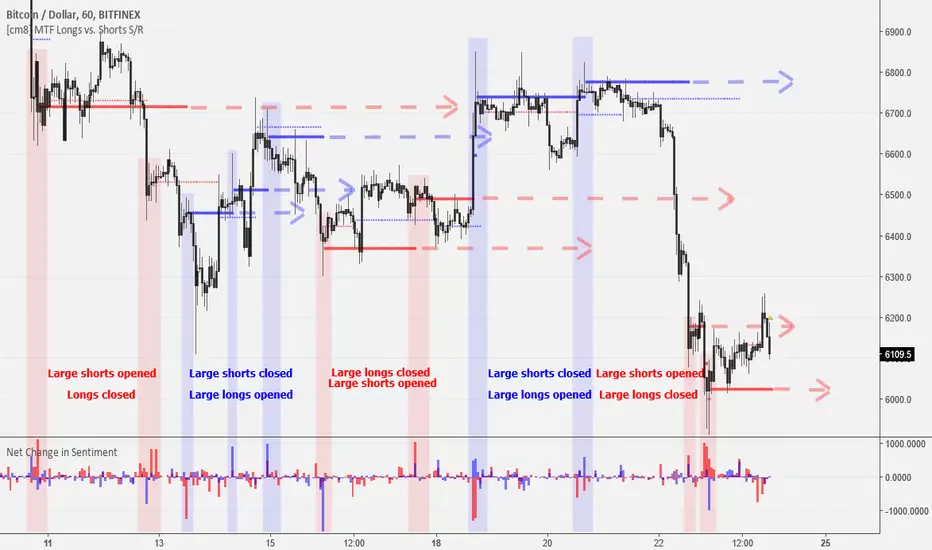
MTF Bitfinex Longs vs. Shorts Support/Resistance [checkm8]Hello and welcome to my multi-timeframe support and resistance indicator based on margin longs and shorts on Bitfinex :D
The premise of the script is simple. It draws support and resistance levels based on large margin movements ( effectively showing the break-even points of those positions ), where:
Longs opening and shorts closing is bullish pressure
Longs closing and shorts opening is bearish pressure
You can select your desired timeframe for the script to show the levels on. The script draws two sets of lines, one based on medium-sized movements and another based on large movements, where you can also manually input the size of the movements for it to track. By default, the script is optimized for 1-hour timeframes on BTCUSD, where the medium sized movements are set to bullish/bearish pressures of over 500 BTC, and large movements based on pressures of over 1000 BTC.
If you choose to use a different currency pair (ex. LTCUSD, ETCUSD, EOSUSD, etc..) you must adjust the volume that the script tracks , as tracking something like a 500 margin long in XRPUSD is useless. This also applies to timeframes , as timeframes lower than 1 hour may require smaller input values, while larger timeframes will require larger movements.
In addition, there is an input for the source. I recommend leaving this setting at hlc3 , because this will capture a more appropriate break-even points for the S/R levels.
A few tips:
If the current price is under a bullish support/resistance level , this implies that the bullish margin positions are underwater (the price is below their long break-evens), ie. shorts closed at the top or longs were entered at the top
If the current price is above a bullish support/resistance level , this implies that the bullish margin positions are in profit and will act as support (they will support their long break-even points)
If the current price is under a bearish support/resistance level , this implies that the bearish margin positions are in profit and will act as resistance (the price is below their short break-evens)
If the current price is above a bearish support/resistance level , this implies that the bearish margin positions are underwater (the price is above their short break-evens), ie. shorts entered at the bottom or longs were closed at the bottom
Happy trading and feel free to reach out with feedback and suggestions! :D
Special thanks goes to oh92 for his input and feedback on the idea. Check out his profile and his vast selection of indicators in the links below!
www.tradingview.com
depthhouse.com
Wyckoff Method - Comprehensive Analysis# WYCKOFF METHOD - QUICK REFERENCE CHEAT SHEET
## 🟢 STRONGEST BUY SIGNALS
### 1. SPRING ⭐⭐⭐⭐⭐
- **What:** False breakdown below support on LOW volume
- **Look for:** Quick reversal, close above support
- **Entry:** When price closes back in range
- **Stop:** Below spring low
- **Target:** Top of range minimum
### 2. SOS (Sign of Strength) ⭐⭐⭐⭐
- **What:** Breakout above resistance on HIGH volume
- **Look for:** Wide spread up bar, strong close
- **Entry:** On breakout or wait for LPS pullback
- **Stop:** Below range top
- **Target:** Height of range projected up
### 3. SHAKEOUT ⭐⭐⭐⭐
- **What:** Sharp move below support with HIGH volume, immediate reversal
- **Look for:** Long lower wick, closes strong
- **Entry:** When price reclaims support
- **Stop:** Below shakeout low
- **Target:** Previous resistance
---
## 🔴 STRONGEST SELL SIGNALS
### 1. UTAD (Upthrust After Distribution) ⭐⭐⭐⭐⭐
- **What:** False breakout above resistance, quick rejection
- **Look for:** Spike high, weak close, often high volume
- **Entry:** When price closes back in range
- **Stop:** Above UTAD high
- **Target:** Bottom of range minimum
### 2. SOW (Sign of Weakness) ⭐⭐⭐⭐
- **What:** Breakdown below support on HIGH volume
- **Look for:** Wide spread down bar, weak close
- **Entry:** On breakdown or wait for LPSY rally
- **Stop:** Above range bottom
- **Target:** Height of range projected down
### 3. UPTHRUST ⭐⭐⭐⭐
- **What:** Move above resistance on LOW volume, weak close
- **Look for:** Long upper wick, closes in lower half
- **Entry:** When resistance holds
- **Stop:** Above upthrust high
- **Target:** Support level
---
## 📊 ACCUMULATION PHASES (Bottom Formation)
```
PHASE A: Stopping the Downtrend
├─ PS (Preliminary Support) - First buying
├─ SC (Selling Climax) - Panic bottom ⚠️ KEY EVENT
├─ AR (Automatic Rally) - Relief bounce
└─ ST (Secondary Test) - Retest SC low
PHASE B: Building the Cause
├─ Trading range forms
├─ Multiple tests of support
├─ Volume decreasing
└─ Absorption occurring
PHASE C: The Test
├─ SPRING - False breakdown ⚠️ KEY EVENT
└─ TEST - Support holds on low volume
PHASE D: Dominance Emerges
├─ SOS - Breakout ⚠️ KEY EVENT
├─ LPS - Last Point of Support (pullback)
└─ BU - Backup
PHASE E: Markup
└─ New uptrend, strong momentum
```
**Background Color:** Blue → Green (getting brighter)
**Action:** Buy in Phase C/D, Hold through Phase E
---
## 📊 DISTRIBUTION PHASES (Top Formation)
```
PHASE A: Stopping the Uptrend
├─ PSY (Preliminary Supply) - First selling
├─ BC (Buying Climax) - Euphoric top ⚠️ KEY EVENT
├─ AR (Automatic Reaction) - Sharp drop
└─ ST (Secondary Test) - Retest BC high
PHASE B: Building the Cause
├─ Trading range forms
├─ Multiple tests of resistance
├─ Demand being absorbed
└─ Volume patterns change
PHASE C: The Test
└─ UTAD - False breakout ⚠️ KEY EVENT
PHASE D: Dominance Emerges
├─ SOW - Breakdown ⚠️ KEY EVENT
└─ LPSY - Last Point of Supply (rally to exit)
PHASE E: Markdown
└─ New downtrend, strong selling
```
**Background Color:** Orange → Red (getting darker)
**Action:** Sell in Phase C/D, Stay out during Phase E
---
## 💰 VOLUME SPREAD ANALYSIS (VSA)
| Signal | Meaning | Color | Implication |
|--------|---------|-------|-------------|
| **ND** (No Demand) | Up bar, LOW volume | 🟠 Orange | Weakness - uptrend ending |
| **NS** (No Supply) | Down bar, LOW volume | 🔵 Blue | Strength - downtrend ending |
| **SV** (Stopping Volume) | VERY HIGH volume, narrow spread | 🟣 Purple | Potential reversal |
| **UT** (Upthrust) | Above resistance, LOW vol, weak close | 🔴 Red | Sell signal |
| **SO** (Shakeout) | Below support, HIGH vol, strong close | 🟢 Green | Buy signal |
---
## 🎯 VOLUME INTERPRETATION
| Volume Level | Bar Color | Meaning |
|--------------|-----------|---------|
| **VERY HIGH** (>2x average) | Dark Green/Red | Climax, potential reversal |
| **HIGH** (>1.5x average) | Light Green/Red | Strong interest |
| **NORMAL** | Gray | Average trading |
| **LOW** (<0.7x average) | Faint Gray | Testing, no interest |
---
## ⚖️ EFFORT vs RESULT
| Scenario | Volume | Spread | Meaning |
|----------|--------|--------|---------|
| **High Effort, Low Result** | HIGH | Narrow | ⚠️ Potential reversal |
| **Low Effort, High Result** | LOW | Wide | ⚠️ Trend weakening |
| **High Effort, High Result** | HIGH | Wide | ✅ Strong trend |
| **Low Effort, Low Result** | LOW | Narrow | 😴 No interest |
---
## 📏 TRADING RULES
### ✅ DO:
- ✅ Wait for confirmation before entering
- ✅ Trade in direction of higher timeframe
- ✅ Use springs and UTAD as primary signals
- ✅ Measure trading range for targets
- ✅ Place stops outside the range
- ✅ Look for volume confirmation
- ✅ Check multiple timeframes
- ✅ Focus on Phase C and D events
### ❌ DON'T:
- ❌ Buy during Phase E Markdown
- ❌ Sell during Phase E Markup
- ❌ Trade against major trend
- ❌ Ignore volume signals
- ❌ Enter without clear stop loss
- ❌ Trade every signal
- ❌ Use on very low timeframes without practice
- ❌ Ignore the context
---
## 🎪 COMPOSITE OPERATOR (Smart Money)
### 💰 Green Money Symbol (Bottom)
- **Meaning:** Institutions accumulating
- **Location:** Demand zones, springs, tests
- **Action:** Follow the smart money - buy
### 💰 Red Money Symbol (Top)
- **Meaning:** Institutions distributing
- **Location:** Supply zones, UTAD, weak rallies
- **Action:** Follow the smart money - sell
---
## 📍 SUPPLY & DEMAND ZONES
### 🟢 Demand Zones (Green Boxes)
- **Created at:** SC, Spring, Shakeout
- **Represents:** Where smart money bought
- **Action:** Look for bounces
### 🔴 Supply Zones (Red Boxes)
- **Created at:** BC, UTAD, Upthrust
- **Represents:** Where smart money sold
- **Action:** Look for rejections
---
## 🎯 TARGET CALCULATION
### Measured Move Method
```
1. Measure trading range height
Example: Top at 120, Bottom at 100 = 20 points
2. Add to breakout point (accumulation)
Breakout at 120 + 20 = Target: 140
3. Or subtract from breakdown (distribution)
Breakdown at 100 - 20 = Target: 80
```
### Multiple Targets
- **Conservative:** 1x range height (100% probability reached)
- **Moderate:** 1.5x range height (70% probability)
- **Aggressive:** 2x range height (40% probability)
---
## ⏰ TIMEFRAME GUIDE
| Timeframe | Use For | Reliability | Recommended For |
|-----------|---------|-------------|-----------------|
| **Weekly** | Major trends | ⭐⭐⭐⭐⭐ | Position traders |
| **Daily** | Swing trades | ⭐⭐⭐⭐⭐ | Most traders |
| **4-Hour** | Active swing | ⭐⭐⭐⭐ | Active traders |
| **1-Hour** | Day trading | ⭐⭐⭐ | Experienced only |
| **15-Min** | Scalping | ⭐⭐ | Experts only |
**Golden Rule:** Always check one timeframe higher for context!
---
## 🚨 ALERT PRIORITY
### 🔔 MUST-HAVE ALERTS
1. Spring
2. UTAD
3. SOS
4. SOW
### 🔔 NICE-TO-HAVE ALERTS
5. Selling Climax (SC)
6. Buying Climax (BC)
7. Smart Money Accumulation
8. Smart Money Distribution
### 🔔 CONFIRMATION ALERTS
9. Phase E Markup
10. Phase E Markdown
---
## 💡 QUICK DECISION TREE
```
Is there a clear trading range?
├─ YES
│ ├─ Did price break BELOW support?
│ │ ├─ Volume LOW + Quick reversal = SPRING → BUY ✅
│ │ └─ Volume HIGH + Stays down = Breakdown → SELL ⚠️
│ │
│ └─ Did price break ABOVE resistance?
│ ├─ Volume LOW + Quick reversal = UTAD → SELL ✅
│ └─ Volume HIGH + Stays up = Breakout → BUY ⚠️
│
└─ NO
├─ Strong uptrend = Wait for re-accumulation
└─ Strong downtrend = Wait for re-distribution
```
---
## 📝 PRE-TRADE CHECKLIST
Before entering any trade:
- Identified the current Wyckoff phase
- Confirmed with volume analysis
- Checked higher timeframe trend
- Located supply/demand zones
- Identified clear entry point
- Set stop loss level
- Calculated target (risk:reward >1:2)
- Verified position size (risk 1-2%)
- Have at least 2 confirming signals
- Not trading against major trend
---
## 🧠 REMEMBER
**The Three Laws:**
1. **Supply & Demand** - Price is determined by imbalance
2. **Cause & Effect** - Range size predicts move size
3. **Effort & Result** - Volume should confirm price movement
**The Key Principle:**
> "Trade with the Composite Operator (smart money), not against them"
**Best Setups:**
1. Spring in accumulation (Phase C)
2. UTAD in distribution (Phase C)
3. SOS breakout (Phase D)
4. SOW breakdown (Phase D)
**When in Doubt:**
- ❓ Stay out
- 📈 Use higher timeframe
- 📚 Review the documentation
- 🎯 Wait for clearer signal
---
## 📱 INDICATOR SETTINGS QUICK SETUP
**For Stocks/Crypto (Good Volume Data):**
- Volume MA Length: 20
- High Volume Multiplier: 1.5
- Climax Volume: 2.0
- Swing Length: 5
**For Forex (Limited Volume Data):**
- Volume MA Length: 20
- High Volume Multiplier: 1.3
- Climax Volume: 1.8
- Swing Length: 7
- Turn OFF "Volume Confirmation"
**For Day Trading:**
- Swing Length: 3
- All other settings: Default
**For Position Trading:**
- Swing Length: 7-10
- Volume MA Length: 30
- Use Daily/Weekly charts
---
## 🎓 SKILL PROGRESSION
### Beginner (Month 1-2)
- Focus on: SC, Spring, SOS
- Timeframe: Daily only
- Goal: Identify phases correctly
### Intermediate (Month 3-6)
- Add: All accumulation events
- Timeframe: Daily + 4H
- Goal: Trade springs profitably
### Advanced (Month 6-12)
- Add: Distribution events, VSA
- Timeframe: Multiple timeframes
- Goal: Trade complete cycles
### Expert (Year 2+)
- Master: All events, all timeframes
- Combine: With other methodologies
- Goal: Consistent profitability
---
**Print this sheet and keep it next to your trading desk!**
*Remember: Quality over quantity. Wait for the best setups.*
# Wyckoff Method - Comprehensive Analysis Indicator
## Complete Implementation Guide for TradingView Pine Script
---
## TABLE OF CONTENTS
1. (#overview)
2. (#installation)
3. (#theory)
4. (#components)
5. (#signals)
6. (#strategies)
7. (#settings)
8. (#alerts)
9. (#patterns)
10. (#troubleshooting)
---
## OVERVIEW
This indicator implements Richard Wyckoff's complete trading methodology, including:
- **All 5 Phases** of Accumulation and Distribution
- **18+ Wyckoff Events** (PS, SC, AR, ST, Spring, SOS, LPS, BC, UTAD, SOW, etc.)
- **Volume Spread Analysis (VSA)** principles
- **Supply & Demand Zone** detection
- **Composite Operator** logic (Smart Money tracking)
- **Effort vs Result** analysis
- **Three Wyckoff Laws**: Supply/Demand, Cause/Effect, Effort/Result
---
## INSTALLATION
### Step 1: Copy the Code
1. Open the `wyckoff_comprehensive.pine` file
2. Select all code (Ctrl+A / Cmd+A)
3. Copy to clipboard (Ctrl+C / Cmd+C)
### Step 2: Add to TradingView
1. Go to TradingView.com
2. Open any chart
3. Click "Pine Editor" at the bottom of the screen
4. Click "New" or "Open"
5. Paste the entire code
6. Click "Save" and give it a name
7. Click "Add to Chart"
### Step 3: Verify Installation
You should see:
- Labels on the chart (PS, SC, Spring, SOS, etc.)
- Background colors indicating phases
- Volume analysis in the lower pane
- A table in the top-right corner showing current phase
---
## WYCKOFF METHOD THEORY
### The Three Fundamental Laws
#### 1. **Law of Supply and Demand**
- Price rises when demand exceeds supply
- Price falls when supply exceeds demand
- The indicator tracks volume vs price movement to identify imbalances
#### 2. **Law of Cause and Effect**
- A period of accumulation (cause) leads to markup (effect)
- A period of distribution (cause) leads to markdown (effect)
- Trading ranges build "cause" for future price movement
#### 3. **Law of Effort vs Result**
- **Effort** = Volume (energy put into the market)
- **Result** = Price movement (spread of the bar)
- High effort with low result = potential reversal
- Low effort with high result = trend weakness
### The Five Phases
#### **ACCUMULATION CYCLE**
**Phase A: Stopping the Downtrend**
- Preliminary Support (PS): First sign of buying
- Selling Climax (SC): Panic selling exhaustion
- Automatic Rally (AR): Bounce from SC
- Secondary Test (ST): Test of SC low on lower volume
**Phase B: Building the Cause**
- Trading range develops
- Supply being absorbed by composite operator
- Multiple tests of support and resistance
- Volume generally decreases
**Phase C: The Test (Spring)**
- False breakdown below support
- Traps late sellers
- Quick reversal on low volume
- Last chance to accumulate before markup
**Phase D: Dominance Emerges**
- Sign of Strength (SOS): Break above resistance
- Last Point of Support (LPS): Pullback opportunity
- Backup (BU): Final consolidation
- Demand clearly exceeds supply
**Phase E: Markup**
- New uptrend established
- Price moves rapidly higher
- Phase E can last months/years
- Original trading range becomes support
#### **DISTRIBUTION CYCLE**
**Phase A: Stopping the Uptrend**
- Preliminary Supply (PSY): First sign of selling
- Buying Climax (BC): Euphoric buying exhaustion
- Automatic Reaction (AR): Sharp selloff from BC
- Secondary Test (ST): Test of BC high on lower volume
**Phase B: Building the Cause**
- Trading range at top
- Demand being absorbed by composite operator
- Multiple tests of support and resistance
**Phase C: The Test (UTAD)**
- Upthrust After Distribution
- False breakout above resistance
- Traps late buyers
- Quick reversal
**Phase D: Dominance Emerges**
- Sign of Weakness (SOW): Break below support
- Last Point of Supply (LPSY): Rally opportunity to exit
- Supply clearly exceeds demand
**Phase E: Markdown**
- New downtrend established
- Price moves rapidly lower
- Original trading range becomes resistance
---
## INDICATOR COMPONENTS
### 1. EVENT LABELS
#### Accumulation Events (Green labels)
- **PS** = Preliminary Support
- **SC** = Selling Climax (largest label, most important)
- **AR** = Automatic Rally
- **ST** = Secondary Test
- **SPRING** = Spring (critical buy signal)
- **TEST** = Test of support
- **SOS** = Sign of Strength (breakout)
- **LPS** = Last Point of Support
- **BU** = Backup
#### Distribution Events (Red labels)
- **PSY** = Preliminary Supply
- **BC** = Buying Climax (largest label, most important)
- **AR** = Automatic Reaction
- **ST** = Secondary Test
- **UTAD** = Upthrust After Distribution (critical sell signal)
- **SOW** = Sign of Weakness
- **LPSY** = Last Point of Supply
#### VSA Events (Small colored labels)
- **ND** (Orange) = No Demand - weakness
- **NS** (Blue) = No Supply - strength
- **SV** (Purple) = Stopping Volume
- **UT** (Red) = Upthrust - weakness
- **SO** (Green) = Shakeout - strength
#### Composite Operator (💰 symbols)
- Green 💰 at bottom = Smart Money Accumulation
- Red 💰 at top = Smart Money Distribution
### 2. BACKGROUND COLORS
- **Light Blue** = Phase A (Accumulation)
- **Light Orange** = Phase A (Distribution)
- **Very Light Green** = Phase C (Accumulation Testing)
- **Very Light Red** = Phase C (Distribution Testing)
- **Light Green** = Phase D (Accumulation Strength)
- **Light Red** = Phase D (Distribution Weakness)
- **Green** = Phase E (Markup - Bull trend)
- **Red** = Phase E (Markdown - Bear trend)
### 3. SUPPLY & DEMAND ZONES
- **Green boxes** = Demand zones (where smart money accumulated)
- **Red boxes** = Supply zones (where smart money distributed)
- Zones extend 20 bars into the future
- Price reactions at these zones are significant
### 4. VOLUME PANEL
- **Dark Green/Red bars** = Very High Volume (climax)
- **Light Green/Red bars** = High Volume
- **Gray bars** = Normal Volume
- **Faint Gray bars** = Low Volume
- **Blue line** = Volume Moving Average
### 5. INFORMATION TABLE (Top Right)
Displays real-time analysis:
- **Current Phase** (A, B, C, D, or E)
- **Status** (description of what's happening)
- **Volume** (Very High, High, Normal, Low)
- **Spread** (Wide, Normal, Narrow)
- **Effort/Result** (Poor, Normal, Good)
- **Range** (YES if in trading range)
- **Bias** (BULLISH, BEARISH, or NEUTRAL)
---
## HOW TO READ THE SIGNALS
### STRONG BUY SIGNALS (in order of strength)
1. **SPRING** (strongest)
- False breakdown below support
- Look for: Low volume, quick reversal, close above support
- Entry: When price closes back above support level
- Stop: Below the spring low
2. **SOS (Sign of Strength)**
- Break above trading range resistance
- Look for: High volume, wide spread up bar
- Entry: On breakout or pullback to LPS
- Stop: Below trading range
3. **Shakeout (SO)**
- Similar to spring but more violent
- Look for: High volume, penetration of support, strong close
- Entry: When price reclaims support
- Stop: Below shakeout low
4. **LPS (Last Point of Support)**
- Pullback after SOS
- Look for: Low volume, shallow pullback
- Entry: When support holds
- Stop: Below LPS
5. **No Supply (NS)**
- Down bar on very low volume
- Indicates lack of selling pressure
- Confirms accumulation phase
### STRONG SELL SIGNALS (in order of strength)
1. **UTAD (Upthrust After Distribution)** (strongest)
- False breakout above resistance
- Look for: High volume spike, rejection, close below resistance
- Entry: When price closes back below resistance
- Stop: Above UTAD high
2. **SOW (Sign of Weakness)**
- Break below trading range support
- Look for: High volume, wide spread down bar
- Entry: On breakdown or rally to LPSY
- Stop: Above trading range
3. **Upthrust (UT)**
- Move above resistance on low volume, weak close
- Look for: Low volume, close in lower half of bar
- Entry: When resistance becomes resistance again
- Stop: Above upthrust high
4. **LPSY (Last Point of Supply)**
- Rally after SOW
- Look for: Low volume, weak rally
- Entry: When rally fails
- Stop: Above LPSY
5. **No Demand (ND)**
- Up bar on very low volume
- Indicates lack of buying pressure
- Confirms distribution phase
### NEUTRAL/WARNING SIGNALS
- **High Effort, Low Result** = Potential reversal coming
- **Stopping Volume** = Trend may be ending
- **Absorption** = Large volume with small movement (accumulation/distribution)
---
## TRADING STRATEGY EXAMPLES
### Strategy 1: Accumulation Range Breakout
**Setup:**
1. Identify trading range (blue background in Phase B)
2. Wait for Spring or Test (Phase C)
3. Wait for SOS breakout (Phase D)
**Entry:**
- Option A: Buy on SOS breakout
- Option B: Wait for LPS pullback (better risk/reward)
**Stop Loss:**
- Below the spring low or trading range bottom
**Target:**
- Measure height of trading range (cause)
- Project upward from breakout point (effect)
- Minimum target = range height
**Example:**
```
Trading Range: 100 to 120 (20 point range)
SOS Breakout at: 120
Target: 120 + 20 = 140 minimum
```
### Strategy 2: Distribution Range Breakdown
**Setup:**
1. Identify trading range after uptrend
2. Wait for UTAD (Phase C)
3. Wait for SOW breakdown (Phase D)
**Entry:**
- Option A: Sell on SOW breakdown
- Option B: Wait for LPSY rally (better risk/reward)
**Stop Loss:**
- Above the UTAD high or trading range top
**Target:**
- Measure height of trading range
- Project downward from breakdown point
- Minimum target = range height
### Strategy 3: Spring Trading
**Setup:**
1. Strong downtrend followed by range
2. Price breaks below range bottom
3. Volume is LOW on breakdown
4. Price quickly reverses and closes above support
**Entry:**
- When candle closes above support level
- Or on retest of support
**Stop Loss:**
- Below spring low (usually tight)
**Target:**
- Top of trading range
- Previous swing high
**Risk/Reward:**
- Typically 1:3 or better
### Strategy 4: Smart Money Tracking
**Setup:**
1. Look for 💰 symbols in demand zones
2. Multiple accumulation signals (PS, SC, ST, Test)
3. Volume decreasing during range
**Entry:**
- At next demand zone test
- On SOS breakout
**Confirmation:**
- Background turning green (Phase D/E)
- Table shows "BULLISH" bias
### Strategy 5: VSA Reversal
**Setup:**
1. Strong trend in place
2. Stopping Volume (SV) appears at extreme
3. Followed by No Demand (ND) or No Supply (NS)
**Entry:**
- When trend breaks down/up
- On retest of extreme
**Example (Bullish):**
```
Downtrend → Stopping Volume → No Supply → Up bar
Entry: Buy when price moves above SV bar
```
---
## SETTINGS & CUSTOMIZATION
### Volume Analysis Settings
**Volume MA Length** (default: 20)
- Shorter = More sensitive to volume changes
- Longer = Smoother, less noise
- Recommended: 15-25 for most timeframes
**High Volume Multiplier** (default: 1.5)
- Threshold for "high volume"
- Lower = More signals
- Higher = Only extreme volume
- Recommended: 1.3-2.0
**Climax Volume Multiplier** (default: 2.0)
- Threshold for climax events (SC, BC)
- Should be significantly higher than normal
- Recommended: 2.0-3.0
### Phase Detection Settings
**Swing Detection Length** (default: 5)
- How many bars to look left/right for swing points
- Shorter = More swings detected (more noise)
- Longer = Fewer swings (cleaner, might miss some)
- Recommended: 3-7
**Range Expansion Threshold** (default: 1.5)
- Multiplier for "wide spread" bars
- Higher = Only very wide bars qualify
- Recommended: 1.3-2.0
**Volume Confirmation** (default: ON)
- Requires volume confirmation for events
- Turn OFF for very low volume instruments
- Keep ON for stocks, forex, crypto
### Display Options
Toggle on/off:
- ✅ **Show Accumulation/Distribution Phases** - Background colors
- ✅ **Show Wyckoff Events** - All labeled events
- ✅ **Show Volume Spread Analysis** - VSA labels
- ✅ **Show Supply/Demand Zones** - Boxes on chart
- ✅ **Show Composite Operator Signals** - 💰 symbols
### Color Customization
- **Bullish Color** - All accumulation events
- **Bearish Color** - All distribution events
- **Neutral Color** - Range/neutral signals
---
## ALERT SETUP
### Available Alerts
1. **Selling Climax (SC)** - Potential bottom forming
2. **Spring** - Strong buy signal
3. **Sign of Strength (SOS)** - Bullish breakout
4. **Buying Climax (BC)** - Potential top forming
5. **UTAD** - Strong sell signal
6. **Sign of Weakness (SOW)** - Bearish breakdown
7. **Phase E Markup** - Uptrend confirmed
8. **Phase E Markdown** - Downtrend confirmed
9. **Smart Money Accumulation** - Institutions buying
10. **Smart Money Distribution** - Institutions selling
### How to Set Up Alerts
1. Click the "⏰" icon on TradingView
2. Select "Create Alert"
3. Condition: Choose the indicator and alert type
4. Example: "Wyckoff Method - Spring"
5. Set notification preferences (popup, email, webhook)
6. Click "Create"
### Recommended Alert Strategy
**Conservative Trader:**
- Spring
- SOS
- UTAD
- SOW
**Aggressive Trader:**
- Add: SC, BC, Smart Money signals
**Long-term Investor:**
- Phase E Markup
- Phase E Markdown
- Smart Money Accumulation
---
## COMMON PATTERNS
### Pattern 1: Classic Accumulation
```
Phase A: Downtrend → PS → SC → AR → ST
Phase B: Range building (4-12 weeks typical)
Phase C: Spring (false breakdown)
Phase D: SOS → LPS → BU
Phase E: Markup (new uptrend)
```
**What to do:**
- Mark the range boundaries
- Wait for spring
- Buy on LPS or SOS
- Hold through markup
### Pattern 2: Classic Distribution
```
Phase A: Uptrend → PSY → BC → AR → ST
Phase B: Range building (topping process)
Phase C: UTAD (false breakout)
Phase D: SOW → LPSY
Phase E: Markdown (new downtrend)
```
**What to do:**
- Mark the range boundaries
- Wait for UTAD
- Sell on LPSY or SOW
- Stay out during markdown
### Pattern 3: Re-Accumulation
```
Uptrend → Trading Range → Spring → Uptrend continues
```
- Occurs during existing uptrend
- Shorter accumulation period
- Often no clear SC (trend is already up)
- Spring is the key signal
### Pattern 4: Re-Distribution
```
Downtrend → Trading Range → UTAD → Downtrend continues
```
- Occurs during existing downtrend
- Shorter distribution period
- Often no clear BC (trend is already down)
- UTAD is the key signal
### Pattern 5: Failed Breakout
**Bullish Failed Breakout:**
```
Range → Breakdown → Immediate reversal (Spring)
```
- Price breaks support
- Volume is LOW
- Immediate strong reversal
- Very bullish
**Bearish Failed Breakout:**
```
Range → Breakout → Immediate reversal (UTAD)
```
- Price breaks resistance
- Volume may be high initially
- Quick rejection and reversal
- Very bearish
---
## TIMEFRAME RECOMMENDATIONS
### Daily Charts (Most Reliable)
- Best for swing trading
- Clear phases and events
- Less noise
- Recommended for beginners
### 4-Hour Charts
- Good for active swing traders
- Faster signals than daily
- Still reliable
### 1-Hour Charts
- For day traders
- More false signals
- Need to filter carefully
- Use in conjunction with higher timeframe
### 15-Minute / 5-Minute
- Only for experienced traders
- High noise level
- Many false signals
- Use daily chart for context
**Golden Rule:** Always check higher timeframe first!
---
## MULTI-TIMEFRAME ANALYSIS
### Top-Down Approach (Recommended)
1. **Weekly Chart** - Identify major trend and phase
2. **Daily Chart** - Find current accumulation/distribution
3. **4H Chart** - Identify entry timing
4. **Entry Timeframe** - Execute trade
### Example Analysis:
**Weekly:** Phase E Markup (bullish)
**Daily:** Phase B Re-accumulation
**4-Hour:** Spring detected
**Action:** Buy on daily LPS
---
## WYCKOFF + OTHER INDICATORS
### Complementary Tools
1. **Moving Averages**
- 20/50 SMA for trend context
- Already plotted on indicator
2. **RSI**
- Divergences at SC/BC
- Confirms overbought/oversold
3. **MACD**
- Confirms trend change in Phase D
- Divergences support Wyckoff events
4. **Volume Profile**
- Identifies value areas
- Confirms supply/demand zones
5. **Order Flow / Footprint Charts**
- See institutional activity
- Confirms smart money signals
**Don't Over-Complicate:**
- Wyckoff is a complete system
- Other indicators are supplementary
- When in doubt, trust Wyckoff
---
## TROUBLESHOOTING
### Issue: Too Many Labels
**Solution:**
- Increase swing length (Settings → 7 or 10)
- Increase volume multipliers
- Turn off VSA labels if not needed
- Focus on major events only (SC, Spring, SOS, BC, UTAD, SOW)
### Issue: Missing Expected Events
**Solution:**
- Decrease swing length (Settings → 3)
- Decrease volume multipliers
- Turn OFF volume confirmation
- Check timeframe (use daily chart)
### Issue: False Signals
**Solution:**
- Use higher timeframe
- Wait for confirmation
- Don't trade against major trend
- Look for multiple signal convergence
### Issue: Can't See Background Colors
**Solution:**
- Check "Show Phases" is enabled
- Increase monitor brightness
- Colors are subtle by design (not to obscure price)
### Issue: Volume Shows Incorrectly
**Solution:**
- Ensure volume data is available for your symbol
- Some symbols have poor volume data
- Forex spot pairs have no real volume
- Use futures or stock markets for best results
### Issue: No Trading Range Detected
**Solution:**
- Market may be trending strongly
- Trading range might be too small
- Wait for price to consolidate
- Not all markets have clear ranges
---
## ADVANCED TIPS
### 1. Count Point & Figure Charts
- Wyckoff used P&F to measure "cause"
- Width of range × height = minimum move target
- Longer accumulation = larger markup
### 2. Watch for Absorption
- High volume + narrow spread = someone absorbing
- In downtrend = accumulation
- In uptrend = distribution
### 3. Multiple Timeframe Springs
- Spring on daily + spring on weekly = very strong
- Increases probability significantly
### 4. Failed Signals Are Signals Too
- Failed spring = weakness, expect lower
- Failed UTAD = strength, expect higher
### 5. Context is King
- Don't buy during Phase E Markdown
- Don't sell during Phase E Markup
- Respect the major trend
### 6. Volume Precedes Price
- Study volume changes first
- Price follows volume
- Decreasing volume in range = building energy
### 7. Composite Operator Mindset
- Think like institutions
- Where would smart money buy/sell?
- They need liquidity (retail traders)
---
## RISK MANAGEMENT
### Position Sizing
**Conservative:**
- Risk 1% per trade
- Wider stops at range boundaries
**Moderate:**
- Risk 1-2% per trade
- Stops below spring/above UTAD
**Aggressive:**
- Risk 2-3% per trade
- Tight stops
- Higher win rate needed
### Stop Loss Placement
**Accumulation:**
- Below spring low
- Below trading range bottom
- Below demand zone
**Distribution:**
- Above UTAD high
- Above trading range top
- Above supply zone
### Take Profit Strategy
**Method 1: Measured Move**
- Range height = minimum target
- 2x range height = extended target
**Method 2: Fibonacci Extensions**
- 1.0 = range height
- 1.618 = extended target
- 2.618 = maximum target
**Method 3: Trail the Stop**
- Move stop to breakeven at 1R
- Trail under swing lows in markup
- Lock in profits progressively
---
## BACKTESTING CHECKLIST
Before trading with real money:
- Backtest on 50+ historical examples
- Record all signals in trading journal
- Calculate win rate (aim for >50%)
- Calculate average R:R (aim for >1:2)
- Test on multiple instruments
- Test on multiple timeframes
- Test in different market conditions
- Verify signal consistency
- Practice on demo account
- Start small with real money
---
## RECOMMENDED READING
### Books
1. **"Studies in Tape Reading"** - Richard D. Wyckoff
2. **"The Richard D. Wyckoff Method"** - Rubén Villahermosa
3. **"Charting the Stock Market: The Wyckoff Method"** - Jack Hutson
4. **"Master the Markets"** - Tom Williams (VSA)
### Courses
1. Wyckoff Analytics - Official Wyckoff course
2. TradeVSA - Volume Spread Analysis
3. StockCharts - Wyckoff education
### Communities
1. Wyckoff Analytics Forum
2. Reddit r/Wyckoff
3. TradingView Wyckoff ideas section
---
## FREQUENTLY ASKED QUESTIONS
**Q: Can I use this on crypto?**
A: Yes, works well on major cryptocurrencies with good volume.
**Q: Does it work on forex?**
A: Yes, but use futures volume (like 6E for EUR/USD) for better accuracy.
**Q: What's the best timeframe?**
A: Daily chart for most traders. 4H for more active trading.
**Q: How long does accumulation last?**
A: Typically 2-12 weeks. Longer accumulation = bigger markup.
**Q: Can I automate this?**
A: You can use the alerts, but manual analysis is recommended.
**Q: What's the win rate?**
A: With proper filtering: 60-70% on major signals (Spring, UTAD, SOS, SOW).
**Q: Should I trade every signal?**
A: No. Focus on Spring, UTAD, SOS, and SOW in trending markets.
**Q: What if I see conflicting signals?**
A: Use higher timeframe for context. When in doubt, stay out.
**Q: How do I know which phase I'm in?**
A: Check the table in top-right corner. Also look at background color.
**Q: Can I use this for options trading?**
A: Yes, excellent for timing option entries (especially around Spring/UTAD).
---
## FINAL THOUGHTS
The Wyckoff Method is:
- **A complete trading system** (not just an indicator)
- **Based on 100+ years** of market wisdom
- **Used by institutions** and professional traders
- **Requires practice** and screen time
- **Highly effective** when applied correctly
**Success Tips:**
1. Start with daily charts
2. Focus on major events (SC, Spring, SOS, BC, UTAD, SOW)
3. Always check higher timeframe context
4. Wait for confirmation before entering
5. Manage risk properly
6. Keep a trading journal
7. Be patient - wait for the best setups
**Remember:**
- Not every range will have all events
- Some phases may be abbreviated
- Context and confluence matter most
- Practice makes perfect
---
## SUPPORT & UPDATES
For questions, improvements, or bug reports:
- Check TradingView script comments
- Join Wyckoff trading communities
- Study historical examples
- Practice on demo accounts
**Good luck and happy trading!**
---
*Disclaimer: This indicator is for educational purposes. Always do your own analysis and risk management. Past performance does not guarantee future results.*
# WYCKOFF VISUAL SETUP EXAMPLES
## ACCUMULATION SCHEMATIC #1 (Classic Bottom)
```
Price Chart View:
│ PHASE E
│ MARKUP
│ ╱
│ ╱
┌─SOS─────┤ ╱
│ │ ╱
┌───────────┤ ┌LPS │╱
│ PHASE B │ │ │
│ (Cause) └──┴──────┤
┌AR──┤ │
┌────┤ │ ┌─Spring │ PHASE D
│ └ST──┤ │ │
│ │ │ │
────SC────────┴─────────┴───────────┴──────────
│
PS
│ PHASE A
│
Downtrend
```
### PHASE A - Stopping the Downtrend
```
PS: │ High volume down bar
▼ First sign of support
■ Not bottom yet
SC: │ VERY HIGH volume
▼ Panic selling exhaustion
█ Long lower wick
█ This is the low
AR: │ Automatic rally
▲ Relief bounce
■ High volume acceptable
ST: │ Secondary test
▼ Low volume (KEY!)
■ Tests SC low
```
### PHASE B - Building the Cause
```
┌─────────┐
│ ~~~ │ Multiple tests
│ ~ ~ │ Volume decreases
│~ ~ │ Range gets tighter
└─────────┘
Duration: 2-12 weeks typical
The longer, the bigger the eventual move
```
### PHASE C - The Test (SPRING)
```
║ False breakdown
─────╨─────
▼ Low volume
█ Breaks below support
■
█ Quick reversal
▲ Closes ABOVE support
CRITICAL: Volume must be LOW
Close must be strong
Happens quickly (1-3 bars)
```
### PHASE D - Strength Emerges
```
SOS: ▲ Sign of Strength
────╥──── Break above resistance
║ High volume
║ Wide spread
LPS: ▼ Last Point Support
■ Pullback on LOW volume
▲ Great entry point
BU: ▲ Backup
■ Final consolidation
▲ Before markup
```
### PHASE E - Markup
```
╱
╱
╱ Strong uptrend
╱ High momentum
╱ Can last months/years
──╱──
```
---
## DISTRIBUTION SCHEMATIC #2 (Classic Top)
```
Price Chart View:
Uptrend
│
PSY
│ PHASE A
────BC────────┬─────────┬───────────┬──────────
│ │ UTAD │
│ PHASE B │ │ PHASE D
┌AR──┤ ┌LPSY │ │
│ │ │ └───────────┤
│ └──┴──────┐ │╲
└ST──┤ │ │ ╲
│ └───────────┤ ╲
└─SOW─────┤ │ ╲
│ │ ╲
│ PHASE C │ ╲
│ │ PHASE E
│ │ MARKDOWN
```
### PHASE A - Stopping the Uptrend
```
PSY: │ High volume up bar
▲ Preliminary supply
■ Selling starting
BC: │ VERY HIGH volume
▲ Buying climax
█ Euphoric top
█ Long upper wick
AR: │ Automatic reaction
▼ Sharp selloff
■ High volume
ST: │ Secondary test
▲ Low volume (KEY!)
■ Tests BC high
```
### PHASE C - The Test (UTAD)
```
▲ False breakout
────╥────
║ Breaks ABOVE resistance
║ Often high volume spike
▼
█ Rejection / weak close
█ Closes BELOW resistance
▼
CRITICAL: Closes weak
Quick rejection
Traps buyers
```
### PHASE D - Weakness Emerges
```
SOW: ▼ Sign of Weakness
────╨──── Break below support
║ High volume
║ Wide spread
LPSY: ▲ Last Point Supply
■ Rally on LOW volume
▼ Last chance to exit
```
---
## VOLUME PATTERNS (Critical to Understanding)
### ACCUMULATION Volume Pattern
```
Volume
│ SC
█
█ ST
■ ■ Spring
■ ■ ■ SOS LPS
──┴────┴────┴──────█───■────►
│ │ │ │ │
│ │ │ │ │
A A C D D
Pattern: HIGH → low → low → HIGH → low
Key: Volume DECREASES during range
INCREASES on breakout
```
### DISTRIBUTION Volume Pattern
```
Volume
│ BC
█
█ ST
■ ■ UTAD
■ ■ ■ SOW LPSY
──┴────┴────┴──────█───■────►
│ │ │ │ │
│ │ │ │ │
A A C D D
Pattern: HIGH → low → varies → HIGH → low
Key: Volume MAY increase on UTAD
Definitely HIGH on breakdown (SOW)
```
---
## REAL TRADE SETUPS
### Setup #1: SPRING BUY
```
Entry Conditions:
1. Clear trading range identified
2. Price breaks BELOW support
3. Volume is LOW (critical!)
4. Price reverses QUICKLY
5. Closes ABOVE support level
Entry: Next bar or on retest
Stop: Below spring low
Target: Top of range (minimum)
Example:
Support: $100
Spring low: $98 (low volume)
Close: $101
Entry: $102
Stop: $97.50
Target: $120 (range top)
Risk/Reward: 1:4
```
### Setup #2: UTAD SELL
```
Entry Conditions:
1. Clear trading range identified (after uptrend)
2. Price breaks ABOVE resistance
3. Often high volume spike
4. Price reverses QUICKLY
5. Closes BELOW resistance level
Entry: Next bar or on retest
Stop: Above UTAD high
Target: Bottom of range (minimum)
Example:
Resistance: $200
UTAD high: $205 (spike)
Close: $198
Entry: $197
Stop: $206
Target: $180 (range bottom)
Risk/Reward: 1:2
```
### Setup #3: SOS BREAKOUT
```
Entry Conditions:
1. Clear accumulation range
2. Spring already occurred (ideal)
3. Price breaks ABOVE resistance
4. HIGH volume on breakout
5. Wide spread up bar
Entry Option A: On breakout ($120)
Entry Option B: Wait for LPS pullback ($115)
Stop: Below range or LPS
Target: Range height projected up
Example:
Range: $100-$120 (20 points)
SOS breakout: $120
Entry A: $120
Stop: $115
Target 1: $140 (100%)
Target 2: $150 (150%)
```
---
## VSA SPECIFIC PATTERNS
### Pattern 1: No Demand (Weakness)
```
▲
■ Up bar
■ Low volume ◄── KEY
▲ Small body
Context: After uptrend
Meaning: Buyers exhausted
Action: Prepare to sell
```
### Pattern 2: No Supply (Strength)
```
▼
■ Down bar
■ Low volume ◄── KEY
▼ Small body
Context: After downtrend
Meaning: Sellers exhausted
Action: Prepare to buy
```
### Pattern 3: Stopping Volume
```
═ Very high volume
█ Narrow spread ◄── KEY
═ Price not moving
Context: At extremes
Meaning: Absorption
Action: Expect reversal
```
---
## COMMON MISTAKES (What NOT to Do)
### ❌ Mistake 1: Buying Prematurely
```
WRONG:
SC
▼
█ ← DON'T BUY HERE
CORRECT:
Spring
─────╨─────
▼
█ ← BUY HERE
▲
```
### ❌ Mistake 2: Ignoring Volume
```
WRONG: "It broke below support, must be spring"
─────╨───── High volume
█
This is a BREAKDOWN, not a spring!
CORRECT Spring:
─────╨───── LOW volume ✓
■ Quick reversal ✓
▲
```
### ❌ Mistake 3: Trading Against Trend
```
WRONG:
Markdown Phase E
╲
╲ ← Trying to buy here
╲
╲
CORRECT:
Wait for new accumulation to complete
```
---
## MULTI-TIMEFRAME EXAMPLE
### Weekly Chart: Phase E Markup (Bullish)
```
╱
╱
╱ Long-term uptrend
╱
───╱─────
```
### Daily Chart: Re-Accumulation Phase C
```
┌─────────┐
│ Spring │ ← We are here
│ ▼ │
─────┴────█────┴─────
▲
```
### 4-Hour Chart: Entry Timing
```
Last 48 hours:
─────╨───── Spring occurred
█
▲ ← Enter now
■
```
**Result:** Triple confirmation across timeframes = High probability trade
---
## PROFIT TARGETS (Visual Guide)
### Method 1: Basic Measured Move
```
Resistance: 120 ┐ ─────────
│
│ 20 points
│
Support: 100 ┘ ─────────
Breakout: 120
Target: 120 + 20 = 140
╱╱╱ 140 (Target)
╱╱╱
╱╱╱
──────◄ 120 (Breakout)
│
Range │ 20
│
──────┘ 100
```
### Method 2: Multiple Targets
```
╱╱╱ 150 (Target 3: 2.5x) - 20% position
╱╱╱
╱╱╱ 140 (Target 2: 2x) - 30% position
╱╱╱
─────◄╱ 130 (Target 1: 1x) - 50% position
│
10 │ 120 (Breakout)
│
─────┘ 110 (Support)
```
### Method 3: Trailing Stop
```
1. Move stop to breakeven at Target 1
2. Trail stop under swing lows
3. Let winners run
╱╱╱
╱ ╱╱ ← Trail stop here
╱╱ ╱
╱ ╱ ← Then here
─────◄──╱
← Start here (breakeven)
```
---
## TIMING ENTRIES (Exact Bar Patterns)
### Perfect Spring Entry
```
Bar 1: ▼ Breaks below (Low vol)
█
Bar 2: ▲ Reverses (Closes strong)
█ ◄─ ENTER HERE
Bar 3: ■ Confirms
▲
DON'T WAIT for Bar 3!
Enter on Bar 2 close
```
### Perfect UTAD Entry
```
Bar 1: ▲ Breaks above (Spike vol OK)
█
Bar 2: ▼ Reverses (Closes weak)
█ ◄─ ENTER HERE
Bar 3: ■ Confirms
▼
SHORT on Bar 2 close
Don't wait for more confirmation
```
---
## COMPOSITE OPERATOR PSYCHOLOGY
### What Smart Money Does (Follow Them)
**Accumulation:**
```
1. Create fear (PS, SC)
2. Shake out weak hands (Spring)
3. Absorb supply quietly (Phase B)
4. Test for remaining supply (Test)
5. Mark it up (SOS → Phase E)
💰 They buy LOW when retail panics
```
**Distribution:**
```
1. Create euphoria (PSY, BC)
2. Trap late buyers (UTAD)
3. Distribute to buyers (Phase B)
4. Test for remaining demand (ST)
5. Mark it down (SOW → Phase E)
💰 They sell HIGH when retail buys
```
### Where to Look for Smart Money
```
💰 Buy signals appear at:
- Demand zones (green boxes)
- Springs and shakeouts
- Tests of support
- After selling climax
💰 Sell signals appear at:
- Supply zones (red boxes)
- UTAD and upthrusts
- Weak rallies (LPSY)
- After buying climax
```
---
## PRACTICE EXERCISES
### Exercise 1: Identify the Phase
Look at any chart and ask:
1. Is there a trading range? (Phase B likely)
2. Did we just stop a trend? (Phase A)
3. Was there a spring/UTAD? (Phase C)
4. Is there a breakout? (Phase D)
5. Is trend running? (Phase E)
### Exercise 2: Volume Analysis
For each bar, note:
- Volume level (High/Normal/Low)
- Spread (Wide/Normal/Narrow)
- Effort vs Result (Matching? Diverging?)
### Exercise 3: Find Historical Springs
Go back 6 months:
- Mark all springs you can find
- Note the setup before each
- Track what happened after
- Calculate win rate
---
## FINAL VISUALIZATION: The Complete Cycle
```
ACCUMULATION → MARKUP → DISTRIBUTION → MARKDOWN → ACCUMULATION...
Distribution Accumulation
(Top) (Bottom)
┌───────────────┐ ┌───────────────┐
│ BC UTAD │ │ Spring SC │
│ │ │ │ │ │ │ │
────┴───┴───┴───────┴─╲ ╱────────┴───┴───┴────
╲ ╱
Markdown ╲ ╱ Markup
(Phase E) ╲ ╱ (Phase E)
╲ ╱
╲ ╱
╲ ╱
╲ ╱
V
The market cycles endlessly
Your job: Identify where you are in the cycle
Trade accordingly
```
---
**Remember:**
- 📊 Study charts daily
- 📝 Journal every setup
- 🎯 Wait for the best signals
- 💰 Follow smart money
- ⏰ Be patient
- 🚀 Let winners run
**The indicator does the heavy lifting - you make the decisions!**
Quantum Expansion Engine MTF# 🎯 QUANTUM EXPANSION ENGINE MTF
## *Your Unfair Advantage in the Markets*
---
## 🔥 WHAT IS THIS BEAST?
Welcome to the **Quantum Expansion Engine MTF** - the most advanced multi-timeframe market scanner that separates winners from losers. This isn't just another indicator. This is your personal trading radar that scans multiple markets simultaneously and tells you EXACTLY:
✅ **WHICH** market to trade (ranked by opportunity)
✅ **WHICH** direction to trade (BUY or SELL)
✅ **WHEN** to enter (price location analysis)
✅ **WHERE** to take profit (probability-based targets)
While other traders are guessing, you'll know **with mathematical precision** where the best opportunities are hiding.
---
## 💎 WHY THIS CHANGES EVERYTHING
### **The Problem with Traditional Trading:**
- You stare at ONE chart, hoping it moves
- You have NO IDEA if better opportunities exist elsewhere
- You chase moves that already happened
- You miss the REAL winners because you weren't watching
### **The Quantum Solution:**
✨ Scans **8+ markets simultaneously** in real-time
✨ Uses **multi-timeframe analysis** (4H for direction, current TF for entry)
✨ Calculates **expansion potential** using ADR (Average Daily Range) and ATR
✨ Ranks opportunities from **BEST to WORST**
✨ Shows you **exact entry zones** with color-coded price location
✨ Gives **probability-based profit targets** so you know what's realistic
**Translation:** You'll never trade a dead market again. You'll always be on the HOTTEST movers. 🔥
---
## 🎮 THE CONTROL CENTER: YOUR SETTINGS
### **🎯 Display Filter** (Temperature Control)
Choose what opportunities you want to see:
- **"Show All"** - See everything (beginners start here)
- **"HOT Only"** 🔥 - ONLY the absolute best setups (advanced traders)
- **"WARM Only"** ⚡ - Moderate opportunities
- **"HOT + WARM"** 🔥⚡ - **RECOMMENDED** - Filters out garbage, shows quality
- **"WARM + COLD"** - Everything except hot (not recommended)
**Pro Tip:** Set to **"HOT + WARM"** and only trade what appears. This alone will 10x your win rate.
---
### **📊 Asset Type Filter** (Market Focus)
Focus on what you trade best:
- **"Show All"** - All markets
- **"Forex Only"** 💱 - Currency pairs only (EURUSD, GBPUSD, etc.)
- **"Indices Only"** 📈 - Stock indices (US30, NAS100, SPX500)
- **"Commodities Only"** 🥇 - Gold, Silver, Oil
- **"Forex + Indices"** 💱📈 - Most popular combo
- **"Forex + Commodities"** 💱🥇
- **"Indices + Commodities"** 📈🥇
**Pro Tip:** Forex traders → "Forex Only". Index traders → "Indices Only". Don't mix if you're focused.
---
### **📊 Higher Timeframe (MTF Analysis)**
Default: **240 (4-Hour)**
This is WHERE the magic happens. The engine analyzes trend direction and momentum on a HIGHER timeframe (4H or Daily), then shows you entries on your current timeframe.
**Why This Works:**
- Higher timeframe = stronger trends
- Current timeframe = precise entries
- You trade WITH the big picture, not against it
**Settings to Try:**
- **240 (4H)** - Swing traders, intraday trends
- **D (Daily)** - Position traders, major swings
- **60 (1H)** - Day traders (faster signals)
---
### **🎚️ Thresholds** (Fine-Tuning)
**🔥 HOT Threshold** (Default: 0.0015)
- Higher = stricter (fewer hot signals, higher quality)
- Lower = more generous (more hot signals)
- **Keep at 0.0015** unless you know what you're doing
**⚡ WARM Threshold** (Default: 0.0008)
- Defines the minimum "decent" opportunity
- **Keep at 0.0008** for balanced results
---
### **🎯 Take Profit Settings**
**TP1 Distance:** 250 points (conservative, high probability)
**TP2 Distance:** 500 points (moderate, balanced)
**TP3 Distance:** 1000 points (aggressive, trending markets)
**How to Use:**
- The engine shows **probability %** for each target
- Look for the **🎯 target icon** - that's your recommended exit
- **Green TP (70%+)** = High confidence, take it
- **Yellow TP (50-69%)** = Decent chance
- **Red TP (<50%)** = Low probability, avoid or scale down
**Pro Strategy:** Take 50% profit at TP1, let 50% run to TP2 or TP3. Lock in wins, let winners run.
---
## 🏆 THE QUANTUM TRADING METHOD (STEP-BY-STEP)
### **PHASE 1: SETUP** ⚙️
1. Add indicator to ANY chart (doesn't matter which - it scans all symbols)
2. Set **Display Filter** to **"HOT + WARM"**
3. Set **Asset Type Filter** to your preferred markets
4. Set **Higher Timeframe** to **240** (4H)
5. Position HUD where you like it (Bottom Right recommended)
---
### **PHASE 2: SCAN** 👀
**Every morning or before your trading session:**
1. Open the chart and check the HUD
2. Look at **RANK #1** - This is your BEST opportunity
3. Check its color:
- 🔥 **GREEN (#1)** = Prime setup, highest priority
- ⚡ **YELLOW (#1)** = Good setup, decent opportunity
- ❄️ **RED (#1)** = Market is cold, wait or skip
4. Note the **DIRECTION**: 📈 BUY or 📉 SELL
5. Check **📍LOC%** (price location in daily range)
---
### **PHASE 3: VALIDATE** ✅
**Before entering, confirm these THREE things:**
**✅ CHECK #1: Temperature + Direction Match**
- 🔥 GREEN + 📈 BUY = STRONG
- 🔥 GREEN + 📉 SELL = STRONG
- ⚡ YELLOW = DECENT
- ❄️ RED = SKIP
**✅ CHECK #2: Price Location Makes Sense**
For **📈 BUY** signals, you want:
- 🟢 0-20% = PERFECT (price at lows)
- 🔵 20-40% = GOOD (still low)
- 🟡 40-60% = OKAY (middle, less ideal)
- 🟠 60-80% = RISKY (price high)
- 🔴 80-100% = AVOID (price at highs, don't buy!)
For **📉 SELL** signals, you want:
- 🔴 80-100% = PERFECT (price at highs)
- 🟠 60-80% = GOOD (still high)
- 🟡 40-60% = OKAY (middle, less ideal)
- 🔵 20-40% = RISKY (price low)
- 🟢 0-20% = AVOID (price at lows, don't sell!)
**✅ CHECK #3: Take Profit Probability**
- Look for **GREEN TP** percentages (70%+)
- The **🎯 icon** shows recommended target
- If all TPs are red/low, market may be exhausted
---
### **PHASE 4: EXECUTE** 🎯
**The Entry:**
1. Switch to the specific market (e.g., EURUSD, NAS100)
2. Switch to YOUR entry timeframe (5M, 15M, 1H - whatever you trade)
3. Wait for a pullback/confirmation in your direction
4. Enter with proper risk management (1-2% risk per trade)
**The Stop Loss:**
Use ATR-based stops:
- **Conservative:** 1.5 x ATR below entry (BUY) or above entry (SELL)
- **Aggressive:** 1.0 x ATR
- **Or use structure:** Recent swing high/low
**The Targets:**
Follow the **🎯 recommended TP** from the HUD:
- If **TP1** is recommended → Conservative exit at 250 points
- If **TP2** is recommended → Hold for 500 points
- If **TP3** is recommended → Let it run to 1000 points
**Pro Scaling Strategy:**
- Take 33% profit at TP1
- Take 33% profit at TP2
- Let 33% run to TP3 or trailing stop
---
### **PHASE 5: MONITOR** 📊
**Throughout the day:**
- Check HUD every 1-4 hours for NEW opportunities
- If a HOTTER setup appears, consider moving capital
- The #1 spot can change as markets move
- **Alerts enabled?** You'll get notified automatically! 🔔
---
## 🚀 ADVANCED TECHNIQUES FOR DOMINANCE
### **🔥 THE "HOT ONLY" SNIPER METHOD**
**Settings:**
- Display Filter: **"HOT Only"**
- Asset Filter: Your specialty (Forex/Indices)
- Higher TF: **240** or **D**
**Strategy:**
Only trade when markets appear in the HUD. If nothing shows = NO TRADES TODAY.
**Why This Works:**
You're ONLY trading the absolute best setups. Your win rate will skyrocket because you're ultra-selective. You might only take 2-3 trades per week, but they'll be QUALITY.
---
### **⚡ THE "MULTI-MARKET" SCALPER METHOD**
**Settings:**
- Display Filter: **"HOT + WARM"**
- Asset Filter: **"Show All"**
- Higher TF: **60** (1H)
**Strategy:**
Trade the top 3 opportunities simultaneously. Diversify across markets (one forex, one index, one commodity).
**Why This Works:**
You're not putting all eggs in one basket. If NAS100 is choppy, EURUSD might be trending. Spread risk, increase opportunities.
---
### **📈 THE "SESSION HUNTER" METHOD**
**Settings:**
- Display Filter: **"HOT + WARM"**
- Asset Filter: Changes per session
- Higher TF: **240**
**Strategy:**
- **Asian Session (8PM-4AM EST):** Focus on **"Forex Only"** (JPY pairs)
- **London Session (3AM-12PM EST):** Focus on **"Forex + Indices"** (EUR, GBP, FTSE)
- **NY Session (8AM-5PM EST):** Focus on **"Indices Only"** (US30, NAS100, SPX500)
**Why This Works:**
You trade markets when they're MOST ACTIVE. Asian session = Yen. London = Euro/Pound. NY = Indices. Maximum volatility = maximum profit potential.
---
## 💰 REAL-WORLD EXAMPLE TRADE
**Scenario:** It's 9 AM EST (NY Session Opens)
**Step 1:** Check HUD
```
🔥 1 EURUSD 📈 BUY 0.5995 🟢 8% TP1: 0% TP2: 0% TP3: 0%
⚡ 2 GBPUSD 📈 BUY 0.5992 🟢 5% TP1: 85% TP2: 60% TP3: 45%
```
**Step 2:** Analyze
- **EURUSD** is HOT 🔥 but TPs are 0% (market exhausted for the day)
- **GBPUSD** is WARM ⚡ with STRONG TP probabilities
- **GBPUSD** shows 📈 BUY + 🟢 5% (price near lows) = PERFECT SETUP
**Step 3:** Execute GBPUSD Trade
- Switch to GBPUSD 15-minute chart
- Wait for bullish confirmation (break of resistance, candlestick pattern)
- Enter BUY at 1.2650
- Stop Loss: 1.2620 (30 pips, 1.5x ATR)
- Take Profit #1: 1.2675 (25 pips) ← **TP1 has 85% probability**
- Take Profit #2: 1.2700 (50 pips) ← **TP2 has 60% probability**
**Step 4:** Manage
- Price hits TP1 at 1.2675 → Take 50% profit (+25 pips)
- Move stop loss to breakeven
- Let remaining 50% run to TP2
- Price hits TP2 at 1.2700 → Take remaining profit (+50 pips)
**Result:** +37.5 pips average (25+50/2), ZERO risk after TP1, HIGH probability setup. 💰
---
## 🎯 THE GOLDEN RULES OF QUANTUM TRADING
### **RULE #1: Trust the Temperature 🌡️**
If it's 🔥 GREEN = Trade it
If it's ⚡ YELLOW = Consider it
If it's ❄️ RED = Skip it
The math doesn't lie. Cold markets stay cold. Hot markets MOVE.
---
### **RULE #2: Location, Location, Location 📍**
NEVER buy 📈 at 🔴 80%+
NEVER sell 📉 at 🟢 0-20%
Wait for price to be in the RIGHT zone or walk away.
---
### **RULE #3: Respect the Probabilities 🎲**
If TP shows 25% probability, it's a COIN FLIP.
If TP shows 75% probability, it's FAVORABLE ODDS.
Trade the odds, not emotions.
---
### **RULE #4: Higher Timeframe is BOSS 👑**
The 4H/Daily trend direction is your NORTH STAR.
Don't fight it. Trade WITH it.
---
### **RULE #5: No HUD Signal = No Trade 🚫**
If nothing appears in your filtered view, the markets are DEAD.
Cash is a position. Patience is a strategy.
---
## 🔔 ALERT SETUP (Never Miss a Setup!)
**Enable Alerts:**
1. In settings, turn ON:
- 🔥 **Enable HOT Alerts**
- ⚡ **Enable WARM Alerts** (optional)
2. In TradingView, right-click chart → **Add Alert**
3. Set **Condition:** Your indicator name
4. **Notification:** Phone, Email, SMS - your choice
5. Click **Create**
**What Happens:**
You get notified THE MOMENT a hot opportunity appears. You can be away from computer and still catch setups!
---
## 📊 BEST PRACTICES & PRO TIPS
### **⏰ BEST TIMES TO SCAN:**
- **Pre-Market:** 30 min before major sessions open
- **Session Opens:** London (3 AM EST), NY (9:30 AM EST)
- **Mid-Session:** Check every 2-4 hours
- **Avoid:** Late Friday (low liquidity), major news events (wait for dust to settle)
### **💼 RISK MANAGEMENT:**
- Never risk more than 1-2% per trade
- If #1 and #2 are both 🔥 HOT, split your risk (1% each)
- Use proper position sizing calculators
- **The engine finds setups. YOU manage risk.**
### **🧠 PSYCHOLOGY:**
- **FOMO is the enemy.** If you miss #1, there's always a #2, #3, tomorrow
- **Quality > Quantity.** 3 great trades/week beats 20 mediocre trades
- **The HUD is objective.** Your emotions are not. Trust the system.
### **📈 PERFORMANCE TRACKING:**
Keep a journal:
- What was the rank? (#1, #2, #3)
- What was the temperature? (🔥⚡❄️)
- What was price location? (🟢🔵🟡🟠🔴)
- What was TP probability?
- Did it hit target?
**After 20 trades, patterns emerge.** You'll see what works best for YOUR style.
---
## 🏆 THE COMPETITIVE EDGE
**What 99% of traders do:**
❌ Trade the same pair every day (even when dead)
❌ Guess direction based on "feeling"
❌ Have no idea where to take profit
❌ Miss better opportunities in other markets
❌ Chase moves that already happened
**What YOU now do:**
✅ Trade ONLY the hottest opportunities
✅ Follow mathematically-calculated direction
✅ Use probability-based profit targets
✅ Scan 8+ markets simultaneously
✅ Catch moves BEFORE they happen
**Result?** You're not just "trading better." You're playing a completely different game.
---
## 🚀 YOUR QUANTUM TRADING JOURNEY
**Week 1-2: LEARNING PHASE**
- Keep Display Filter on "Show All"
- Observe how markets move when they're HOT vs COLD
- Paper trade or micro lots
- Build confidence in the system
**Week 3-4: IMPLEMENTATION PHASE**
- Switch Display Filter to "HOT + WARM"
- Start taking real trades on top 1-2 opportunities
- Use conservative TP1 targets
- Track results in journal
**Month 2+: MASTERY PHASE**
- Experiment with different filters for your style
- Increase position sizes as win rate proves itself
- Use advanced multi-market strategies
- Let TP2 and TP3 targets run on high-probability setups
**Month 3+: DOMINATION PHASE**
- You're consistently profitable
- You know which setups are YOUR bread and butter
- You're capitalizing on multiple markets
- You're trading less, earning more
- **You've become the 1%** 👑
---
## 💎 FINAL WORDS
The **Quantum Expansion Engine MTF** is not magic. It's mathematics, probability, and market mechanics working in harmony.
It won't make you rich overnight.
It won't win every trade.
It won't eliminate losses.
**But it WILL:**
✅ Show you WHERE the best opportunities are
✅ Tell you WHICH direction has momentum
✅ Give you REALISTIC profit targets
✅ Keep you OUT of dead markets
✅ Stack the odds in your favor
**The difference between a losing trader and a winning trader isn't talent.**
It's **information, discipline, and execution.**
You now have the information.
The discipline and execution? That's on you.
**Welcome to the Quantum level.**
Now go dominate. 🚀🔥💰
---
## 📞 QUICK REFERENCE CARD
**🔥 HOT** = Score ≥ 0.0015 (TRADE IT)
**⚡ WARM** = Score ≥ 0.0008 (CONSIDER IT)
**❄️ COLD** = Score < 0.0008 (SKIP IT)
**📈 BUY** = Want 🟢🔵 location (low in range)
**📉 SELL** = Want 🟠🔴 location (high in range)
**🎯 TP Icons** = Follow the recommendation
**GREEN TP** = High confidence (70%+)
**YELLOW TP** = Medium confidence (50-69%)
**RED TP** = Low confidence (<50%)
**Best Settings for Beginners:**
- Display Filter: "HOT + WARM"
- Asset Filter: "Forex Only" or "Indices Only"
- Higher TF: 240
- Take TP1 always, let TP2 run sometimes
**Remember:** The market will always be there tomorrow. Only trade when the engine gives you 🔥 or ⚡. Patience pays.
---
*Built for traders who refuse to be average. 🎯*
Smart Divergence Engine [ChartNation]SMART DIVERGENCE ENGINE — REPAINTING-PROOF RSI DIVERGENCE WITH EXHAUSTION CONFIRMATION
═══════════════════════════════════════════
Smart Divergence Engine solves three critical problems that plague free RSI divergence indicators:
PROBLEM 1: REPAINTING DIVERGENCES
Most divergence scripts detect divergence in real-time as bars form. This causes signals to appear, disappear, and reappear unpredictably—making them unusable for alerts or systematic trading.
OUR SOLUTION: Pivot-Locked Detection
Smart Divergence Engine evaluates RSI at the exact bar where price structure confirms (rsi ), not at the current bar. Once a divergence prints, it NEVER disappears. This is implemented via:
Full swing confirmation (Pivot Left + Pivot Right bars must complete)
RSI evaluation at historical bar: rsi , not rsi
Divergence triggers AFTER structure lock, not during formation
Technical implementation: The script stores RSI values at confirmed pivot bars using var floats (lowRsiPrev, lowRsiCurr, highRsiPrev, highRsiCurr), then compares these locked values when new pivots confirm. This prevents any possibility of historical repaint.
PROBLEM 2: FALSE POSITIVE OVERLOAD
Divergence scripts trigger on ANY price-RSI mismatch, flooding charts with weak signals during choppy conditions. No filtering means traders must manually screen out noise.
OUR SOLUTION: Shark Fin Exhaustion Filter
Before any divergence can be considered actionable, Smart Divergence Engine requires RSI to demonstrate genuine momentum exhaustion through our proprietary "Shark Fin" detection:
Shark Fin Logic (Not Found in Free Scripts):
RSI must pierce the outer volatility band by a configurable buffer (default 1.5 RSI points)
RSI must re-enter the band with directional confirmation (positive slope for bullish, negative slope for bearish)
Band width must exceed minimum standard deviation threshold (volatility qualification)
Cooldown period enforced (default 25 bars) to prevent signal clustering
This multi-condition filter dramatically reduces false divergences by requiring RSI to physically demonstrate exhaustion BEFORE structure confirmation matters.
Technical implementation: The Shark Fin state machine uses boolean flags (bullFinForming, bearFinForming) to track when RSI is stretched beyond bands, then validates re-entry using ta.crossover(rsi, lower) / ta.crossunder(rsi, upper) with slope checks (ta.change(rsi) > 0 / < 0) and volatility gates (dev >= finMinDev).
PROBLEM 3: NO VOLATILITY CONTEXT
Divergence scripts use fixed RSI levels (30/70 or similar) that fail to adapt to changing market conditions. What's "overbought" in a low-volatility regime differs drastically from high-volatility conditions.
OUR SOLUTION: Adaptive Volatility Bands
Smart Divergence Engine calculates dynamic overbought/oversold zones using:
34-period SMA of RSI as basis
1.618 standard deviation multiplier (golden ratio expansion)
Real-time band expansion/contraction based on RSI volatility
The bands provide three advantages:
Shark Fin events only qualify when RSI breaches ADAPTIVE thresholds, not arbitrary fixed levels
Band width (standard deviation) serves as volatility filter—narrow bands = low conviction moves get rejected
50-line midline provides regime context (above 50 = bullish bias, below 50 = bearish bias)
Technical implementation: basis = ta.sma(rsi, 34), dev = ta.stdev(rsi, 34), upper/lower = basis ± dev * 1.618. Shark Fin logic requires rsi < (lower - finBuffer) or rsi > (upper + finBuffer) to trigger, ensuring exhaustion is measured relative to CURRENT volatility, not historical constants.
═══════════════════════════════════════════
METHODOLOGY COMPARISON VS FREE ALTERNATIVES
═══════════════════════════════════════════
STANDARD DIVERGENCE SCRIPTS:
Detection timing: Real-time (current bar)
Historical stability: Repaints continuously
Signal filtering: None or minimal
Volatility adaptation: Fixed levels (30/70)
Exhaustion confirmation: Not implemented
Confirmation layers: 1 (divergence only)
Alert reliability: Unreliable (signals disappear)
SMART DIVERGENCE ENGINE:
Detection timing: Pivot-confirmed (rsi )
Historical stability: Locked at structure bar
Signal filtering: Shark Fin + cooldown + stdev gate
Volatility adaptation: Dynamic bands (34-SMA + 1.618σ)
Exhaustion confirmation: Required via Shark Fin
Confirmation layers: 3 (structure + exhaustion + volatility)
Alert reliability: Stable (never repaints)
═══════════════════════════════════════════
TECHNICAL SPECIFICATIONS
═══════════════════════════════════════════
RSI ENGINE:
Base calculation: ta.rsi(src, 14)
Smoothing: ta.rma(rsiRaw, 2) — reduces whipsaw noise
Source: Configurable (default close)
VOLATILITY BANDS:
Basis: 34-period SMA of RSI
Multiplier: 1.618 (golden ratio)
Upper band: basis + (stdev * 1.618)
Lower band: basis - (stdev * 1.618)
Purpose: Creates adaptive overbought/oversold zones
DIVERGENCE DETECTION:
Pivot confirmation: 10 left bars + 10 right bars (default)
RSI evaluation: Locked at rsi (historical bar, never current)
Bullish divergence: price lower low + RSI higher low
Bearish divergence: price higher high + RSI lower high
Rendering: Lines drawn between last two confirmed pivots with labels
SHARK FIN EXHAUSTION FILTER:
Depth buffer: 1.5 RSI points (penetration threshold beyond band)
Min band stdev: 1.0 (volatility qualification)
Cooldown: 25 bars minimum between Shark Fin confirmations
Slope validation: Requires ta.change(rsi) > 0 (bullish) or < 0 (bearish)
State tracking: Boolean flags prevent premature confirmations
VISUAL CUSTOMIZATION:
Beauty Mode: Six-layer gradient fill anchored at 50-line
• Purple regime (above 50) with configurable opacity
• Green regime (below 50) with configurable opacity
• Gradient layers: 33%, 66%, 100% intensity
Divergence lines: Glow effect (6px) + core line (3px), both configurable
Shark Fin rendering: 20% fill between RSI and violated band (ephemeral)
Labels: Compact "Bull"/"Bear" markers with dot indicators
═══════════════════════════════════════════
ALERT SYSTEM
═══════════════════════════════════════════
Four distinct alert conditions (configure once, fires on all intervals):
"RSI Shark Fin — Bullish"
Triggers when: RSI re-enters lower band from below with slope + stdev + cooldown confirmation
Use case: Momentum exhaustion at oversold extreme
Reliability: No repaint (confirmation locked at re-entry bar)
"RSI Shark Fin — Bearish"
Triggers when: RSI re-enters upper band from above with slope + stdev + cooldown confirmation
Use case: Momentum exhaustion at overbought extreme
Reliability: No repaint (confirmation locked at re-entry bar)
"Bullish Divergence (Panel)"
Triggers when: Pivot-confirmed bullish divergence completes (price LL + RSI HL)
Timing: Fires AFTER Pivot Right bars complete (delayed but stable)
Reliability: Never repaints (divergence locked at rsi )
"Bearish Divergence (Panel)"
Triggers when: Pivot-confirmed bearish divergence completes (price HH + RSI LH)
Timing: Fires AFTER Pivot Right bars complete (delayed but stable)
Reliability: Never repaints (divergence locked at rsi )
═══════════════════════════════════════════
TRADING IMPLEMENTATION
═══════════════════════════════════════════
CONFLUENCE FRAMEWORK:
Highest-probability setups occur when three conditions align:
Bullish Setup:
Shark Fin confirms below lower band (exhaustion)
Bullish divergence prints at pivot (structure)
RSI reclaims 50 line (regime shift to bullish)
→ Entry consideration at next price structure (support, swing low)
Bearish Setup:
Shark Fin confirms above upper band (exhaustion)
Bearish divergence prints at pivot (structure)
RSI loses 50 line (regime shift to bearish)
→ Entry consideration at next price structure (resistance, swing high)
TREND CONTEXT:
Strong uptrends: Prioritize bullish divergence + lower band Shark Fins (buy dips)
Strong downtrends: Prioritize bearish divergence + upper band Shark Fins (sell rallies)
Range-bound markets: Use 50-line crossovers as additional confirmation filter
RISK MANAGEMENT:
Smart Divergence Engine provides CONTEXT, not entries:
Wait for price confirmation (engulfing candle, rejection wick, structure break)
Place stops below/above pivot structure that triggered divergence
Size positions based on distance to invalidation level
Divergence + Shark Fin = elevated probability, not certainty
═══════════════════════════════════════════
CONFIGURATION PARAMETERS
═══════════════════════════════════════════
RSI SETTINGS:
RSI Length: 14 (default, standard momentum window)
Price Source: close (configurable to any price source)
Note: 2-period RMA smoothing is hardcoded (reduces noise)
VOLATILITY BAND SETTINGS:
Band Length: 34 (SMA period for RSI basis)
Band Multiplier: 1.618 (golden ratio, adjustable)
Show Bands: Toggle visibility (true/false)
DIVERGENCE SETTINGS:
Pivot Left: 10 bars (left-side swing confirmation)
Pivot Right: 10 bars (right-side swing confirmation)
Overbought Level: 68 (reference line, does not affect logic)
Oversold Level: 32 (reference line, does not affect logic)
SHARK FIN SETTINGS:
Fin Depth Buffer: 1.5 RSI points (penetration threshold)
Min Band Stdev: 1.0 (volatility qualification gate)
Min Bars Between Fins: 25 (cooldown period)
VISUAL SETTINGS (Beauty Mode):
Enable Beauty Mode: true/false (gradient rendering)
Divergence Glow: true/false (glow effect on lines)
Glow Width: 3-10 px (glow layer thickness)
Main Line Width: 1-6 px (divergence core line)
Top Color: Purple (configurable, above-50 regime)
Bottom Color: Green (configurable, below-50 regime)
Top Opacity: 0-100% (gradient base transparency)
Bottom Opacity: 0-100% (gradient base transparency)
═══════════════════════════════════════════
PERFORMANCE & LIMITATIONS
═══════════════════════════════════════════
RESOURCE ALLOCATION:
max_lines_count: 500 (divergence + Shark Fin lines)
max_labels_count: 500 (divergence markers)
max_bars_back: 500 (historical pivot lookback)
Suitable for most timeframes; reduce limits if performance degrades on low-end devices
SIGNAL TIMING:
Divergences print AFTER Pivot Right bars complete. This is intentional:
Delayed signals are more reliable than real-time signals
Structure confirmation requires waiting for swing completion
Users demanding instant signals should use free real-time divergence indicators
Users demanding reliable signals that never disappear should use this
PANEL VS OVERLAY:
This is the panel version (overlay=false):
Renders in separate pane below price chart
RSI, bands, divergence lines, and Shark Fin fills appear in this pane
For price-chart annotations, use the companion overlay version (same logic, different rendering)
═══════════════════════════════════════════
This script implements proprietary methodology not available in regular community scripts:
REPAINTING-PROOF ARCHITECTURE
The pivot-locked detection system (rsi evaluation) is a non-trivial implementation that requires:
State management across bars using var variables
Historical RSI value storage at pivot confirmation
Divergence comparison between stored values (not current bar)
This architecture eliminates the #1 complaint with free divergence indicators: disappearing signals.
SHARK FIN EXHAUSTION LOGIC
The multi-condition state machine that validates momentum exhaustion is not found in free scripts:
Penetration threshold (buffer beyond band)
Directional slope confirmation on re-entry
Volatility gate (minimum standard deviation)
Cooldown enforcement (prevents clustering)
This filter layer was developed through extensive backtesting to reduce false divergences during choppy conditions.
ADAPTIVE VOLATILITY FRAMEWORK
The dynamic band system (34-SMA + 1.618σ) provides context-aware overbought/oversold detection:
Bands expand in volatile markets → signals adapt to conditions
Bands contract in ranging markets → tighter detection thresholds
50-line regime framework → directional bias context
This approach outperforms fixed-level systems (30/70) that ignore market context.
CONFLUENCE METHODOLOGY
The three-layer confirmation system (structure + exhaustion + volatility) was engineered to answer: "When is a divergence actually tradeable?" Free scripts detect divergence and stop there. Smart Divergence Engine asks: "Did RSI show exhaustion? Is volatility sufficient? Did structure confirm?"
This level of methodological depth—combined with repainting-proof architecture and professional-grade visual implementation—justifies closed-source protection and paid access.
═══════════════════════════════════════════
Smart Divergence Engine is engineered for traders who demand institutional-grade divergence detection without the noise, repainting, and false positives that plague free alternatives.
Access is restricted to maintain signal quality as methodology evolves.
Momentum Factor Model [QuantAlgo]🟢 Overview
The Momentum Factor Model is a multi-horizon momentum analysis system that combines weighted return calculations with risk-adjusted price projections to identify and track persistent directional trends. The indicator employs a quantitative approach by measuring momentum across multiple timeframes simultaneously, applying exponential decay weighting to balance recent versus historical price action, and constructing volatility-normalized boundaries for trend validation. This factor-based methodology provides traders and investors with a systematic framework for momentum regime identification, trend persistence evaluation, and dynamic support/resistance determination across diverse market conditions and timeframes.
🟢 How It Works
The indicator constructs a composite momentum factor by calculating percentage returns over three distinct lookback periods (1, 3, and 5 bars) and combining them using exponentially decayed weights. The momentum decay parameter controls the relative importance of each timeframe, with higher decay values creating more balanced weighting between recent and historical momentum, while lower values emphasize immediate price action. This weighted momentum factor captures the multi-dimensional nature of trend strength rather than relying on a single timeframe measurement.
The expected return is derived by smoothing the momentum factor over a user-defined period, establishing a baseline for anticipated price movement based on recent momentum characteristics. This expected return then projects a factor-based price estimate, which undergoes risk adjustment through volatility normalization, creating a price estimate that accounts for both directional bias and market volatility conditions.
🟢 How to Use It
▶ Enter Long positions when the momentum factor dots (⏺) transition from red to green (bullish) , indicating the momentum factor model has confirmed positive directional bias. The color change represents a validated shift where the factor line has broken through the lower boundary and begun tracking the upper bound, signaling momentum reversal to the upside. Conversely, enter Short positions or exit existing Longs when the dots shift from green to red (bearish) , confirming negative momentum establishment and downward trend tracking.
The momentum factor dots function as a dynamic momentum-based reference pathway that can be used for position management and risk control. During bullish phases, the dot formation represents a momentum-weighted support zone where pullbacks may find stability before continuation. During bearish trends, it acts as resistance where rallies may encounter selling pressure. Price action relative to the momentum factor pathway provides context on trend health: sustained price movement in the direction of the trend (above the dots during bullish phases, below during bearish phases) confirms momentum persistence, while repeated violations may suggest weakening directional conviction.
▶ Configure alert notifications to monitor trend changes without continuous chart observation. The indicator provides three alert types: "Bullish Momentum Signal" triggers specifically on upward trend reversals, "Bearish Momentum Signal" captures downward momentum shifts, and "Momentum Trend Change" fires on any directional transition. These alerts activate only when the trend state changes from one regime to another, eliminating false triggers from intrabar noise or temporary boundary touches that don't result in confirmed trend reversals.
▶ The indicator also offers six pre-designed color schemes (Classic, Aqua, Cosmic, Ember, Neon, Custom) optimized for various chart backgrounds and visual preferences, ensuring the momentum trend remains clearly visible under different display conditions. The bar coloring feature overlays trend direction directly onto the price candles, providing immediate visual confirmation of the momentum regime without needing to reference the dot pattern position.
🟢 Pro Tips for Trading and Investing
▶ Align the configuration preset with your trading timeframe and objectives: Fast Response settings excel on 1-15 minute charts for scalping and day trading where capturing quick momentum shifts is paramount, though this comes with increased signal frequency and potential whipsaws in ranging conditions. Default parameters suit hourly to daily charts for swing trading, providing balanced responsiveness without excessive noise. Smooth Trend configuration works best on 4-hour to weekly timeframes for position trading and investment analysis, prioritizing trend stability over timing precision and significantly reducing false reversals during consolidation periods.
▶ Context matters significantly for momentum-based systems. The indicator performs optimally during trending market regimes where directional persistence exists and may struggle during sideways consolidation where momentum lacks consistency. Before taking signals, assess the broader market structure: look for established higher highs/higher lows (uptrend) or lower highs/lower lows (downtrend) on higher timeframes to confirm you're trading with the dominant directional bias. During range-bound periods, reduce position sizing or wait for the momentum factor dots to establish a clear directional slope and consistent movement before committing capital.
▶ Layer the momentum factor model with complementary analysis rather than using it in isolation. Combine trend signals with volume confirmation (increasing volume on trend changes suggests institutional participation), key support/resistance levels (signals near major levels carry higher probability), and volatility context (ATR expansion can precede significant moves). Consider the momentum decay parameter's impact: values near 0.85 make the model highly sensitive to recent price action, ideal for fast-moving markets but prone to false signals; values near 0.95 create smoother momentum estimates that better filter noise but may lag major reversals.
▶ Implement dynamic position management using the momentum factor pathway as a trailing reference framework. Rather than placing fixed stops, observe the dot formation's progression: as long as it maintains its directional slope and price respects it as support (bullish) or resistance (bearish), the momentum regime remains intact. Exit or tighten stops when price closes decisively through the momentum factor dots against your position, or when the dot pathway itself flattens (losing slope) indicating momentum exhaustion. For portfolio allocation, scale position sizes based on momentum factor strength, e.g., steeper dot progression angles and faster advancement suggest stronger momentum worthy of larger allocations within your risk parameters.
Obsidian Flux Matrix# Obsidian Flux Matrix | JackOfAllTrades
Made with my Senior Level AI Pine Script v6 coding bot for the community!
Narrative Overview
Obsidian Flux Matrix (OFM) is an open-source Pine Script v6 study that fuses social sentiment, higher timeframe trend bias, fair-value-gap detection, liquidity raids, VWAP gravitation, session profiling, and a diagnostic HUD. The layout keeps the obsidian palette so critical overlays stay readable without overwhelming a price chart.
Purpose & Scope
OFM focuses on actionable structure rather than marketing claims. It documents every driver that powers its confluence engine so reviewers understand what triggers each visual.
Core Analytical Pillars
1. Social Pulse Engine
Sentiment Webhook Feed: Accepts normalized scores (-1 to +1). Signals only arm when the EMA-smoothed value exceeds the `sentimentMin` input (0.35 by default).
Volume Confirmation: Requires local volume > 30-bar average × `volSpikeMult` (default 2.0) before sentiment flags.
EMA Cross Validation: Fast EMA 8 crossing above/below slow EMA 21 keeps momentum aligned with flow.
Momentum Alignment: Multi-timeframe momentum composite must agree (positive for longs, negative for shorts).
2. Peer Momentum Heatmap
Multi-Timeframe Blend: RSI + Stoch RSI fetched via request.security() on 1H/4H/1D by default.
Composite Scoring: Each timeframe votes +1/-1/0; totals are clamped between -3 and +3.
Intraday Readability: Configurable band thickness (1-5) so scalpers see context without losing space.
Dynamic Opacity: Stronger agreement boosts column opacity for quick bias checks.
3. Trend & Displacement Framework
Dual EMA Ribbon: Cyan/magenta ribbon highlights immediate posture.
HTF Bias: A higher-timeframe EMA (default 55 on 4H) sets macro direction.
Displacement Score: Body-to-ATR ratio (>1.4 default) detects impulses that seed FVGs or VWAP raids.
ATR Normalization: All thresholds float with volatility so the study adapts to assets and regimes.
4. Intelligent Fair Value Gap (FVG) System
Gap Detection: Three-candle logic (bullish: low > high ; bearish: high < low ) with ATR-sized minimums (0.15 × ATR default).
Overlap Prevention: Price-range checks stop redundant boxes.
Spacing Control: `fvgMinSpacing` (default 5) avoids stacking from the same impulse.
Storage Caps: Max three FVGs per side unless the user widens the limit.
Session Awareness: Kill zone filters keep taps focused on London/NY if desired.
Auto Cleanup: Boxes delete when price closes beyond their invalidation level.
5. VWAP Magnet + Liquidity Raid Engine
Session or Rolling VWAP: Toggle resets to match intraday or rolling preferences.
Equal High/Low Scanner: Looks back 20 bars by default for liquidity pools.
Displacement Filter: ATR multiplier ensures raids represent genuine liquidity sweeps.
Mean Reversion Focus: Signals fire when price displaces back toward VWAP following a raid.
6. Session Range Breakout System
Initial Balance Tracking: First N bars (15 default) define the session box.
Breakout Logic: Requires simultaneous liquidity spikes, nearby FVG activity, and supportive momentum.
Z-Score Volume Filter: >1.5σ by default to filter noisy moves.
7. Lifestyle Liquidity Scanner
Volume Z-Scores: 50-bar baseline highlights statistically significant spikes.
Smart Money Footprints: Bottom-of-chart squares color-code buy vs sell participation.
Panel Memory: HUD logs the last five raid timestamps, direction, and normalized size.
8. Risk Matrix & Diagnostic HUD
HUD Structure: Table in the top-right summarizes HTF bias, sentiment, momentum, range state, liquidity memory, and current risk references.
Signal Tags: Aggregates SPS, FVG, VWAP, Range, and Liquidity states into a compact string.
Risk Metrics: Swing-based stops (5-bar lookback) + ATR targets (1.5× default) keep risk transparent.
Signal Families & Alerts
Social Pulse (SPS): Volume-confirmed sentiment alignment; triangle markers with “SPS”.
Kill-Zone FVG: Session + HTF alignment + FVG tap; arrow markers plus SL/TP labels.
Local FVG: Captures local reversals when HTF bias has not flipped yet.
VWAP Raid: Equal-high/low raids that snap toward VWAP; “VWAP” label markers.
Range Breakout: Initial balance violations with liquidity and imbalance confirmation; circle markers.
Liquidity Spike: Z-score spikes ≥ threshold; square markers along the baseline.
Visual Design & Customization
Theme Palette: Primary background RGB (12,6,24). Accent shading RGB (26,10,48). Long accents RGB (88,174,255). Short accents RGB (219,109,255).
Stylized Candles: Optional overlay using theme colors.
Signal Toggles: Independently enable markers, heatmap, and diagnostics.
Label Spacing: Auto-spacing enforces ≥4-bar gaps to prevent text overlap.
Customization & Workflow Notes
Adjust ATR/FVG thresholds when volatility shifts.
Re-anchor sentiment to your webhook cadence; EMA smoothing (default 5) dampens noise.
Reposition the HUD by editing the `table.new` coordinates.
Use multiples of the chart timeframe for HTF requests to minimize load.
Session inputs accept exchange-local time; align them to your market.
Performance & Compliance
Pure Pine v6: Single-line statements, no `lookahead_on`.
Resource Safe: Arrays trimmed, boxes limited, `request.security` cached.
Repaint Awareness: Signals confirm on close; alerts mirror on-chart logic.
Runtime Safety: Arrays/loops guard against `na`.
Use Cases
Measure when social sentiment aligns with structure.
Plan ICT-style intraday rebalances around session-specific FVG taps.
Fade VWAP raids when displacement shows exhaustion.
Watch initial balance breaks backed by statistical volume.
Keep risk/target references anchored in ATR logic.
Signal Logic Snapshot
Social Pulse Long/Short: `sentimentEMA` gated by `sentimentMin`, `volSpike`, EMA 8/21 cross, and `momoComposite` sign agreement. Keeps hype tied to structural follow-through.
Kill-Zone FVG Long/Short: Requires session filter, HTF EMA bias alignment, and an active FVG tap (`bullFvgTap` / `bearFvgTap`). Labels include swing stops + ATR targets pulled from `swingLookback` and `liqTargetMultiple`.
Local FVG Long/Short: Uses `localBullish` / `localBearish` heuristics (EMA slope, displacement, sequential closes) to surface intraday reversals even when HTF bias has not flipped.
VWAP Raids: Detect equal-high/equal-low sweeps (`raidHigh`, `raidLow`) that revert toward `sessionVwap` or rolling VWAP when displacement exceeds `vwapAlertDisplace`.
Range Breakouts: Combine `rangeComplete`, breakout confirmation, liquidity spikes, and nearby FVG activity for statistically backed initial balance breaks.
Liquidity Spikes: Volume Z-score > `zScoreThreshold` logs direction, size, and timestamp for the HUD and optional review workflows.
Session Logic & VWAP Handling
Kill zone + NY session inputs use TradingView’s session strings; `f_inSession()` drives both visual shading and whether FVG taps are tradeable when `killZoneOnly` is true.
Session VWAP resets using cumulative price × volume sums that restart when the daily timestamp changes; rolling VWAP falls back to `ta.vwap(hlc3)` for instruments where daily resets are less relevant.
Initial balance box (`rangeBars` input) locks once complete, extends forward, and stays on chart to contextualize later liquidity raids or breakouts.
Parameter Reference
Trend: `emaFastLen`, `emaSlowLen`, `htfResolution`, `htfEmaLen`, `showEmaRibbon`, `showHtfBiasLine`.
Momentum: `tf1`, `tf2`, `tf3`, `rsiLen`, `stochLen`, `stochSmooth`, `heatmapHeight`.
Volume/Liquidity: `volLookback`, `volSpikeMult`, `zScoreLen`, `zScoreThreshold`, `equalLookback`.
VWAP & Sessions: `vwapMode`, `showVwapLine`, `vwapAlertDisplace`, `killSession`, `nySession`, `showSessionShade`, `rangeBars`.
FVG/Risk: `fvgMinTicks`, `fvgLookback`, `fvgMinSpacing`, `killZoneOnly`, `liqTargetMultiple`, `swingLookback`.
Visualization Toggles: `showSignalMarkers`, `showHeatmapBand`, `showInfoPanel`, `showStylizedCandles`.
Workflow Recipes
Kill-Zone Continuation: During the defined kill session, look for `killFvgLong` or `killFvgShort` arrows that line up with `sentimentValid` and positive `momoComposite`. Use the HUD’s risk readout to confirm SL/TP distances before entering.
VWAP Raid Fade: Outside kill zone, track `raidToVwapLong/Short`. Confirm the candle body exceeds the displacement multiplier, and price crosses back toward VWAP before considering reversions.
Range Break Monitor: After the initial balance locks, mark `rangeBreakLong/Short` circles only when the momentum band is >0 or <0 respectively and a fresh FVG box sits near price.
Liquidity Spike Review: When the HUD shows “Liquidity” timestamps, hover the plotted squares at chart bottom to see whether spikes were buy/sell oriented and if local FVGs formed immediately after.
Metadata
Author: officialjackofalltrades
Platform: TradingView (Pine Script v6)
Category: Sentiment + Liquidity Intelligence
Hope you Enjoy!
P6●智能资金概念交易系统//@version=5
indicator("P6●智能资金概念交易系统", overlay=true, max_boxes_count = 500, max_labels_count = 500)
// === 参数分类标题 ===
// --------------------------
// 1. 基础指标设置
// --------------------------
// 2. 范围过滤器 设置
// --------------------------
// 3. ADX 趋势过滤器 设置
// --------------------------
// 4. 趋势线 设置
// --------------------------
// 5. 支撑与阻力 设置
// --------------------------
// 6. PMA 设置
// --------------------------
// 7. 交易信息表格 设置
// --------------------------
// 8. 顶部规避 设置
// --------------------------
// 9. 底部规避 设置
// --------------------------
// 10. RSI 动量指标 设置
// --------------------------
// 11. 多时间框架 设置
// --------------------------
// === 显示/隐藏选项 ===
showRangeFilter = input.bool(true, title="显示 范围过滤器", group="1. 基础指标设置")
showADXFilter = input.bool(true, title="启用 ADX 趋势过滤器", group="1. 基础指标设置")
showTrendLines = input.bool(false, title="显示 趋势线", group="1. 基础指标设置")
showSupRes = input.bool(true, title="显示 支撑与阻力", group="1. 基础指标设置")
showPMA = input.bool(true, title="显示 多周期移动平均线", group="1. 基础指标设置")
showTable = input.bool(true, title="显示 交易信息表格", group="1. 基础指标设置")
showTopAvoidance = input.bool(false, title="启用 顶部规避系统", group="1. 基础指标设置")
showBottomAvoidance = input.bool(false, title="启用 底部规避系统", group="1. 基础指标设置")
showRSI = input.bool(false, title="启用 RSI 动量指标", group="1. 基础指标设置")
showMTF = input.bool(true, title="启用 多时间框架分析", group="1. 基础指标设置")
// === RSI 动量指标 设置 ===
rsiLength = input.int(14, title="RSI 周期", minval=1, group="10. RSI 动量指标 设置")
rsiOverbought = input.float(70.0, title="超买阈值", minval=50, maxval=90, step=1, group="10. RSI 动量指标 设置")
rsiOversold = input.float(30.0, title="超卖阈值", minval=10, maxval=50, step=1, group="10. RSI 动量指标 设置")
rsiNeutralUpper = input.float(60.0, title="中性区间上沿", minval=50, maxval=70, step=1, group="10. RSI 动量指标 设置")
rsiNeutralLower = input.float(40.0, title="中性区间下沿", minval=30, maxval=50, step=1, group="10. RSI 动量指标 设置")
// === 多时间框架设置 ===
mtfEnable1m = input.bool(true, title="启用 1分钟", group="11. 多时间框架 设置")
mtfEnable5m = input.bool(true, title="启用 5分钟", group="11. 多时间框架 设置")
mtfEnable15m = input.bool(true, title="启用 15分钟", group="11. 多时间框架 设置")
mtfEnable1h = input.bool(true, title="启用 1小时", group="11. 多时间框架 设置")
mtfEnable4h = input.bool(true, title="启用 4小时", group="11. 多时间框架 设置")
// === RSI 计算与状态判断 ===
rsiValue = ta.rsi(close, rsiLength)
rsiPrevious = ta.rsi(close , rsiLength)
// RSI 动量状态判断
getRSIStatus() =>
status = "动量中性"
// 动量回落条件:RSI从高位下降或处于下降趋势
fallCondition1 = rsiValue < rsiPrevious and rsiValue > rsiNeutralUpper
fallCondition2 = rsiValue >= rsiOverbought and rsiValue < rsiPrevious
fallCondition3 = rsiPrevious >= rsiOverbought and rsiValue < rsiOverbought and rsiValue < rsiPrevious
if fallCondition1 or fallCondition2 or fallCondition3
status := "动量回落"
// 动量回升条件:RSI从低位上升或处于上升趋势
riseCondition1 = rsiValue > rsiPrevious and rsiValue < rsiNeutralLower
riseCondition2 = rsiValue <= rsiOversold and rsiValue > rsiPrevious
riseCondition3 = rsiPrevious <= rsiOversold and rsiValue > rsiOversold and rsiValue > rsiPrevious
if riseCondition1 or riseCondition2 or riseCondition3
status := "动量回升"
// 动量中性条件:RSI在中性区间或无明确趋势
if rsiValue >= rsiNeutralLower and rsiValue <= rsiNeutralUpper
status := "动量中性"
status
rsiStatus = getRSIStatus()
// RSI 信号与其他指标结合
rsiSupportsBuy = rsiStatus == "动量回升" or (rsiValue <= rsiOversold and rsiValue > rsiPrevious)
rsiSupportssell = rsiStatus == "动量回落" or (rsiValue >= rsiOverbought and rsiValue < rsiPrevious)
// === 多时间框架数据获取 ===
// 简化的多时间框架趋势计算
calcSimpleTrend(src) =>
ema21 = ta.ema(src, 21)
ema50 = ta.ema(src, 50)
trend = src > ema21 and ema21 > ema50 ? 1 : src < ema21 and ema21 < ema50 ? -1 : 0
trend
// 获取各时间框架的趋势数据
trend1m = showMTF and mtfEnable1m ? request.security(syminfo.tickerid, "1", calcSimpleTrend(close)) : 0
trend5m = showMTF and mtfEnable5m ? request.security(syminfo.tickerid, "5", calcSimpleTrend(close)) : 0
trend15m = showMTF and mtfEnable15m ? request.security(syminfo.tickerid, "15", calcSimpleTrend(close)) : 0
trend1h = showMTF and mtfEnable1h ? request.security(syminfo.tickerid, "60", calcSimpleTrend(close)) : 0
trend4h = showMTF and mtfEnable4h ? request.security(syminfo.tickerid, "240", calcSimpleTrend(close)) : 0
// === 多时间框架趋势判断函数 ===
getTrendDirection(trend) =>
if trend > 0
"多头倾向"
else if trend < 0
"空头倾向"
else
"震荡"
// 获取各时间框架趋势方向
trend1mDir = getTrendDirection(trend1m)
trend5mDir = getTrendDirection(trend5m)
trend15mDir = getTrendDirection(trend15m)
trend1hDir = getTrendDirection(trend1h)
trend4hDir = getTrendDirection(trend4h)
// === 顶部规避系统 ===
ma_period_top = input.int(10, 'MA Period (Length)', group='8. 顶部规避 设置')
topThreshold = input.int(85, 'VAR顶部阈值', minval=70, maxval=95, step=1, group='8. 顶部规避 设置')
// 计算VAR指标 - 顶部(检测上涨动能)
pre_price_top = close
VAR_top = ta.sma(math.max(close-pre_price_top,0), ma_period_top) / ta.sma(math.abs(close-pre_price_top), ma_period_top) * 100
// 顶部信号 - 当上涨动能达到高位时
isTop = VAR_top > topThreshold and VAR_top <= topThreshold
// 图表显示顶部标记
plotshape(series=showTopAvoidance and isTop, title="顶", style=shape.labeldown, location=location.abovebar,
color=color.new(color.purple, 0), textcolor=color.white, size=size.normal, text="顶")
// === 底部规避系统 ===
ma_period_bottom = input.int(14, 'MA Period (Length)', group='9. 底部规避 设置')
bottomThreshold = input.int(15, 'VAR底部阈值', minval=5, maxval=30, step=1, group='9. 底部规避 设置')
// 计算VAR指标 - 底部(检测下跌动能)
pre_price_bottom = close
VAR_bottom = ta.sma(math.max(pre_price_bottom-close,0), ma_period_bottom) / ta.sma(math.abs(close-pre_price_bottom), ma_period_bottom) * 100
// 底部信号 - 当下跌动能达到高位时
isBottom = VAR_bottom > bottomThreshold and VAR_bottom <= bottomThreshold
// 图表显示底部标记
plotshape(series=showBottomAvoidance and isBottom, title="底", style=shape.labelup, location=location.belowbar,
color=color.new(color.orange, 0), textcolor=color.white, size=size.normal, text="底")
// === 范围过滤器 部分 ===
upColor = color.white
midColor = #90bff9
downColor = color.blue
src = input(defval=close, title="数据源", group="2. 范围过滤器 设置")
per = input.int(defval=100, minval=1, title="采样周期", group="2. 范围过滤器 设置")
mult = input.float(defval=3.0, minval=0.1, title="区间倍数", group="2. 范围过滤器 设置")
smoothrng(x, t, m) =>
wper = t * 2 - 1
avrng = ta.ema(math.abs(x - x ), t)
smoothrng = ta.ema(avrng, wper) * m
smoothrng
smrng = smoothrng(src, per, mult)
rngfilt(x, r) =>
rngfilt = x
rngfilt := x > nz(rngfilt ) ? x - r < nz(rngfilt ) ? nz(rngfilt ) : x - r :
x + r > nz(rngfilt ) ? nz(rngfilt ) : x + r
rngfilt
filt = rngfilt(src, smrng)
upward = 0.0
upward := filt > filt ? nz(upward ) + 1 : filt < filt ? 0 : nz(upward )
downward = 0.0
downward := filt < filt ? nz(downward ) + 1 : filt > filt ? 0 : nz(downward )
hband = filt + smrng
lband = filt - smrng
filtcolor = upward > 0 ? upColor : downward > 0 ? downColor : midColor
barcolor_ = src > filt and src > src and upward > 0 ? upColor :
src > filt and src < src and upward > 0 ? upColor :
src < filt and src < src and downward > 0 ? downColor :
src < filt and src > src and downward > 0 ? downColor : midColor
longCond = bool(na)
shortCond = bool(na)
longCond := src > filt and src > src and upward > 0 or
src > filt and src < src and upward > 0
shortCond := src < filt and src < src and downward > 0 or
src < filt and src > src and downward > 0
CondIni = 0
CondIni := longCond ? 1 : shortCond ? -1 : CondIni
// === ADX 趋势过滤器 部分 ===
adxLength = input.int(defval=14, minval=1, title="ADX 周期", group="3. ADX 趋势过滤器 设置")
adxThreshold = input.float(defval=25.0, minval=0, maxval=100, step=0.5, title="ADX 阈值", tooltip="ADX大于此值才允许交易信号", group="3. ADX 趋势过滤器 设置")
// 简化的ADX计算 - 更准确的方法
calcADX(len) =>
up = ta.change(high)
down = -ta.change(low)
plusDM = na(up) ? na : (up > down and up > 0 ? up : 0)
minusDM = na(down) ? na : (down > up and down > 0 ? down : 0)
truerange = ta.rma(ta.tr, len)
plus = fixnan(100 * ta.rma(plusDM, len) / truerange)
minus = fixnan(100 * ta.rma(minusDM, len) / truerange)
sum = plus + minus
adx = 100 * ta.rma(math.abs(plus - minus) / (sum == 0 ? 1 : sum), len)
= calcADX(adxLength)
// ADX状态判断
adxStrong = adxValue >= adxThreshold
adxTrendUp = diPlus > diMinus
adxTrendDown = diMinus > diPlus
// 修改信号生成逻辑,加入顶部和底部规避以及RSI确认
longCondition = longCond and CondIni == -1 and (not showADXFilter or adxStrong) and (not showTopAvoidance or not isTop) and (not showRSI or rsiSupportsBuy)
shortCondition = shortCond and CondIni == 1 and (not showADXFilter or adxStrong) and (not showBottomAvoidance or not isBottom) and (not showRSI or rsiSupportssell)
// === 记录买卖信号价格 ===
var float entryPrice = na
var string entryType = na
var float entryTime = na
// 当出现买入信号时记录
if longCondition
entryPrice := close
entryType := "多单"
entryTime := time
// 当出现卖出信号时记录
if shortCondition
entryPrice := close
entryType := "空单"
entryTime := time
// === 趋势颜色逻辑 ===
var trendColor = color.gray
if longCondition
trendColor := color.green
else if shortCondition
trendColor := color.red
// ADX线绘制(可选)- 已隐藏显示
adxColor = adxStrong ? (adxTrendUp ? color.green : color.red) : color.gray
// plot(showADXLine and showADXFilter ? adxValue : na, title="平均方向指数", color=adxColor, linewidth=1)
// hline(showADXLine and showADXFilter ? adxThreshold : na, title="ADX阈值线", color=color.yellow, linestyle=hline.style_dashed)
// 绘图部分 - 已隐藏线条显示,保留功能
// filtplot = plot(showRangeFilter ? filt : na, color=trendColor, linewidth=2, title="区间过滤器")
// hbandplot = plot(showRangeFilter ? hband : na, color=color.new(trendColor, 30), title="上轨线", linewidth=1)
// lbandplot = plot(showRangeFilter ? lband : na, color=color.new(trendColor, 30), title="下轨线", linewidth=1)
// barcolor(na) - 已隐藏K线颜色
plotshape(showRangeFilter and longCondition, title="买入信号", text="买", textcolor=color.white, style=shape.labelup, size=size.small, location=location.belowbar, color=color.new(color.green, 20))
plotshape(showRangeFilter and shortCondition, title="卖出信号", text="卖", textcolor=color.white, style=shape.labeldown, size=size.small, location=location.abovebar, color=color.new(color.red, 20))
// === 趋势线 部分 ===
length_tl = input.int(14, '分型回溯长度', group="4. 趋势线 设置")
mult_tl = input.float(1., '斜率系数', minval = 0, step = .1, group="4. 趋势线 设置")
calcMethod = input.string('平均真实波幅', '斜率计算方法', options = , group="4. 趋势线 设置")
backpaint = input(true, tooltip = '回溯显示:将可视元素向历史偏移,禁用后可查看实时信号。', group="4. 趋势线 设置")
upCss = input.color(color.teal, '上升趋势线颜色', group = "4. 趋势线 设置")
dnCss = input.color(color.red, '下降趋势线颜色', group = "4. 趋势线 设置")
showExt = input(true, '显示延长线', group="4. 趋势线 设置")
var upper_tl = 0.
var lower_tl = 0.
var slope_ph_tl = 0.
var slope_pl_tl = 0.
var offset_tl = backpaint ? length_tl : 0
n = bar_index
src_tl = close
ph = ta.pivothigh(length_tl, length_tl)
pl = ta.pivotlow(length_tl, length_tl)
slope = switch calcMethod
'平均真实波幅' => ta.atr(length_tl) / length_tl * mult_tl
'标准差' => ta.stdev(src_tl, length_tl) / length_tl * mult_tl
'线性回归' => math.abs(ta.sma(src_tl * n, length_tl) - ta.sma(src_tl, length_tl) * ta.sma(n, length_tl)) / ta.variance(n, length_tl) / 2 * mult_tl
slope_ph_tl := ph ? slope : slope_ph_tl
slope_pl_tl := pl ? slope : slope_pl_tl
upper_tl := ph ? ph : upper_tl - slope_ph_tl
lower_tl := pl ? pl : lower_tl + slope_pl_tl
var upos = 0
var dnos = 0
upos := ph ? 0 : close > upper_tl - slope_ph_tl * length_tl ? 1 : upos
dnos := pl ? 0 : close < lower_tl + slope_pl_tl * length_tl ? 1 : dnos
var uptl = line.new(na,na,na,na, color = upCss, style = line.style_dashed, extend = extend.right)
var dntl = line.new(na,na,na,na, color = dnCss, style = line.style_dashed, extend = extend.right)
if ph and showExt and showTrendLines
line.set_xy1(uptl, n-offset_tl, backpaint ? ph : upper_tl - slope_ph_tl * length_tl)
line.set_xy2(uptl, n-offset_tl+1, backpaint ? ph - slope : upper_tl - slope_ph_tl * (length_tl+1))
if pl and showExt and showTrendLines
line.set_xy1(dntl, n-offset_tl, backpaint ? pl : lower_tl + slope_pl_tl * length_tl)
line.set_xy2(dntl, n-offset_tl+1, backpaint ? pl + slope : lower_tl + slope_pl_tl * (length_tl+1))
plot(showTrendLines ? (backpaint ? upper_tl : upper_tl - slope_ph_tl * length_tl) : na, '上升趋势线', color = ph ? na : upCss, offset = -offset_tl)
plot(showTrendLines ? (backpaint ? lower_tl : lower_tl + slope_pl_tl * length_tl) : na, '下降趋势线', color = pl ? na : dnCss, offset = -offset_tl)
// 趋势线突破也需要ADX确认,并加入顶部和底部规避以及RSI确认
trendLineBuySignal = showTrendLines and upos > upos and (not showADXFilter or adxStrong) and (not showTopAvoidance or not isTop) and (not showRSI or rsiSupportsBuy)
trendLineSellSignal = showTrendLines and dnos > dnos and (not showADXFilter or adxStrong) and (not showBottomAvoidance or not isBottom) and (not showRSI or rsiSupportssell)
plotshape(trendLineBuySignal ? low : na, "上轨突破"
, shape.labelup
, location.absolute
, upCss
, text = "突"
, textcolor = color.white
, size = size.tiny)
plotshape(trendLineSellSignal ? high : na, "下轨突破"
, shape.labeldown
, location.absolute
, dnCss
, text = "突"
, textcolor = color.white
, size = size.tiny)
alertcondition(trendLineBuySignal, '上轨突破', '价格向上突破下趋势线')
alertcondition(trendLineSellSignal, '下轨突破', '价格向下突破上趋势线')
// === 支撑与阻力 部分 ===
g_sr = '5. 支撑与阻力'
g_c = '条件'
g_st = '样式'
t_r = 'K线确认:仅在K线收盘时生成警报(延后1根K线)。\n\n高点与低点:默认情况下,突破/回踩系统使用当前收盘价判断,选择高点与低点后将使用高低点判断条件,不再重绘,结果会不同。'
t_rv = '每当检测到潜在回踩时,指标会判断回踩事件即将发生。此输入用于设置在潜在回踩激活时,最大允许检测多少根K线。\n\n例如,出现潜在回踩标签时,该标签允许存在多少根K线以确认回踩?此功能防止回踩警报在10根K线后才触发导致不准确。'
input_lookback = input.int(defval = 20, title = '回溯区间', minval = 1, tooltip = '检测分型事件的K线数量。', group = g_sr)
input_retSince = input.int(defval = 2, title = '突破后K线数', minval = 1, tooltip = '突破后多少根K线内检测回踩。', group = g_sr)
input_retValid = input.int(defval = 2, title = '回踩检测限制', minval = 1, tooltip = t_rv, group = g_sr)
input_breakout = input.bool(defval = true, title = '显示突破', group = g_c)
input_retest = input.bool(defval = true, title = '显示回踩', group = g_c)
input_repType = input.string(defval = '开启', title = '重绘模式', options = , tooltip = t_r, group = g_c)
input_outL = input.string(defval = line.style_dotted, title = '边框样式', group = g_st, options = )
input_extend = input.string(defval = extend.none, title = '延长方向', group = g_st, options = )
input_labelType = input.string(defval = '详细', title = '标签类型', options = , group = g_st)
input_labelSize = input.string(defval = size.small, title = '标签大小', options = , group = g_st)
st_break_lb_co1 = input.color(defval = color.lime , title = '空头突破标签颜色' ,inline = 'st_break_lb_co', group = g_st)
st_break_lb_co2 = input.color(defval = color.new(color.lime,40) , title = '' ,inline = 'st_break_lb_co', group = g_st)
lg_break_lb_co1 = input.color(defval = color.red , title = '多头突破标签颜色' ,inline = 'lg_break_lb_co', group = g_st)
lg_break_lb_co2 = input.color(defval = color.new(color.red,40) , title = '' ,inline = 'lg_break_lb_co', group = g_st)
st_retest_lb_co1 = input.color(defval = color.lime , title = '空头回踩标签颜色' ,inline = 'st_retest_lb_col', group = g_st)
st_retest_lb_co2 = input.color(defval = color.new(color.lime,40) , title = '' ,inline = 'st_retest_lb_col', group = g_st)
lg_retest_lb_co1 = input.color(defval = color.red , title = '多头回踩标签颜色' ,inline = 'lg_retest_lb_co', group = g_st)
lg_retest_lb_co2 = input.color(defval = color.new(color.red,40) , title = '' ,inline = 'lg_retest_lb_co', group = g_st)
input_plColor1 = input.color(defval = color.lime, title = '支撑方框颜色', inline = 'pl_Color', group = g_st)
input_plColor2 = input.color(defval = color.new(color.lime,85), title = '', inline = 'pl_Color', group = g_st)
input_phColor1 = input.color(defval = color.red, title = '阻力方框颜色', inline = 'ph_Color', group = g_st)
input_phColor2 = input.color(defval = color.new(color.red,85), title = '', inline = 'ph_Color', group = g_st)
input_override = input.bool(defval = false, title = '自定义文字颜色', inline = '覆盖', group = g_st)
input_textColor = input.color(defval = color.white, title = '', inline = '覆盖', group = g_st)
bb = input_lookback
// 兼容label与英文选项
rTon = input_repType == '开启'
rTcc = input_repType == '关闭:K线确认'
rThv = input_repType == '关闭:高低点'
breakText = input_labelType == '简洁' ? '突' : '突破'
// 分型
rs_pl = fixnan(ta.pivotlow(low, bb, bb))
rs_ph = fixnan(ta.pivothigh(high, bb, bb))
// Box 高度
s_yLoc = low > low ? low : low
r_yLoc = high > high ? high : high
//-----------------------------------------------------------------------------
// 函数
//-----------------------------------------------------------------------------
drawBox(condition, y1, y2, color,bgcolor) =>
var box drawBox = na
if condition and showSupRes // 仅在显示开关打开时绘制
box.set_right(drawBox, bar_index - bb)
drawBox.set_extend(extend.none)
drawBox := box.new(bar_index - bb, y1, bar_index, y2, color, bgcolor = bgcolor, border_style = input_outL, extend = input_extend)
updateBox(box) =>
if barstate.isconfirmed and showSupRes
box.set_right(box, bar_index + 5)
breakLabel(y, txt_col,lb_col, style, textform) =>
if showSupRes
label.new(bar_index, y, textform, textcolor = input_override ? input_textColor : txt_col, style = style, color = lb_col, size = input_labelSize)
retestCondition(breakout, condition) =>
ta.barssince(na(breakout)) > input_retSince and condition
repaint(c1, c2, c3) => rTon ? c1 : rThv ? c2 : rTcc ? c3 : na
//-----------------------------------------------------------------------------
// 绘制与更新区间
//-----------------------------------------------------------------------------
= drawBox(ta.change(rs_pl), s_yLoc, rs_pl, input_plColor1,input_plColor2)
= drawBox(ta.change(rs_ph), rs_ph, r_yLoc, input_phColor1,input_phColor2)
sTop = box.get_top(sBox), rTop = box.get_top(rBox)
sBot = box.get_bottom(sBox), rBot = box.get_bottom(rBox)
if showSupRes
updateBox(sBox), updateBox(rBox)
//-----------------------------------------------------------------------------
// 突破事件 - 加入顶部和底部规避以及RSI确认
//-----------------------------------------------------------------------------
var bool sBreak = na
var bool rBreak = na
cu = repaint(ta.crossunder(close, box.get_bottom(sBox)), ta.crossunder(low, box.get_bottom(sBox)), ta.crossunder(close, box.get_bottom(sBox)) and barstate.isconfirmed)
co = repaint(ta.crossover(close, box.get_top(rBox)), ta.crossover(high, box.get_top(rBox)), ta.crossover(close, box.get_top(rBox)) and barstate.isconfirmed)
switch
cu and na(sBreak) and showSupRes and (not showADXFilter or adxStrong) and (not showBottomAvoidance or not isBottom) and (not showRSI or rsiSupportssell) =>
sBreak := true
if input_breakout
breakLabel(sBot, st_break_lb_co1,st_break_lb_co2, label.style_label_upper_right, breakText)
co and na(rBreak) and showSupRes and (not showADXFilter or adxStrong) and (not showTopAvoidance or not isTop) and (not showRSI or rsiSupportsBuy) =>
rBreak := true
if input_breakout
breakLabel(rTop, lg_break_lb_co1,lg_break_lb_co2, label.style_label_lower_right, breakText)
if ta.change(rs_pl) and showSupRes
if na(sBreak)
box.delete(sBox )
sBreak := na
if ta.change(rs_ph) and showSupRes
if na(rBreak)
box.delete(rBox )
rBreak := na
//-----------------------------------------------------------------------------
// 回踩事件
//-----------------------------------------------------------------------------
s1 = retestCondition(sBreak, high >= sTop and close <= sBot)
s2 = retestCondition(sBreak, high >= sTop and close >= sBot and close <= sTop)
s3 = retestCondition(sBreak, high >= sBot and high <= sTop)
s4 = retestCondition(sBreak, high >= sBot and high <= sTop and close < sBot)
r1 = retestCondition(rBreak, low <= rBot and close >= rTop)
r2 = retestCondition(rBreak, low <= rBot and close <= rTop and close >= rBot)
r3 = retestCondition(rBreak, low <= rTop and low >= rBot)
r4 = retestCondition(rBreak, low <= rTop and low >= rBot and close > rTop)
retestEvent(c1, c2, c3, c4, y1, y2, txt_col,lb_col, style, pType) =>
if input_retest and showSupRes
var bool retOccurred = na
retActive = c1 or c2 or c3 or c4
retEvent = retActive and not retActive
retValue = ta.valuewhen(retEvent, y1, 0)
if pType == 'ph' ? y2 < ta.valuewhen(retEvent, y2, 0) : y2 > ta.valuewhen(retEvent, y2, 0)
retEvent := retActive
retValue := ta.valuewhen(retEvent, y1, 0)
retSince = ta.barssince(retEvent)
var retLabel = array.new()
if retEvent
retOccurred := na
array.push(retLabel, label.new(bar_index - retSince, y2 , text = input_labelType == '简洁' ? '潜回' : '潜在回踩', color = lb_col, style = style, textcolor = input_override ? input_textColor : txt_col, size = input_labelSize))
if array.size(retLabel) == 2
label.delete(array.first(retLabel))
array.shift(retLabel)
retConditions = pType == 'ph' ? repaint(close >= retValue, high >= retValue, close >= retValue and barstate.isconfirmed) : repaint(close <= retValue, low <= retValue, close <= retValue and barstate.isconfirmed)
retValid = ta.barssince(retEvent) > 0 and ta.barssince(retEvent) <= input_retValid and retConditions and not retOccurred and (not showADXFilter or adxStrong) and (not showRSI or (pType == 'ph' ? rsiSupportsBuy : rsiSupportssell))
if retValid
label.new(bar_index - retSince, y2 , text = input_labelType == '简洁' ? '回' : '回踩', color = lb_col, style = style, textcolor = input_override ? input_textColor : txt_col, size = input_labelSize)
retOccurred := true
if retValid or ta.barssince(retEvent) > input_retValid
label.delete(array.first(retLabel))
if pType == 'ph' and ta.change(rs_ph) and retOccurred
box.set_right(rBox , bar_index - retSince)
retOccurred := na
if pType == 'pl' and ta.change(rs_pl) and retOccurred
box.set_right(sBox , bar_index - retSince)
retOccurred := na
else
= retestEvent(r1, r2, r3, r4, high, low, lg_retest_lb_co1,lg_retest_lb_co2, label.style_label_upper_left, 'ph')
= retestEvent(s1, s2, s3, s4, low, high, st_retest_lb_co1,st_retest_lb_co2, label.style_label_lower_left, 'pl')
//-----------------------------------------------------------------------------
// 警报
//-----------------------------------------------------------------------------
// 买卖信号警报条件
buySignal = showTrendLines and trendLineBuySignal
sellSignal = showTrendLines and trendLineSellSignal
// 添加买卖信号的警报条件
alertcondition(buySignal, title='买入信号', message='范围过滤器买入信号:上轨突破')
alertcondition(sellSignal, title='卖出信号', message='范围过滤器卖出信号:下轨突破')
alertcondition((showSupRes and ta.change(rs_pl)), '新支撑位')
alertcondition((showSupRes and ta.change(rs_ph)), '新阻力位')
alertcondition((showSupRes and ta.barssince(na(sBreak)) == 1), '支撑位突破')
alertcondition((showSupRes and ta.barssince(na(rBreak)) == 1), '阻力位突破')
alertcondition((showSupRes and sRetValid), '支撑位回踩')
alertcondition((showSupRes and sRetEvent), '潜在支撑回踩')
alertcondition((showSupRes and rRetValid), '阻力位回踩')
alertcondition((showSupRes and rRetEvent), '潜在阻力回踩')
AllAlerts(condition, message) =>
if condition and showSupRes
alert(message)
AllAlerts(ta.change(rs_pl), '新支撑位')
AllAlerts(ta.change(rs_ph), '新阻力位')
AllAlerts(ta.barssince(na(sBreak)) == 1, '支撑位突破')
AllAlerts(ta.barssince(na(rBreak)) == 1, '阻力位突破')
AllAlerts(sRetValid, '支撑位回踩')
AllAlerts(sRetEvent, '潜在支撑回踩')
AllAlerts(rRetValid, '阻力位回踩')
AllAlerts(rRetEvent, '潜在阻力回踩')
AllAlerts(buySignal, '买入信号:上轨突破')
AllAlerts(sellSignal, '卖出信号:下轨突破')
// === 多周期移动平均线 部分 ===
// === 公共函数 ===
strRoundValue(num) =>
strv = ''
if num >= 100000
strv := str.tostring(num/1000, '#千')
else if (num < 100000) and (num >= 100)
strv := str.tostring(num, '#')
else if (num < 100) and (num >= 1)
strv := str.tostring(num, '#.##')
else if (num < 1) and (num >= 0.01)
strv := str.tostring(num, '#.####')
else if (num < 0.01) and (num >= 0.0001)
strv := str.tostring(num, '#.######')
else if (num < 0.0001) and (num >= 0.000001)
strv := str.tostring(num, '#.########')
(strv)
defaultFunction(func, src, len, alma_offst, alma_sigma) =>
has_len = false
ma = ta.swma(close)
if func == '自适应移动平均'
ma := ta.alma(src, len, alma_offst, alma_sigma)
has_len := true
else if func == '指数移动平均'
ma := ta.ema(src, len)
has_len := true
else if func == '修正移动平均'
ma := ta.rma(src, len)
has_len := true
else if func == '简单移动平均'
ma := ta.sma(src, len)
has_len := true
else if func == '对称加权移动平均'
ma := ta.swma(src)
has_len := false
else if func == '成交量加权平均价'
ma := ta.vwap(src)
has_len := false
else if func == '成交量加权移动平均'
ma := ta.vwma(src, len)
has_len := true
else if func == '加权移动平均'
ma := ta.wma(src, len)
has_len := true
def_fn = input.string(title='默认移动平均线', defval='指数移动平均', options= , group="6. PMA 设置")
ma1_on = input.bool(inline='均线1', title='启用移动平均线1', defval=false, group="6. PMA 设置")
ma2_on = input.bool(inline='均线2', title='启用移动平均线2', defval=true, group="6. PMA 设置")
ma3_on = input.bool(inline='均线3', title='启用移动平均线3', defval=true, group="6. PMA 设置")
ma4_on = input.bool(inline='均线4', title='启用移动平均线4', defval=true, group="6. PMA 设置")
ma5_on = input.bool(inline='均线5', title='启用移动平均线5', defval=true, group="6. PMA 设置")
ma6_on = input.bool(inline='均线6', title='启用移动平均线6', defval=true, group="6. PMA 设置")
ma7_on = input.bool(inline='均线7', title='启用移动平均线7', defval=true, group="6. PMA 设置")
ma1_fn = input.string(inline='均线1', title='', defval='默认', options= , group="6. PMA 设置")
ma2_fn = input.string(inline='均线2', title='', defval='默认', options= , group="6. PMA 设置")
ma3_fn = input.string(inline='均线3', title='', defval='默认', options= , group="6. PMA 设置")
ma4_fn = input.string(inline='均线4', title='', defval='默认', options= , group="6. PMA 设置")
ma5_fn = input.string(inline='均线5', title='', defval='默认', options= , group="6. PMA 设置")
ma6_fn = input.string(inline='均线6', title='', defval='默认', options= , group="6. PMA 设置")
ma7_fn = input.string(inline='均线7', title='', defval='默认', options= , group="6. PMA 设置")
ma1_len = input.int(inline='均线1', title='', defval=12, minval=1, group="6. PMA 设置")
ma2_len = input.int(inline='均线2', title='', defval=144, minval=1, group="6. PMA 设置")
ma3_len = input.int(inline='均线3', title='', defval=169, minval=1, group="6. PMA 设置")
ma4_len = input.int(inline='均线4', title='', defval=288, minval=1, group="6. PMA 设置")
ma5_len = input.int(inline='均线5', title='', defval=338, minval=1, group="6. PMA 设置")
ma6_len = input.int(inline='均线6', title='', defval=576, minval=1, group="6. PMA 设置")
ma7_len = input.int(inline='均线7', title='', defval=676, minval=1, group="6. PMA 设置")
alma1_offst = input.float(group='均线1其他设置', inline='均线11', title='自适应偏移', defval=0.85, minval=-1, maxval=1, step=0.01)
alma1_sigma = input.float(group='均线1其他设置', inline='均线11', title=', 西格玛', defval=6, minval=0, maxval=100, step=0.01)
ma1_src = input.source(group='均线1其他设置', inline='均线12', title='数据源', defval=close)
ma1_plt_offst = input.int(group='均线1其他设置', inline='均线12', title=', 绘图偏移', defval=0, minval=-500, maxval=500)
alma2_offst = input.float(group='均线2其他设置', inline='均线21', title='自适应偏移', defval=0.85, minval=-1, maxval=1, step=0.01)
alma2_sigma = input.float(group='均线2其他设置', inline='均线21', title='西格玛', defval=6, minval=0, maxval=100, step=0.01)
ma2_src = input.source(group='均线2其他设置', inline='均线22', title='数据源', defval=close)
ma2_plt_offst = input.int(group='均线2其他设置', inline='均线22', title='绘图偏移', defval=0, minval=-500, maxval=500)
alma3_offst = input.float(group='均线3其他设置', inline='均线31', title='自适应偏移', defval=0.85, minval=-1, maxval=1, step=0.01)
alma3_sigma = input.float(group='均线3其他设置', inline='均线31', title='西格玛', defval=6, minval=0, maxval=100, step=0.01)
ma3_src = input.source(group='均线3其他设置', inline='均线32', title='数据源', defval=close)
ma3_plt_offst = input.int(group='均线3其他设置', inline='均线32', title='绘图偏移', defval=0, minval=-500, maxval=500)
alma4_offst = input.float(group='均线4其他设置', inline='均线41', title='自适应偏移', defval=0.85, minval=-1, maxval=1, step=0.01)
alma4_sigma = input.float(group='均线4其他设置', inline='均线41', title='西格玛', defval=6, minval=0, maxval=100, step=0.01)
ma4_src = input.source(group='均线4其他设置', inline='均线42', title='数据源', defval=close)
ma4_plt_offst = input.int(group='均线4其他设置', inline='均线42', title='绘图偏移', defval=0, minval=-500, maxval=500)
alma5_offst = input.float(group='均线5其他设置', inline='均线51', title='自适应偏移', defval=0.85, minval=-1, maxval=1, step=0.01)
alma5_sigma = input.float(group='均线5其他设置', inline='均线51', title='西格玛', defval=6, minval=0, maxval=100, step=0.01)
ma5_src = input.source(group='均线5其他设置', inline='均线52', title='数据源', defval=close)
ma5_plt_offst = input.int(group='均线5其他设置', inline='均线52', title='绘图偏移', defval=0, minval=-500, maxval=500)
alma6_offst = input.float(group='均线6其他设置', inline='均线61', title='自适应偏移', defval=0.85, minval=-1, maxval=1, step=0.01)
alma6_sigma = input.float(group='均线6其他设置', inline='均线61', title='西格玛', defval=6, minval=0, maxval=100, step=0.01)
ma6_src = input.source(group='均线6其他设置', inline='均线62', title='数据源', defval=close)
ma6_plt_offst = input.int(group='均线6其他设置', inline='均线62', title='绘图偏移', defval=0, minval=-500, maxval=500)
alma7_offst = input.float(group='均线7其他设置', inline='均线71', title='自适应偏移', defval=0.85, minval=-1, maxval=1, step=0.01)
alma7_sigma = input.float(group='均线7其他设置', inline='均线71', title='西格玛', defval=6, minval=0, maxval=100, step=0.01)
ma7_src = input.source(group='均线7其他设置', inline='均线72', title='数据源', defval=close)
ma7_plt_offst = input.int(group='均线7其他设置', inline='均线72', title='绘图偏移', defval=0, minval=-500, maxval=500)
fill_12_on = input.bool(title='启用均线1-2填充', defval=false, group="6. PMA 设置")
fill_23_on = input.bool(title='启用均线2-3填充', defval=true, group="6. PMA 设置")
fill_34_on = input.bool(title='启用均线3-4填充', defval=false, group="6. PMA 设置")
fill_45_on = input.bool(title='启用均线4-5填充', defval=true, group="6. PMA 设置")
fill_56_on = input.bool(title='启用均线5-6填充', defval=false, group="6. PMA 设置")
fill_67_on = input.bool(title='启用均线6-7填充', defval=true, group="6. PMA 设置")
// === 计算移动平均线 ===
= defaultFunction(def_fn, ma1_src, ma1_len, alma1_offst, alma1_sigma)
= defaultFunction(def_fn, ma2_src, ma2_len, alma2_offst, alma2_sigma)
= defaultFunction(def_fn, ma3_src, ma3_len, alma3_offst, alma3_sigma)
= defaultFunction(def_fn, ma4_src, ma4_len, alma4_offst, alma4_sigma)
= defaultFunction(def_fn, ma5_src, ma5_len, alma5_offst, alma5_sigma)
= defaultFunction(def_fn, ma6_src, ma6_len, alma6_offst, alma6_sigma)
= defaultFunction(def_fn, ma7_src, ma7_len, alma7_offst, alma7_sigma)
// === 均线类型切换 ===
if ma1_fn != '默认'
if ma1_fn == '自适应移动平均'
ma1 := ta.alma(ma1_src, ma1_len, alma1_offst, alma1_sigma)
ma1_has_len := true
else if ma1_fn == '指数移动平均'
ma1 := ta.ema(ma1_src, ma1_len)
ma1_has_len := true
else if ma1_fn == '修正移动平均'
ma1 := ta.rma(ma1_src, ma1_len)
ma1_has_len := true
else if ma1_fn == '简单移动平均'
ma1 := ta.sma(ma1_src, ma1_len)
ma1_has_len := true
else if ma1_fn == '对称加权移动平均'
ma1 := ta.swma(ma1_src)
ma1_has_len := false
else if ma1_fn == '成交量加权平均价'
ma1 := ta.vwap(ma1_src)
ma1_has_len := false
else if ma1_fn == '成交量加权移动平均'
ma1 := ta.vwma(ma1_src, ma1_len)
ma1_has_len := true
else if ma1_fn == '加权移动平均'
ma1 := ta.wma(ma1_src, ma1_len)
ma1_has_len := true
if ma2_fn != '默认'
if ma2_fn == '自适应移动平均'
ma2 := ta.alma(ma2_src, ma2_len, alma2_offst, alma2_sigma)
ma2_has_len := true
else if ma2_fn == '指数移动平均'
ma2 := ta.ema(ma2_src, ma2_len)
ma2_has_len := true
else if ma2_fn == '修正移动平均'
ma2 := ta.rma(ma2_src, ma2_len)
ma2_has_len := true
else if ma2_fn == '简单移动平均'
ma2 := ta.sma(ma2_src, ma2_len)
ma2_has_len := true
else if ma2_fn == '对称加权移动平均'
ma2 := ta.swma(ma2_src)
ma2_has_len := false
else if ma2_fn == '成交量加权平均价'
ma2 := ta.vwap(ma2_src)
ma2_has_len := false
else if ma2_fn == '成交量加权移动平均'
ma2 := ta.vwma(ma2_src, ma2_len)
ma2_has_len := true
else if ma2_fn == '加权移动平均'
ma2 := ta.wma(ma2_src, ma2_len)
ma2_has_len := true
if ma3_fn != '默认'
if ma3_fn == '自适应移动平均'
ma3 := ta.alma(ma3_src, ma3_len, alma3_offst, alma3_sigma)
ma3_has_len := true
else if ma3_fn == '指数移动平均'
ma3 := ta.ema(ma3_src, ma3_len)
ma3_has_len := true
else if ma3_fn == '修正移动平均'
ma3 := ta.rma(ma3_src, ma3_len)
ma3_has_len := true
else if ma3_fn == '简单移动平均'
ma3 := ta.sma(ma3_src, ma3_len)
ma3_has_len := true
else if ma3_fn == '对称加权移动平均'
ma3 := ta.swma(ma3_src)
ma3_has_len := false
else if ma3_fn == '成交量加权平均价'
ma3 := ta.vwap(ma3_src)
ma3_has_len := false
else if ma3_fn == '成交量加权移动平均'
ma3 := ta.vwma(ma3_src, ma3_len)
ma3_has_len := true
else if ma3_fn == '加权移动平均'
ma3 := ta.wma(ma3_src, ma3_len)
ma3_has_len := true
if ma4_fn != '默认'
if ma4_fn == '自适应移动平均'
ma4 := ta.alma(ma4_src, ma4_len, alma4_offst, alma4_sigma)
ma4_has_len := true
else if ma4_fn == '指数移动平均'
ma4 := ta.ema(ma4_src, ma4_len)
ma4_has_len := true
else if ma4_fn == '修正移动平均'
ma4 := ta.rma(ma4_src, ma4_len)
ma4_has_len := true
else if ma4_fn == '简单移动平均'
ma4 := ta.sma(ma4_src, ma4_len)
ma4_has_len := true
else if ma4_fn == '对称加权移动平均'
ma4 := ta.swma(ma4_src)
ma4_has_len := false
else if ma4_fn == '成交量加权平均价'
ma4 := ta.vwap(ma4_src)
ma4_has_len := false
else if ma4_fn == '成交量加权移动平均'
ma4 := ta.vwma(ma4_src, ma4_len)
ma4_has_len := true
else if ma4_fn == '加权移动平均'
ma4 := ta.wma(ma4_src, ma4_len)
ma4_has_len := true
if ma5_fn != '默认'
if ma5_fn == '自适应移动平均'
ma5 := ta.alma(ma5_src, ma5_len, alma5_offst, alma5_sigma)
ma5_has_len := true
else if ma5_fn == '指数移动平均'
ma5 := ta.ema(ma5_src, ma5_len)
ma5_has_len := true
else if ma5_fn == '修正移动平均'
ma5 := ta.rma(ma5_src, ma5_len)
ma5_has_len := true
else if ma5_fn == '简单移动平均'
ma5 := ta.sma(ma5_src, ma5_len)
ma5_has_len := true
else if ma5_fn == '对称加权移动平均'
ma5 := ta.swma(ma5_src)
ma5_has_len := false
else if ma5_fn == '成交量加权平均价'
ma5 := ta.vwap(ma5_src)
ma5_has_len := false
else if ma5_fn == '成交量加权移动平均'
ma5 := ta.vwma(ma5_src, ma5_len)
ma5_has_len := true
else if ma5_fn == '加权移动平均'
ma5 := ta.wma(ma5_src, ma5_len)
ma5_has_len := true
if ma6_fn != '默认'
if ma6_fn == '自适应移动平均'
ma6 := ta.alma(ma6_src, ma6_len, alma6_offst, alma6_sigma)
ma6_has_len := true
else if ma6_fn == '指数移动平均'
ma6 := ta.ema(ma6_src, ma6_len)
ma6_has_len := true
else if ma6_fn == '修正移动平均'
ma6 := ta.rma(ma6_src, ma6_len)
ma6_has_len := true
else if ma6_fn == '简单移动平均'
ma6 := ta.sma(ma6_src, ma6_len)
ma6_has_len := true
else if ma6_fn == '对称加权移动平均'
ma6 := ta.swma(ma6_src)
ma6_has_len := false
else if ma6_fn == '成交量加权平均价'
ma6 := ta.vwap(ma6_src)
ma6_has_len := false
else if ma6_fn == '成交量加权移动平均'
ma6 := ta.vwma(ma6_src, ma6_len)
ma6_has_len := true
else if ma6_fn == '加权移动平均'
ma6 := ta.wma(ma6_src, ma6_len)
ma6_has_len := true
if ma7_fn != '默认'
if ma7_fn == '自适应移动平均'
ma7 := ta.alma(ma7_src, ma7_len, alma7_offst, alma7_sigma)
ma7_has_len := true
else if ma7_fn == '指数移动平均'
ma7 := ta.ema(ma7_src, ma7_len)
ma7_has_len := true
else if ma7_fn == '修正移动平均'
ma7 := ta.rma(ma7_src, ma7_len)
ma7_has_len := true
else if ma7_fn == '简单移动平均'
ma7 := ta.sma(ma7_src, ma7_len)
ma7_has_len := true
else if ma7_fn == '对称加权移动平均'
ma7 := ta.swma(ma7_src)
ma7_has_len := false
else if ma7_fn == '成交量加权平均价'
ma7 := ta.vwap(ma7_src)
ma7_has_len := false
else if ma7_fn == '成交量加权移动平均'
ma7 := ta.vwma(ma7_src, ma7_len)
ma7_has_len := true
else if ma7_fn == '加权移动平均'
ma7 := ta.wma(ma7_src, ma7_len)
ma7_has_len := true
// === 均线颜色 ===
ma1_clr = color.new(color.fuchsia, 0)
ma2_clr = color.new(color.aqua, 0)
ma3_clr = color.new(color.yellow, 0)
ma4_clr = color.new(color.blue, 0)
ma5_clr = color.new(color.orange, 0)
ma6_clr = color.new(color.green, 0)
ma7_clr = color.new(color.red, 0)
// === 均线全局绘图 ===
p1 = plot(series=showPMA and ma1_on ? ma1 : na, title="均线1", color=ma1_clr, trackprice=false, offset=ma1_plt_offst, linewidth=2)
p2 = plot(series=showPMA and ma2_on ? ma2 : na, title="均线2", color=ma2_clr, trackprice=false, offset=ma2_plt_offst, linewidth=2)
p3 = plot(series=showPMA and ma3_on ? ma3 : na, title="均线3", color=ma3_clr, trackprice=false, offset=ma3_plt_offst, linewidth=2)
p4 = plot(series=showPMA and ma4_on ? ma4 : na, title="均线4", color=ma4_clr, trackprice=false, offset=ma4_plt_offst, linewidth=2)
p5 = plot(series=showPMA and ma5_on ? ma5 : na, title="均线5", color=ma5_clr, trackprice=false, offset=ma5_plt_offst, linewidth=2)
p6 = plot(series=showPMA and ma6_on ? ma6 : na, title="均线6", color=ma6_clr, trackprice=false, offset=ma6_plt_offst, linewidth=2)
p7 = plot(series=showPMA and ma7_on ? ma7 : na, title="均线7", color=ma7_clr, trackprice=false, offset=ma7_plt_offst, linewidth=2)
// === 多周期移动平均线 填充渲染 ===
fill(p1, p2, color=showPMA and ma1_on and ma2_on and fill_12_on ? color.new(color.purple, 70) : na, title="均线1-2填充")
fill(p2, p3, color=showPMA and ma2_on and ma3_on and fill_23_on ? color.new(color.blue, 70) : na, title="均线2-3填充")
fill(p3, p4, color=showPMA and ma3_on and ma4_on and fill_34_on ? color.new(color.teal, 70) : na, title="均线3-4填充")
fill(p4, p5, color=showPMA and ma4_on and ma5_on and fill_45_on ? color.new(color.green, 70) : na, title="均线4-5填充")
fill(p5, p6, color=showPMA and ma5_on and ma6_on and fill_56_on ? color.new(color.yellow, 70) : na, title="均线5-6填充")
fill(p6, p7, color=showPMA and ma6_on and ma7_on and fill_67_on ? color.new(color.orange, 70) : na, title="均线6-7填充")
// === 交易信息表格 部分 ===
// 表格参数设置 - 修改默认大小为中等
tablePos = input.string("右上角", title="表格位置", options= , group="7. 交易信息表格 设置")
tableSize = input.string("中等", title="表格大小", options= , group="7. 交易信息表格 设置")
showTargets = input.bool(true, title="显示止盈目标", group="7. 交易信息表格 设置")
showRatio = input.bool(true, title="显示盈亏比", group="7. 交易信息表格 设置")
// 辅助函数
getTablePosition() =>
switch tablePos
"右上角" => position.top_right
"右下角" => position.bottom_right
"左上角" => position.top_left
"左下角" => position.bottom_left
getTableSize() =>
switch tableSize
"小" => size.small
"中等" => size.normal
"大" => size.large
formatPrice(price) =>
if na(price)
"N/A"
else
str.tostring(price, "#.####")
calcStopLossPercentage(entryPrice, stopLoss, entryType) =>
if na(entryPrice) or na(stopLoss) or na(entryType)
""
else
pct = 0.0
if entryType == "多单"
pct := (stopLoss - entryPrice) / entryPrice * 100
else if entryType == "空单"
pct := (entryPrice - stopLoss) / entryPrice * 100
" (" + str.tostring(pct, "#.##") + "%)"
calcTakeProfitPercentage(entryPrice, takeProfit, entryType) =>
if na(entryPrice) or na(takeProfit) or na(entryType)
""
else
pct = 0.0
if entryType == "多单"
pct := (takeProfit - entryPrice) / entryPrice * 100
else if entryType == "空单"
pct := (entryPrice - takeProfit) / entryPrice * 100
" (+" + str.tostring(pct, "#.##") + "%)"
calcUnrealizedPnL(entryPrice, currentPrice, entryType) =>
if na(entryPrice) or na(currentPrice) or na(entryType)
""
else
priceDiff = currentPrice - entryPrice
pct = (currentPrice - entryPrice) / entryPrice * 100
if entryType == "多单"
if pct > 0
" (" + formatPrice(priceDiff) + ", +" + str.tostring(pct, "#.##") + "%)"
else
" (" + formatPrice(priceDiff) + ", " + str.tostring(pct, "#.##") + "%)"
else if entryType == "空单"
// 对于空单,价差符号相反
if pct < 0
" (" + formatPrice(-priceDiff) + ", +" + str.tostring(-pct, "#.##") + "%)"
else
" (" + formatPrice(-priceDiff) + ", " + str.tostring(-pct, "#.##") + "%)"
else
""
// RSI状态颜色函数
getRSIStatusColor() =>
switch rsiStatus
"动量回升" => // 绿色
"动量回落" => // 红色
"动量中性" => // 黄色
=> // 默认灰色
// 多时间框架趋势颜色函数
getTrendColor(trendDirection) =>
switch trendDirection
"多头倾向" => // 绿色
"空头倾向" => // 红色
"震荡" => // 黄色
=> // 默认灰色
// === 蓝紫科幻风格表格 ===
// 创建蓝紫色主题的表格
var infoTable = table.new(getTablePosition(), columns=2, rows=26,
bgcolor=color.new(#0f0a1a, 5),
border_width=3,
border_color=color.new(#6633ff, 40),
frame_width=2,
frame_color=color.new(#9966ff, 30))
if showTable and barstate.islast
// 确定止盈止损位
var float stopLoss = na
var float takeProfit1 = na
var float takeProfit2 = na
if not na(entryType)
if entryType == "多单"
stopLoss := na(sBot) ? entryPrice * 0.98 : sBot
takeProfit1 := na(rTop) ? entryPrice * 1.02 : rTop
takeProfit2 := entryPrice * 1.05
else if entryType == "空单"
stopLoss := na(rTop) ? entryPrice * 1.02 : rTop
takeProfit1 := na(sBot) ? entryPrice * 0.98 : sBot
takeProfit2 := entryPrice * 0.95
// 计算盈亏比
riskRewardRatio = na(entryPrice) or na(stopLoss) or na(takeProfit1) ? na :
math.abs(takeProfit1 - entryPrice) / math.abs(entryPrice - stopLoss)
riskRewardStr = na(riskRewardRatio) ? "N/A" : "1:" + str.tostring(riskRewardRatio, "#.##")
rowIndex = 0
// === 作者联系信息行 - 最顶部,大字体 ===
table.cell(infoTable, 0, rowIndex, "合作联系作者", text_color=color.new(#ffcc99, 0),
text_size=size.normal, bgcolor=color.new(#1a1a0d, 0))
table.cell(infoTable, 1, rowIndex, "qq2390107445", text_color=color.new(#66ff99, 0),
text_size=size.normal, bgcolor=color.new(#0d2619, 0))
rowIndex += 1
// === 表格标题行 - 蓝紫主题 ===
table.cell(infoTable, 0, rowIndex, "⚡ P6●智能资金概念交易系统", text_color=color.new(#ccccff, 0),
text_size=getTableSize(), bgcolor=color.new(#1a0d33, 0))
table.cell(infoTable, 1, rowIndex, "『" + syminfo.ticker + "』", text_color=color.new(#9966ff, 0),
text_size=size.normal, bgcolor=color.new(#1a0d33, 0))
rowIndex += 1
// === 当前价格与浮盈浮亏行 - 蓝紫主题 ===
unrealizedPnL = calcUnrealizedPnL(entryPrice, close, entryType)
// 浮盈浮亏颜色逻辑
pnlColor = color.new(#ccccff, 0)
pnlBgColor = color.new(#0d0d1a, 0)
if not na(entryPrice)
if entryType == "多单"
if close > entryPrice
pnlColor := color.new(#66ff99, 0)
pnlBgColor := color.new(#0d2619, 0)
else
pnlColor := color.new(#ff6699, 0)
pnlBgColor := color.new(#260d19, 0)
else if entryType == "空单"
if close < entryPrice
pnlColor := color.new(#66ff99, 0)
pnlBgColor := color.new(#0d2619, 0)
else
pnlColor := color.new(#ff6699, 0)
pnlBgColor := color.new(#260d19, 0)
table.cell(infoTable, 0, rowIndex, "当前价格", text_color=color.new(#b3b3ff, 0),
text_size=getTableSize(), bgcolor=color.new(#0d0d1a, 0))
table.cell(infoTable, 1, rowIndex, formatPrice(close) + unrealizedPnL,
text_color=pnlColor,
text_size=getTableSize(), bgcolor=pnlBgColor)
rowIndex += 1
// === 趋势状态与进场价格行 - 蓝紫主题 ===
trendStatus = na(entryType) ? "待机中" : entryType == "多单" ? "多头执行" : "空头执行"
trendIcon = entryType == "多单" ? " ▲" : entryType == "空单" ? " ▼" : " ●"
trendBgColor = entryType == "多单" ? color.new(#1a4d1a, 0) :
entryType == "空单" ? color.new(#4d1a1a, 0) :
color.new(#1a1a4d, 0)
trendTextColor = entryType == "多单" ? color.new(#66ff99, 0) :
entryType == "空单" ? color.new(#ff6699, 0) :
color.new(#9999ff, 0)
table.cell(infoTable, 0, rowIndex, "交易状态", text_color=color.new(#b3b3ff, 0),
text_size=getTableSize(), bgcolor=color.new(#0d0d1a, 0))
table.cell(infoTable, 1, rowIndex, trendStatus + trendIcon, text_color=trendTextColor,
text_size=getTableSize(), bgcolor=trendBgColor)
rowIndex += 1
// === 进场价格行 - 蓝紫主题 ===
table.cell(infoTable, 0, rowIndex, "进场价位", text_color=color.new(#b3b3ff, 0),
text_size=getTableSize(), bgcolor=color.new(#0d0d1a, 0))
table.cell(infoTable, 1, rowIndex, formatPrice(entryPrice),
text_color=color.new(#ffcc99, 0),
text_size=getTableSize(), bgcolor=color.new(#1a1a0d, 0))
rowIndex += 1
// === 多时间框架分析 - 独立行显示 ===
if showMTF
// 多时间框架标题行
table.cell(infoTable, 0, rowIndex, "━━ 多时间框架趋势 ━━", text_color=color.new(#ccccff, 0),
text_size=getTableSize(), bgcolor=color.new(#1a0d33, 0))
table.cell(infoTable, 1, rowIndex, "━━━━━━━━━━━━━━━━━━━━", text_color=color.new(#6633ff, 0),
text_size=getTableSize(), bgcolor=color.new(#1a0d33, 0))
rowIndex += 1
// 1分钟趋势
if mtfEnable1m
= getTrendColor(trend1mDir)
trend1mIcon = trend1mDir == "多头倾向" ? " ▲" : trend1mDir == "空头倾向" ? " ▼" : " ●"
table.cell(infoTable, 0, rowIndex, "1分钟", text_color=color.new(#b3b3ff, 0),
text_size=getTableSize(), bgcolor=color.new(#0d0d1a, 0))
table.cell(infoTable, 1, rowIndex, trend1mDir + trend1mIcon, text_color=trend1mTextColor,
text_size=getTableSize(), bgcolor=trend1mBgColor)
rowIndex += 1
// 5分钟趋势
if mtfEnable5m
= getTrendColor(trend5mDir)
trend5mIcon = trend5mDir == "多头倾向" ? " ▲" : trend5mDir == "空头倾向" ? " ▼" : " ●"
table.cell(infoTable, 0, rowIndex, "5分钟", text_color=color.new(#b3b3ff, 0),
text_size=getTableSize(), bgcolor=color.new(#0d0d1a, 0))
table.cell(infoTable, 1, rowIndex, trend5mDir + trend5mIcon, text_color=trend5mTextColor,
text_size=getTableSize(), bgcolor=trend5mBgColor)
rowIndex += 1
// 15分钟趋势
if mtfEnable15m
= getTrendColor(trend15mDir)
trend15mIcon = trend15mDir == "多头倾向" ? " ▲" : trend15mDir == "空头倾向" ? " ▼" : " ●"
table.cell(infoTable, 0, rowIndex, "15分钟", text_color=color.new(#b3b3ff, 0),
text_size=getTableSize(), bgcolor=color.new(#0d0d1a, 0))
table.cell(infoTable, 1, rowIndex, trend15mDir + trend15mIcon, text_color=trend15mTextColor,
text_size=getTableSize(), bgcolor=trend15mBgColor)
rowIndex += 1
// 1小时趋势
if mtfEnable1h
= getTrendColor(trend1hDir)
trend1hIcon = trend1hDir == "多头倾向" ? " ▲" : trend1hDir == "空头倾向" ? " ▼" : " ●"
table.cell(infoTable, 0, rowIndex, "1小时", text_color=color.new(#b3b3ff, 0),
text_size=getTableSize(), bgcolor=color.new(#0d0d1a, 0))
table.cell(infoTable, 1, rowIndex, trend1hDir + trend1hIcon, text_color=trend1hTextColor,
text_size=getTableSize(), bgcolor=trend1hBgColor)
rowIndex += 1
// 4小时趋势
if mtfEnable4h
= getTrendColor(trend4hDir)
trend4hIcon = trend4hDir == "多头倾向" ? " ▲" : trend4hDir == "空头倾向" ? " ▼" : " ●"
table.cell(infoTable, 0, rowIndex, "4小时", text_color=color.new(#b3b3ff, 0),
text_size=getTableSize(), bgcolor=color.new(#0d0d1a, 0))
table.cell(infoTable, 1, rowIndex, trend4hDir + trend4hIcon, text_color=trend4hTextColor,
text_size=getTableSize(), bgcolor=trend4hBgColor)
rowIndex += 1
// === RSI 动量状态行 - 蓝紫主题 ===
rsiTextColor = color.new(#ccccff, 0)
rsiBgColor = color.new(#0d0d1a, 0)
if rsiStatus == "动量回升"
rsiTextColor := color.new(#66ff99, 0)
rsiBgColor := color.new(#0d2619, 0)
else if rsiStatus == "动量回落"
rsiTextColor := color.new(#ff6699, 0)
rsiBgColor := color.new(#260d19, 0)
else
rsiTextColor := color.new(#ffcc99, 0)
rsiBgColor := color.new(#1a1a0d, 0)
rsiIcon = rsiStatus == "动量回升" ? " ▲" : rsiStatus == "动量回落" ? " ▼" : " ●"
rsiDisplayText = rsiStatus + rsiIcon + " (" + str.tostring(rsiValue, "#.#") + ")"
table.cell(infoTable, 0, rowIndex, "RSI动量", text_color=color.new(#b3b3ff, 0),
text_size=getTableSize(), bgcolor=color.new(#0d0d1a, 0))
table.cell(infoTable, 1, rowIndex, rsiDisplayText, text_color=rsiTextColor,
text_size=getTableSize(), bgcolor=rsiBgColor)
rowIndex += 1
// === 风险管理分割线 ===
table.cell(infoTable, 0, rowIndex, "━━ 风险管理 ━━", text_color=color.new(#ccccff, 0),
text_size=getTableSize(), bgcolor=color.new(#1a0d33, 0))
table.cell(infoTable, 1, rowIndex, "━━━━━━━━━━━━━━━━━━━━", text_color=color.new(#6633ff, 0),
text_size=getTableSize(), bgcolor=color.new(#1a0d33, 0))
rowIndex += 1
// === 止损行 - 蓝紫主题 ===
slPct = calcStopLossPercentage(entryPrice, stopLoss, entryType)
table.cell(infoTable, 0, rowIndex, "止损价位", text_color=color.new(#b3b3ff, 0),
text_size=getTableSize(), bgcolor=color.new(#0d0d1a, 0))
table.cell(infoTable, 1, rowIndex, formatPrice(stopLoss) + slPct,
text_color=color.new(#ff6699, 0),
text_size=getTableSize(), bgcolor=color.new(#330d1a, 0))
rowIndex += 1
// 止盈目标行
if showTargets
// === 目标位1 - 蓝紫主题 ===
tp1Pct = calcTakeProfitPercentage(entryPrice, takeProfit1, entryType)
tp1Reached = na(takeProfit1) ? false :
(entryType == "多单" ? high >= takeProfit1 : low <= takeProfit1)
tp1Icon = tp1Reached ? " ✓" : ""
tp1Color = tp1Reached ? color.new(#66ff99, 0) : color.new(#99ccff, 0)
tp1BgColor = tp1Reached ? color.new(#0d2619, 0) : color.new(#0d1a26, 0)
table.cell(infoTable, 0, rowIndex, "止盈目标1", text_color=color.new(#b3b3ff, 0),
text_size=getTableSize(), bgcolor=color.new(#0d0d1a, 0))
table.cell(infoTable, 1, rowIndex, formatPrice(takeProfit1) + tp1Pct + tp1Icon,
text_color=tp1Color,
text_size=getTableSize(), bgcolor=tp1BgColor)
rowIndex += 1
// === 目标2 - 蓝紫主题 ===
tp2Pct = calcTakeProfitPercentage(entryPrice, takeProfit2, entryType)
tp2Reached = na(takeProfit2) ? false :
(entryType == "多单" ? high >= takeProfit2 : low <= takeProfit2)
tp2Icon = tp2Reached ? " ✓" : ""
tp2Color = tp2Reached ? color.new(#66ff99, 0) : color.new(#cc99ff, 0)
tp2BgColor = tp2Reached ? color.new(#0d2619, 0) : color.new(#1a0d26, 0)
table.cell(infoTable, 0, rowIndex, "止盈目标2", text_color=color.new(#b3b3ff, 0),
text_size=getTableSize(), bgcolor=color.new(#0d0d1a, 0))
table.cell(infoTable, 1, rowIndex, formatPrice(takeProfit2) + tp2Pct + tp2Icon,
text_color=tp2Color,
text_size=getTableSize(), bgcolor=tp2BgColor)
rowIndex += 1
// === 盈亏比行 - 蓝紫主题 ===
if showRatio
rrColor = color.new(#9999ff, 0)
rrBgColor = color.new(#0d0d1a, 0)
if not na(riskRewardRatio)
if riskRewardRatio >= 2
rrColor := color.new(#66ff99, 0)
rrBgColor := color.new(#0d2619, 0)
else if riskRewardRatio >= 1
rrColor := color.new(#ffcc99, 0)
rrBgColor := color.new(#1a1a0d, 0)
else
rrColor := color.new(#ff9966, 0)
rrBgColor := color.new(#1a1a0d, 0)
table.cell(infoTable, 0, rowIndex, "盈亏比例", text_color=color.new(#b3b3ff, 0),
text_size=getTableSize(), bgcolor=color.new(#0d0d1a, 0))
table.cell(infoTable, 1, rowIndex, riskRewardStr,
text_color=rrColor,
text_size=getTableSize(), bgcolor=rrBgColor)
rowIndex += 1
// === 免责声明行 - 蓝紫主题 ===
table.cell(infoTable, 0, rowIndex, "⚠ 风险提示", text_color=color.new(#9999ff, 0),
text_size=size.small, bgcolor=color.new(#0d0d1a, 0))
table.cell(infoTable, 1, rowIndex, "仅供参考,不构成投资建议,盈亏自负",
text_color=color.new(#9999ff, 0),
text_size=size.small, bgcolor=color.new(#1a1a4d, 0))
TMT Support & Resistance - Hitesh NimjeTMT Support & Resistance - HiteshNimje Indicator
Overview
The TMT Support & Resistance indicator is a professional pivot point analysis tool that automatically calculates and displays key support and resistance levels across multiple timeframe perspectives. It offers various pivot point calculation methods and provides customizable visual elements for comprehensive technical analysis.
Key Features
Pivot Point Calculation Methods
1. Traditional Pivot Points
Standard pivot point calculation using Previous Period High, Low, and Close
Creates P, S1, S2, S3, R1, R2, R3 levels
Most widely used method for day trading and swing trading
2. Fibonacci Pivot Points
Incorporates Fibonacci retracement levels (38.2%, 61.8%)
Uses traditional pivot as base with Fibonacci extensions
Popular among traders following Fibonacci analysis
3. Woodie Pivot Points
Alternative calculation method with different weighting
Emphasizes opening price in calculations
Preferred by some intraday traders
4. Classic Pivot Points
Similar to traditional but with different level calculations
Balanced approach to support/resistance identification
Timeframe Options
* Auto: Automatically selects optimal timeframe based on chart timeframe
Intraday ≤15min → Daily
Intraday >15min → Weekly
Daily → Monthly
* Fixed Timeframes: Daily, Weekly, Monthly, Quarterly, Yearly
* Extended Periods: Biyearly, Triyearly, Quinquennially, Decennially
Level Management System
Support Levels (Blue Colored)
* TMT Support 1 (S1): First major support level
* TMT Support 2 (S2): Second support level
* TMT Support 3 (S3): Third support level
* TMT Support 4 (S4): Fourth support level (Traditional/Camarilla only)
* TMT Support 5 (S5): Fifth support level (Traditional/Camarilla only)
Resistance Levels (Black Colored)
* TMT Resistance 1 (R1): First major resistance level
* TMT Resistance 2 (R2): Second resistance level
* TMT Resistance 3 (R3): Third resistance level
* TMT Resistance 4 (R4): Fourth resistance level (Traditional/Camarilla only)
* TMT Resistance 5 (R5): Fifth resistance level (Traditional/Camarilla only)
Central Pivot (Orange Colored)
* Pivot Point (P): Central price level used for S/R calculations
Customization Options
Display Settings
* Show Labels: Toggle pivot level identification labels
* Show Prices: Display actual price values next to levels
* Labels Position: Choose between Left or Right positioning
* Line Width: Adjustable thickness (1-100 pixels) for all pivot lines
Data Source Options
* Use Daily-based Values:
ON: Uses official daily OHLC values for calculations
OFF: Uses intraday data with extended hours consideration
* Number of Pivots Back: Historical pivot display (1-200 levels)
Color Customization
* Individual color selection for each support/resistance level
* Default colors: Supports (Blue), Resistances (Black), Pivot (Orange)
* Full color picker integration for all levels
Technical Features
Smart Display Logic
* Intraday Charts: Automatically uses daily-based calculations when intraday data is insufficient
* Multi-timeframe Compatibility: Adapts to chart timeframe and pivot timeframe differences
* Extended Hours Handling: Incorporates extended trading hours when enabled on chart
Dynamic Level Management
* Real-time Updates: Levels update as new data becomes available
* Historical Tracking: Maintains configurable number of historical pivot periods
* Automatic Cleanup: Removes old pivot graphics when limit is exceeded
Visual Elements
* Time-based Lines: Lines extend across full time periods for clear visual reference
* Price Labels: Contextual information showing level names and prices
* Professional Styling: Clean, professional appearance suitable for any trading style
Use Cases
Day Trading Applications
* Session Management: Use daily pivots for intraday trading decisions
* Range Trading: Camarilla levels excellent for range-bound strategies
* Breakout Confirmation: Use pivot breaks as entry/exit signals
Swing Trading Applications
* Weekly/Monthly Pivots: Identify key levels for multi-day positions
* Trend Analysis: Track how price interacts with higher timeframe pivots
* Risk Management: Set stop-losses and take-profits at pivot levels
Long-term Trading Applications
* Quarterly/Yearly Pivots: Major institutional levels for position trading
* Support/Resistance Maps: Create comprehensive price level roadmap
* Market Structure Analysis: Understand price behavior around key levels
Benefits for Traders
Professional Analysis
* Multiple Methodologies: Choose pivot calculation that matches trading style
* Timeframe Flexibility: Analyze from multiple temporal perspectives
* Historical Context: See how price has historically responded to pivot levels
Risk Management
* Level Identification: Clear visual reference for stop-loss placement
* Position Sizing: Use pivot distances for risk/reward calculations
* Entry Timing: Identify optimal entry points near support/resistance
Market Understanding
* Psychological Levels: Understand where market participants react
* Volume Confirmation: Cross-reference pivot levels with volume data
* Trend Continuation: Identify pivot levels that may continue or reverse trends
Technical Specifications
* Pine Script Version: 6
* Overlay: True (displays on price chart)
* Performance: Optimized for up to 200 historical pivot periods
* Compatibility: All trading instruments and timeframes
* Data Source: OHLC-based pivot calculations with security function integration
Trading Strategy Integration
1. Support/Resistance Trading: Enter trades at S1/R1 with stops beyond S2/R2
2. Pivot Bounce Strategy: Trade bounces from established pivot levels
3. Range Trading: Use Camarilla pivots for tight range strategies
4. Breakout Strategy: Enter breakouts with confirmation from pivot breaks
5. Multiple Timeframe Analysis: Combine daily, weekly, and monthly pivots for comprehensive analysis
This indicator serves as a comprehensive support and resistance analysis tool, providing traders with institutional-quality pivot point analysis across multiple calculation methods and timeframes. It combines professional-grade pivot point calculations with intuitive customization options, making it suitable for traders of all experience levels and trading styles.
TRADING DISCLAIMER
RISK WARNING
Trading involves substantial risk of loss and is not suitable for all investors. Past performance is not indicative of future results. You should carefully consider whether trading is suitable for you in light of your circumstances, knowledge, and financial resources.
NO FINANCIAL ADVICE
This indicator is provided for educational and informational purposes only. It does not constitute:
* Financial advice or investment recommendations
* Buy/sell signals or trading signals
* Professional investment advice
* Legal, tax, or accounting guidance
LIMITATIONS AND DISCLAIMERS
Technical Analysis Limitations
* Pivot points are mathematical calculations based on historical price data
* No guarantee of accuracy of price levels or calculations
* Markets can and do behave irrationally for extended periods
* Past performance does not guarantee future results
* Technical analysis should be used in conjunction with fundamental analysis
Data and Calculation Disclaimers
* Calculations are based on available price data at the time of calculation
* Data quality and availability may affect accuracy
* Pivot levels may differ when calculated on different timeframes
* Gaps and irregular market conditions may cause level failures
* Extended hours trading may affect intraday pivot calculations
Market Risks
* Extreme market volatility can invalidate all technical levels
* News events, economic announcements, and market manipulation can cause gaps
* Liquidity issues may prevent execution at calculated levels
* Currency fluctuations, inflation, and interest rate changes affect all levels
* Black swan events and market crashes cannot be predicted by technical analysis
USER RESPONSIBILITIES
Due Diligence
* You are solely responsible for your trading decisions
* Conduct your own research before using this indicator
* Verify calculations with multiple sources before trading
* Consider multiple timeframes and confirm levels with other technical tools
* Never rely solely on one indicator for trading decisions
Risk Management
* Always use proper risk management and position sizing
* Set appropriate stop-losses for all positions
* Never risk more than you can afford to lose
* Consider the inherent risks of leverage and margin trading
* Diversify your portfolio and trading strategies
Professional Consultation
* Consult with qualified financial advisors before trading
* Consider your tax obligations and legal requirements
* Understand the regulations in your jurisdiction
* Seek professional advice for complex trading strategies
LIMITATION OF LIABILITY
Indemnification
The creator and distributor of this indicator shall not be liable for:
* Any trading losses, whether direct or indirect
* Inaccurate or delayed price data
* System failures or technical malfunctions
* Loss of data or profits
* Interruption of service or connectivity issues
No Warranty
This indicator is provided "as is" without warranties of any kind:
* No guarantee of accuracy or completeness
* No warranty of uninterrupted or error-free operation
* No warranty of merchantability or fitness for a particular purpose
* The software may contain bugs or errors
Maximum Liability
In no event shall the liability exceed the purchase price (if any) paid for this indicator. This limitation applies regardless of the theory of liability, whether contract, tort, negligence, or otherwise.
REGULATORY COMPLIANCE
Jurisdiction-Specific Risks
* Regulations vary by country and region
* Some jurisdictions prohibit or restrict certain trading strategies
* Tax implications differ based on your location and trading frequency
* Commodity futures and options trading may have additional requirements
* Currency trading may be regulated differently than stock trading
Professional Trading
* If you are a professional trader, ensure compliance with all applicable regulations
* Adhere to fiduciary duties and best execution requirements
* Maintain required records and reporting
* Follow market abuse regulations and insider trading laws
TECHNICAL SPECIFICATIONS
Data Sources
* Calculations based on TradingView data feeds
* Data accuracy depends on broker and exchange reporting
* Historical data may be subject to adjustments and corrections
* Real-time data may have delays depending on data providers
Software Limitations
* Internet connectivity required for proper operation
* Software updates may change calculations or functionality
* TradingView platform dependencies may affect performance
* Third-party integrations may introduce additional risks
MONEY MANAGEMENT RECOMMENDATIONS
Conservative Approach
* Risk only 1-2% of capital per trade
* Use position sizing based on volatility
* Maintain adequate cash reserves
* Avoid over-leveraging accounts
Portfolio Management
* Diversify across multiple strategies
* Don't put all capital into one approach
* Regularly review and adjust trading strategies
* Maintain detailed trading records
FINAL LEGAL NOTICES
Acceptance of Terms
* By using this indicator, you acknowledge that you have read and understood this disclaimer
* You agree to assume all risks associated with trading
* You confirm that you are legally permitted to trade in your jurisdiction
Updates and Changes
* This disclaimer may be updated without notice
* Continued use constitutes acceptance of any changes
* It is your responsibility to stay informed of updates
Governing Law
* This disclaimer shall be governed by the laws of the jurisdiction where the indicator was created
* Any disputes shall be resolved in the appropriate courts
* Severability clause: If any part of this disclaimer is invalid, the remainder remains enforceable
REMEMBER: THERE ARE NO GUARANTEES IN TRADING. THE MAJORITY OF RETAIL TRADERS LOSE MONEY. TRADE AT YOUR OWN RISK.
Contact Information:
* Creator: Hitesh_Nimje
* Phone: Contact@8087192915
* Source: Thought Magic Trading
© HiteshNimje - All Rights Reserved
This disclaimer should be prominently displayed whenever the indicator is shared, sold, or distributed to ensure users are fully aware of the risks and limitations involved in trading.
[longshorti] Auto Fibonacci Grid (Long/Short) 🌟 Auto Fibonacci Grid (Long/Short) — Smart Retracement Tool
The Auto Fibonacci Grid (Long/Short) is an advanced trading utility designed to automate the process of identifying key Fibonacci retracement levels for both bullish and bearish swings. This indicator provides traders with precise zones for potential entries during market corrections.
✨ Key Features and Originality:
True Auto-Detection: The script automatically analyzes the market impulse within the lookback window to determine if the current grid should be calculated for a Bullish (Long) or Bearish (Short) scenario.
Impulse Filtered Alerts: A custom alert system triggers only when the price enters your designated key zone and when the underlying market impulse exceeds a user-defined Minimum Impulse Percentage. This is crucial for filtering out false signals generated by weak, consolidating movements.
Dynamic Correction Zones: Define any range of Fibonacci levels (e.g., 0.5 to 0.618) to be highlighted as your Key Zone (Buy or Sell Zone), with dedicated color schemes for Long and Short setups.
Visual Tracking: Fills between levels dynamically change color to indicate the impulse direction and track which zones have already been successfully tested by the price action.
🧠 How It Works:
The indicator scans the last N bars (Fixed Window Lookback) to identify the Low and High of the swing. It then compares the bar indices to determine the final direction. The calculateFibPrice function internally adapts to project correction levels from the High down (for Long) or from the Low up (for Short), ensuring the grid is always applied correctly to the impulse.
⚙️ Settings Overview:
The script includes comprehensive settings for:
Grid Mode: Auto Detect, Force Bullish, or Force Bearish.
Impulse Filter: Set the minimum percentage (0% = Off) required for alerts to trigger.
MFI/RSI Settings: Used for additional signal confirmation (internal logic).
Display & Style: Full control over line colors, fill colors, and text sizes.